YouTube Client Onboarding: What to Research in the First 14 Days
The contract is signed and the client expects a strategy in two weeks. You'll spend most of that time learning a niche they've worked in for fifteen years.
The fix is to research in a fixed order. Spend days 1 to 3 on kickoff, access and a baseline. Spend days 4 to 10 mapping the niche from one channel outward: competitors, outliers, gaps, audience and search demand. Spend days 11 to 14 turning it into a six-slide strategy meeting. Every slide answers the same client question: how do you know?
I built OutlierKit, so I'll show where it does each step. I'll also show the manual way, because you should know what the tool replaces before you pay for it.
Why do the first 14 days decide the whole retainer?
The first 14 days set the client's idea of what they bought. If week two ends with a content calendar and a mood board, they think they hired an editor. If it ends with a map of their niche, a list of what wins and a plan tied to search demand, they think they hired a strategist. The second agency is much harder to replace.
Expert clients make this harder. A dentist, a tax attorney or an HVAC contractor knows the subject far better than you. They'll test you on it in the first meeting. You can't win that test on subject knowledge. You win it on audience knowledge: what their future viewers watch, search and complain about. That is research, and research can be scheduled.
If the niche is completely new to you, run the one-afternoon niche crash course before the kickoff call. You'll ask better questions and the client will notice.
What does the 14-day onboarding plan look like?
The plan runs in four phases. Each phase produces one artifact that ends up in the strategy deck, so nothing you research is wasted.
| Phase | Days | Output | OutlierKit feature |
|---|---|---|---|
| Kickoff and baseline | 1 to 3 | Questionnaire answers, Studio access, baseline numbers | Channel Analysis |
| Niche map | 4 to 5 | Competitor list with benchmarks | Competitor Studio |
| Evidence | 6 to 10 | Outlier list, gaps, audience segments, demand per topic | Outlier Finder, Similar Channels, Keyword Research |
| Plan and present | 11 to 14 | Six-slide deck, first four videos packaged | Title tool, Script review |
What should you research on each day?
Work the steps in order. Each one feeds the next, and skipping the niche map is the most common reason agencies end week two with ideas they can't defend.
Days 1 to 2
Run the kickoff and collect access
Send the onboarding questionnaire before the kickoff call so the call is spent on follow-up questions, not form filling. On the call, get four things you can't research from outside: the offer YouTube should feed, the ten questions customers ask before they buy, the channels the client admires, and the channels they see as rivals. Ask for Viewer access to YouTube Studio at minimum, because retention and click-through rate never show up in public data. Close the call by booking the day-14 strategy meeting. A date on the calendar keeps both sides honest.
Tool for this step: Onboarding questionnaire (free template) →
Day 3
Baseline the client channel
Pull the last 30 uploads and write down three numbers: median views per video, views per video as a share of subscribers, and how many uploads beat the channel's own average by 3x or more. That last count is the client's outlier rate. These three numbers are the before picture every future report gets measured against, so record them with the date. Channel Analysis gives you the public side in one pass. Studio fills in retention and click-through rate.
Channel Analysis in action. Click to explore the tool.
Tool for this step: Channel Analysis →
Days 4 to 5
Map the whole niche from one channel
This is the step that used to eat the first week. By hand, you search a dozen keywords, open every channel that looks relevant, and log subscribers and recent views in a sheet. Competitor Studio does it from one input. Enter the client's channel, or the strongest rival if the client is brand new, and it scans the niche and returns eight modules: niche mapping, competitor discovery, performance benchmarking, audience psychographics, outlier videos, Sponsor Intelligence, funnels and monetization, and comment intelligence. You now have the competitor list, the benchmarks and the raw material for days 6 to 10 from a single run.
Competitor Studio in action. Click to explore the tool.
Tool for this step: Competitor Studio →
Days 6 to 7
Build the outlier list
An outlier is a video that beat its own channel's average by a wide margin, usually 3x or more. Pull outliers on the client's core topics from the last 6 months and keep only channels within about 10x of the client's size. Big channels win on reach the client doesn't have, so their hits prove little. Aim for 20 videos and tag each one by format, angle and hook. The patterns that repeat across three or more channels are your first content bets.
Outlier Finder in action. Click to explore the tool.
Tool for this step: Outlier Finder →
Day 8
Find the competitor gaps
Put the outlier topics next to the client's upload history. Two kinds of gap matter. The first is a proven topic the client has never covered. The second is a topic with real search demand where every existing video is old, thin or made for the wrong audience. Similar Channels sorted by size shows you who the client actually competes with, which is rarely the famous name they brought to the kickoff.
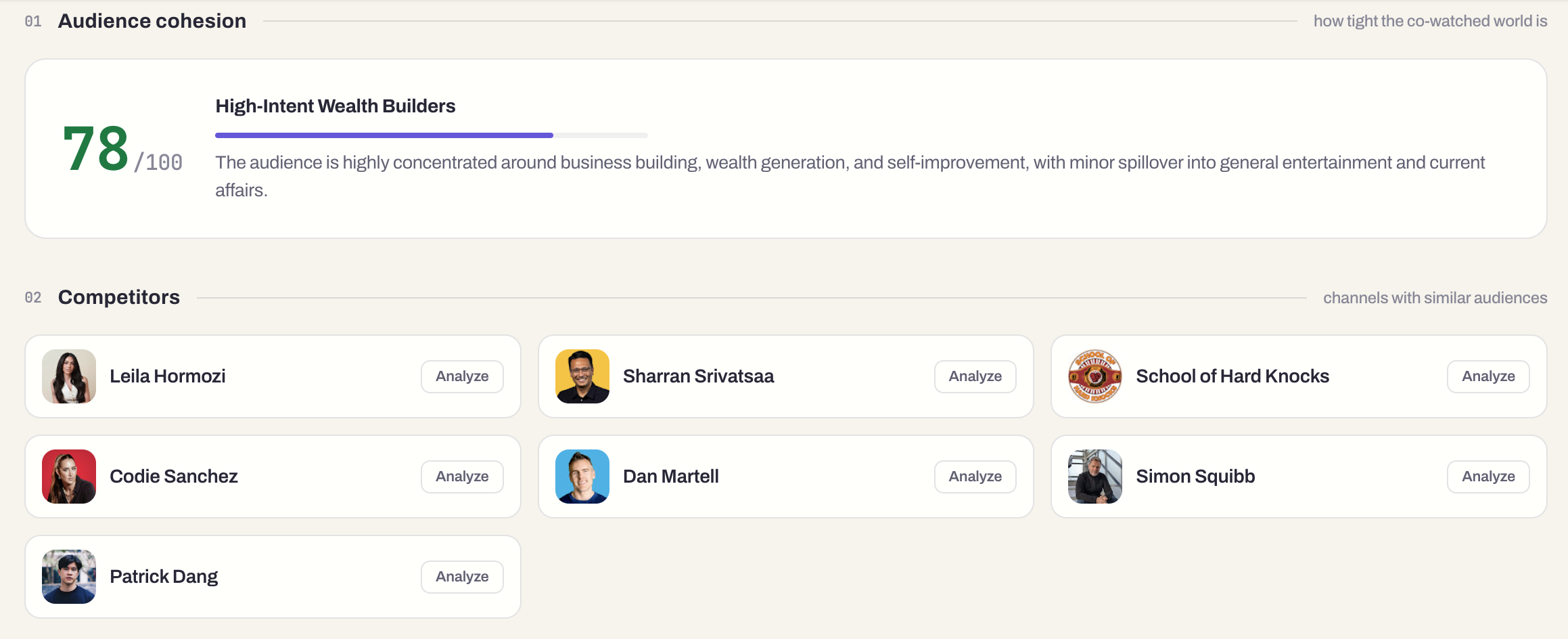
Similar Channels in Channel Analysis in action. Click to explore the tool.
Tool for this step: Similar Channels in Channel Analysis →
Day 9
Write two or three audience segments
Expert channels usually serve more than one viewer: the buyer, the peer and the curious beginner. Read the psychographics module and the comment intelligence from the Competitor Studio run, then read 50 real comments on the top three outliers. Write each segment in one line: who they are, what they're afraid of, and what they already know. Then mark which segment buys the client's offer. That one is who the plan is for.
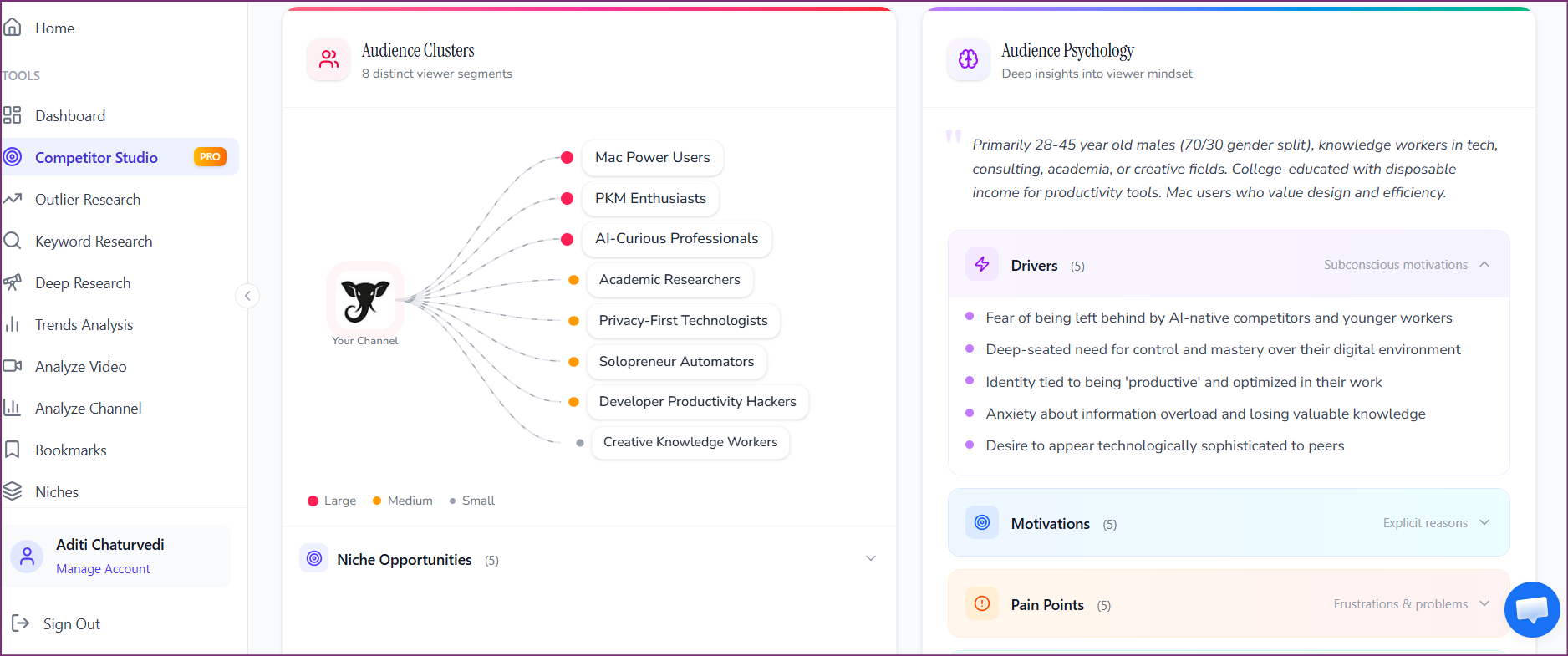
Competitor Studio audience psychographics in action. Click to explore the tool.
Tool for this step: Competitor Studio audience psychographics →
Day 10
Check keyword demand for every candidate topic
Take the topics from the outlier list and the gap list and check each one against search demand. A topic with outliers and search volume is a strong bet. A topic with outliers and no searches is a browse bet that lives or dies on packaging. A topic with searches and no outliers is a gap only if the existing videos are weak. Write the volume next to each idea, because it answers the client's favorite question: why this video?
Keyword Research in action. Click to explore the tool.
Tool for this step: Keyword Research →
Days 11 to 13
Turn the research into a plan and rehearse it
Pick three content pillars, twelve video ideas and the first four videos in full: title options, thumbnail concept and a one-line hook. OutlierKit's title tool ranks 16 options against real breakout videos near the topic, and Script review checks the first draft against how breakouts hook viewers. Then do a dry run with a colleague who plays the client. Every slide should survive the question: how do you know?
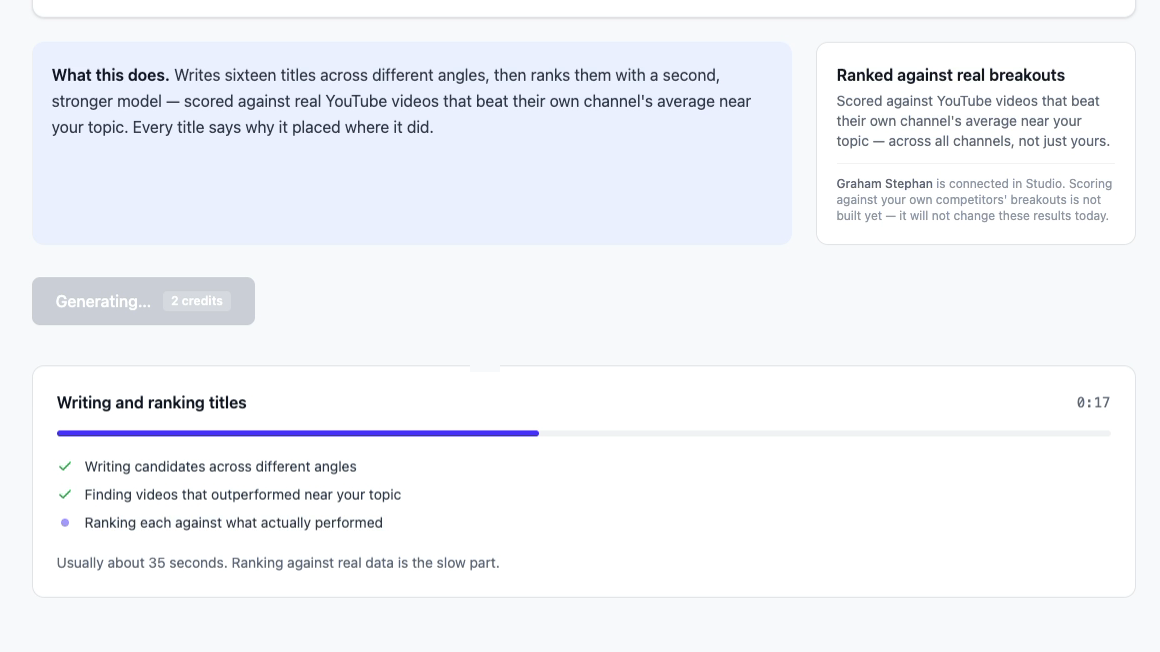
Title and Script tools in action. Click to explore the tool.
Tool for this step: Title and Script tools →
How long does the niche map take by hand versus with Competitor Studio?
By hand, the niche map is a day or more of tab work. These are my own estimates for one strategist on a niche they don't know, not measured averages:
| Task | Manual route (my estimate) | With OutlierKit |
|---|---|---|
| Find 15 to 30 competitors | 2 to 3 hours of searching and logging | Competitor discovery module, one run |
| Benchmark views per video | 1 to 2 hours in a spreadsheet | Benchmarking module, same run |
| Find outlier videos | 2 to 4 hours sorting channel pages | Outlier videos module plus Outlier Finder |
| Understand the audience | 1 to 2 hours reading comments | Psychographics and comment intelligence modules |
| See who sponsors the niche | 1 hour scanning descriptions | Sponsor Intelligence module |
The manual route still works, and it's worth doing once so you know what good output looks like. The point of the tool is that the strategist's hours go into judgment (which angle, which segment, which first video) instead of copying numbers into a sheet.
Want to see a client niche mapped live?
Bring the channel of your newest client to a 30-minute call. I'll run Competitor Studio on it with you and show how agencies turn the eight modules into an onboarding deck. Or start a free trial: 30 credits, no card, plus 20 more when you connect the MCP connector, which covers one Competitor Studio run.
What should you show the client at the end of week 2?
Show six slides, one per research artifact. Six is enough to prove the work and short enough to leave half the meeting for the client to talk. Copy the findings into your own branded template; the client should see your analysis, not a tool screenshot dump.
| Slide | What it shows | Where the data comes from |
|---|---|---|
| 1. Where you are | The day-3 baseline: median views, reach per video, outlier rate. | Channel Analysis and Studio |
| 2. Who you compete with | Five to eight size-matched rivals and how the client ranks on views per video. | Competitor Studio benchmarking |
| 3. What wins in your niche | Six outliers from channels your size, grouped into three repeatable angles. | Outlier Finder |
| 4. Who we are making videos for | The buying segment in one line, plus two real comments in their words. | Psychographics and comments |
| 5. The first 90 days | Three pillars, twelve ideas with search volume, the first four videos in full. | Keyword Research and title tool |
| 6. How we will measure it | Three numbers reported monthly: outlier rate, views per video, and one business metric. | Your monthly report |
Leave out anything you can't source. A slide of generic "YouTube best practices" tells an expert client you ran out of findings.
What do you say in the week-2 strategy meeting?
Use a 45-minute agenda and talk for less than half of it. The script below is a starting point. Swap in your client's numbers and keep the questions.
Minutes 0 to 5: frame the meeting
"For two weeks we studied your niche, not just your channel. We looked at [number] channels that serve your audience. I'll show you where you stand, what wins for channels your size, and the first 90 days. Stop me whenever something doesn't match what you see with your customers."
Minutes 5 to 12: baseline and competitors (slides 1 and 2)
"Your last 30 videos got a median of [X] views. Channels your size in this niche get about [Y]. That gap is the opportunity, and it's not about subscribers. These are the [five] channels you actually compete with for the same viewers. Which of them do your customers mention?"
Minutes 12 to 22: what wins (slide 3)
"These six videos beat their own channel's average by 3x or more, and they come from channels no bigger than yours. They fall into three angles. You can make all three better than these channels can, because you're the one doing the work every day. Which one feels most like you?"
Minutes 22 to 30: the audience (slide 4)
"Three kinds of people watch videos in your niche. This one buys what you sell. These two comments are in their own words. Does this sound like the people who book a call with you?"
Minutes 30 to 40: the plan and the first four videos (slides 5 and 6)
"Three pillars, twelve ideas, and the first four ready to script. Each one has a proven outlier behind it and a search number next to it. Every month we'll report three things: your outlier rate, views per video, and [the business metric]. Pick the two you most want to record first."
Minutes 40 to 45: decisions
"Before we go, I need three decisions: the first video, the recording date, and who on your side approves titles. I'll send the deck and the full outlier list today."
How much OutlierKit research does one onboarding use?
One new client takes about 110 credits if you follow this playbook. The breakdown uses OutlierKit's published per-feature costs:
- Competitor Studio run: 50 credits (10 to refresh it next month)
- Channel Analysis of the client: 10 credits
- About ten outlier searches: 20 credits (2 each)
- Five keyword checks: 10 credits (2 each)
- One Deep Research report on the audience: 20 credits
Competitor Studio is on Pro ($99 a month, 500 credits) and Max ($399 a month, 2,000 credits), not on Hobby. Pro covers about four onboardings a month, or one or two new clients plus monthly refreshes for a small roster. Once you manage four or more client niches, Max gives you room for 40 Competitor Studio runs a month. Extra credits cost $19 per 100. For the monthly routine after onboarding, see how an agency finds video ideas for 20 expert clients.
What mistakes do agencies make in the first two weeks?
- Benchmarking against the famous channel. The client names the biggest creator in the space. Size-matched rivals are the fair comparison and the better source of copyable wins.
- Presenting ideas without evidence. An expert client will argue with your opinion. They won't argue with a video that got 20x its channel average.
- Waiting for the deck to start production. Script one safe video in week one, from the strongest outlier pattern. The client sees motion and you test the workflow.
- Skipping the baseline. Without dated day-3 numbers, the month-three report has nothing to compare against. Use the monthly client report template so the baseline carries straight into reporting.
- Treating onboarding as a one-off. The niche map goes stale. Refresh the Competitor Studio run monthly and add new rivals to a channel watchlist.
Frequently asked questions
How long should YouTube client onboarding take?
Two weeks is the right target for research-led onboarding. Days 1 to 3 cover kickoff, access and the channel baseline. Days 4 to 10 cover the niche map, outliers, gaps, audience and keyword demand. Days 11 to 14 turn that into a plan and present it. Production can start in parallel on one safe video so the client sees output in week one.
What access should I ask a new YouTube client for?
Ask for a YouTube Studio role through channel permissions rather than a shared password. Viewer access is enough for research because it shows retention, click-through rate and traffic sources. Upgrade to Editor or Manager only when your team starts uploading. Also collect brand assets, the offer YouTube should support and any past performance reports.
What if the client has no channel yet?
Run the same playbook with the strongest rival as the seed. Enter that channel in Competitor Studio on day 4, skip the day-3 baseline, and replace slide 1 of the strategy deck with the size of the opportunity: how many channels serve the niche and what a typical upload earns in views. The launch plan then leans harder on proven outlier angles, since there is no history to learn from.
How much does the research cost per new client in OutlierKit?
A typical onboarding uses about 110 credits: one Competitor Studio run (50), one Channel Analysis (10), about ten outlier searches (20), five keyword checks (10) and one Deep Research report (20). Competitor Studio is on Pro ($99 a month, 500 credits) and Max ($399 a month, 2,000 credits). Pro covers about four onboardings a month. Agencies onboarding clients while also refreshing existing ones usually need Max.
Should the strategy presentation include video ideas?
Yes, and the first four should be fully packaged. Clients judge strategy by whether they can picture the videos. A title, a thumbnail concept and a one-line hook for each of the first four, backed by an outlier and a search volume, does more than any pillar diagram. Keep the other eight as one-line ideas so the client can react without the plan feeling locked.
Can I white-label the OutlierKit research for the client?
OutlierKit has no white-label export. Agencies copy the findings into their own branded deck: the competitor table, the outlier list with links, the audience segments and the plan. The client sees your analysis in your template, and the research tool stays in the background.
Related reading
- YouTube client onboarding template: the questionnaire and kickoff doc for days 1 and 2
- Learn a YouTube niche in one afternoon: the crash course to run before the kickoff call
- How to audit a YouTube channel for a pitch: the outside-data audit you ran before they signed
- YouTube competitor analysis template: a sheet for the day 4 to 8 findings
- What to put in a monthly YouTube client report: where the day-3 baseline goes next
- Managing client YouTube channels: the operations side of the retainer
- OutlierKit for agencies: plans and workflows for multi-client teams
Real breakdowns of small expert channels
Consultant and professional channels like the ones agencies onboard, analyzed in OutlierKit:
Map your next client's niche before the kickoff
Competitor Studio turns one channel into a full niche map: competitors, benchmarks, outliers, audience and sponsors. Book a 30-minute walkthrough with the founder, or start free with 30 credits and no card.
Book a Demo