Analyze Any YouTube Competitor's Entire Niche, From One Channel
Enter one channel. Competitor Studio scans thousands of rivals. It shows who's winning, why they win, and where your opening lies. You get audience psychology, outlier videos, and sponsor intelligence. You also get monetization plans and comment signals. All from a single query.
Updated September 27, 2026
- Scans thousands of competitors automatically
- Audience psychographics with psychology profiles
- Sponsor intelligence & monetization mapping
- 1,000-5,000+ outlier videos per analysis





Rated 5.0/5 on Product Hunt
1000s
Channels Analyzed Per Query
TL;DR
Competitor Studio is OutlierKit's YouTube competitor analysis tool. It scans thousands of channels from a single seed. It is built for experts, consultants and coaches who run a YouTube channel, and for the agencies that run it for them. One report gives you audience psychographics and sponsor intelligence. It maps monetization too. It also finds outlier videos and comment intelligence.
8 Intelligence Modules. One Query.
Enter any YouTube channel. Competitor Studio uses it as a seed to scan thousands of channels in that niche. You get a complete competitive intelligence report.
What you'll discover with these modules
Sponsor Intelligence shows every brand actively sponsoring creators in your niche, with frequency counts. It pairs with the YouTube Sponsorships Guide for outbound discovery and pitching playbooks. Agencies and brand teams use the same view to shortlist creators for partnerships.
Funnels & Monetization mapping shows the exact revenue split (course / product / affiliate / lead magnet) of the top creators in any niche. It pairs with the YouTube Monetization Strategies pillar, the full breakdown of all 11 ways channels earn.
Niche Mapping & Positioning
Enter any channel. Competitor Studio identifies its precise niche and maps where it outperforms the field. It also surfaces the topic affinities that define the space. Know exactly where a channel stands before creating a single video.
Competitor Discovery at Scale
We surface competitors across several dimensions: fastest-growing, most uploads, most views, and emerging channels just getting started. See who actually matters in the niche, including rivals you didn't know existed.
Performance Benchmarking
Compare any channel against the niche median. See view rate, the share of subscribers actually watching. See weekly subscriber growth relative to the space. See conversion efficiency, the views-to-subscriber ratio. Know exactly where you stand.
Audience Psychographics
Go beyond demographics. Competitor Studio finds specific viewer segments (e.g., "hustleface founders," "corporate escapers," "scale-stock operators"). Each segment gets a psychology profile. It lists drivers, motivations, pain points, and content likes.
Niche-wide psychographic segments. Rival trackers stop at basic demographics.
Outliers & Opportunities
Surface 1,000-5,000+ outlier videos across the entire niche. Each comes with channel attribution, relevance scoring, views, outlier score, and recency. See what's breaking through right now, with full niche context that standalone outlier tools can't provide.
Sponsor Intelligence
Map who sponsors what across the niche. See established sponsors, emerging sponsors, and vertical integration patterns (creators promoting their own platforms). See which sponsor categories lead the space. Know what content attracts sponsor money before you create it.
Niche-wide sponsor mapping. VidIQ and TubeBuddy don't cover sponsorships.
Funnels & Monetization
See how channels in any niche actually make money. Get a percentage breakdown of lead magnets, newsletter signups, service sales, and book sales. Specific channel examples are included for each monetization type.
Monetization funnels with channel examples. Not covered by VidIQ, TubeBuddy, or 1of10.
Comment Intelligence
Analyze comments across the entire niche. Surface audience requests, recommendations, pain points, and praise. You get exact comments, attribution, and clear guidance on whether to act on each signal.
Niche-wide comment analysis. VidIQ and TubeBuddy offer comment management for your own channel only.
What Used to Take 5 Tools Now Takes One Query
Competitor Studio combines five jobs in one. It covers channel analysis, outlier detection, and audience research. It also covers niche research and deep content research. All of it starts from entering a single YouTube channel.
Channel Analysis Tool
What you'd normally need: Analyze a single competitor's videos, growth, and strategy
Competitor Studio delivers: Analyzes thousands of channels at once. Benchmarks against niche medians. Finds competitors you didn't know existed
Single-channel analysis →Outlier Finder Tool
What you'd normally need: Search for outlier videos by keyword or channel
Competitor Studio delivers: Surfaces 1,000-5,000+ outlier videos across the entire niche. Each has a relevance score, the channel name, and full context
Quick outlier searches →Video Analyzer Tool
What you'd normally need: Analyze a single video's hooks, script, and performance
Competitor Studio delivers: Shows which video formats, engagement triggers, and content styles work. See what resonates with each audience segment across the whole niche
Analyze individual videos →Deep Research Tool
What you'd normally need: AI-powered content ideas from a research prompt
Competitor Studio delivers: Gives you the data layer for smarter research. That means audience psychology, content gaps, and proven topic ideas
AI-powered content ideas →Niche Research Tool
What you'd normally need: Discover profitable niches to enter
Competitor Studio delivers: Maps a niche you've already identified: competitive density, audience segments, monetization strategies, and where the gaps are
Discover new niches →Each of these tools works great on its own. But Competitor Studio is where they converge. It delivers the complete competitive picture that single tools can only show pieces of.
From One Channel to Complete Niche Intelligence
Enter any YouTube channel URL
Paste any channel URL or search by name. Competitor Studio uses it as a seed to identify the niche.
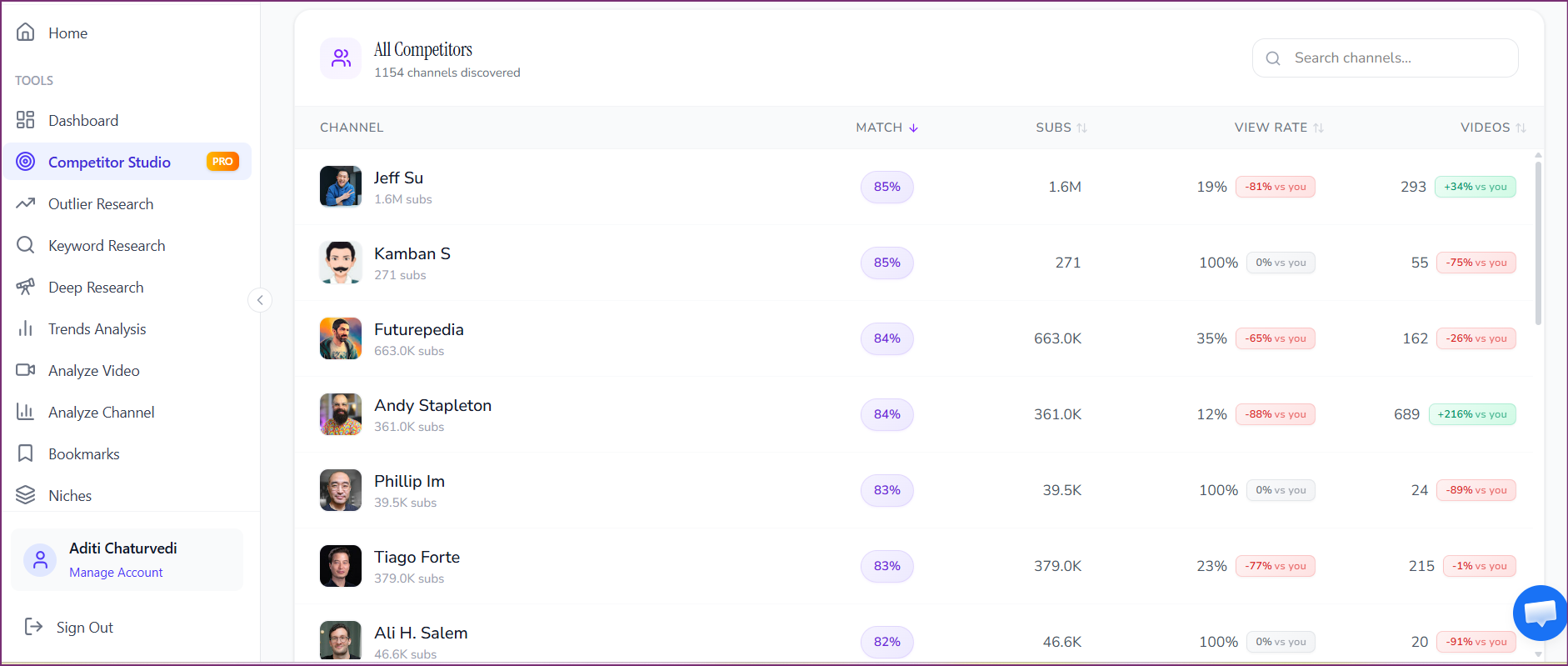
We scan thousands of channels in that niche
Our engine scans the whole space. It looks at rivals, audience patterns, and how content performs. It also looks at sponsors, monetization, and comments.
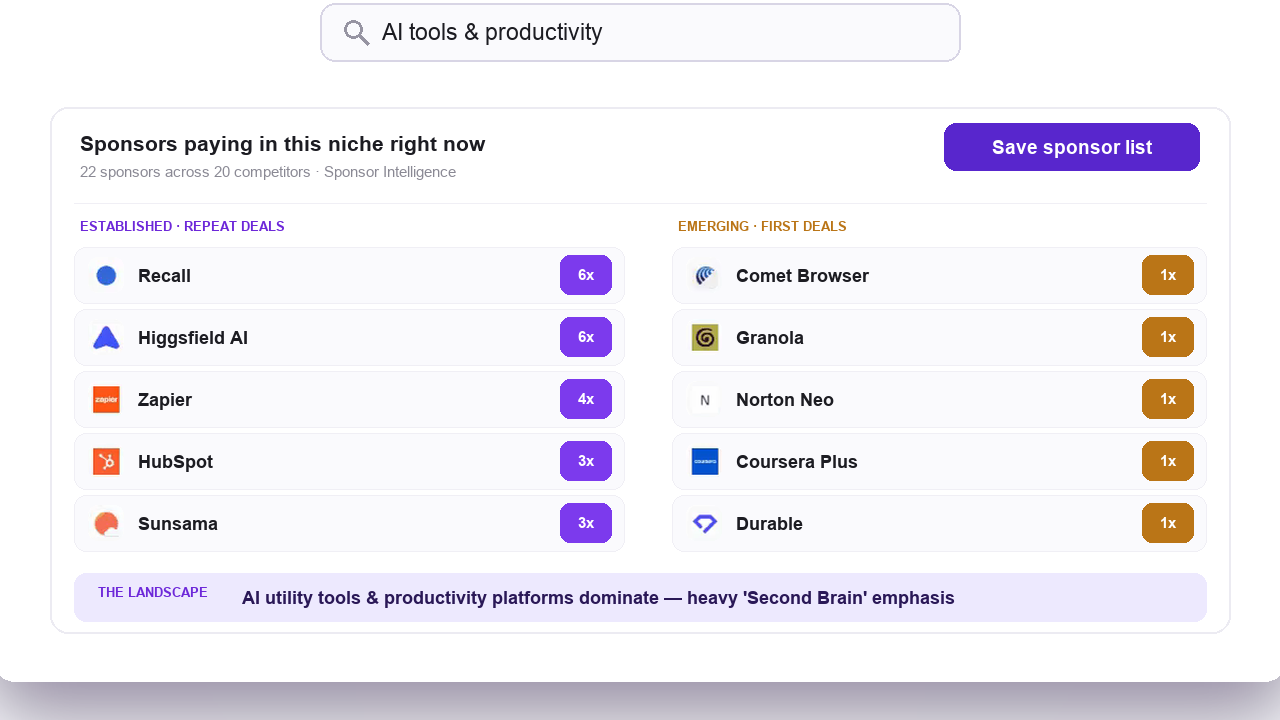
Get your complete niche intelligence report
Get clear insights across 8 intelligence modules. These cover audience psychology, outlier videos, and sponsor data. They also cover monetization funnels and more. Ready to act on right away.
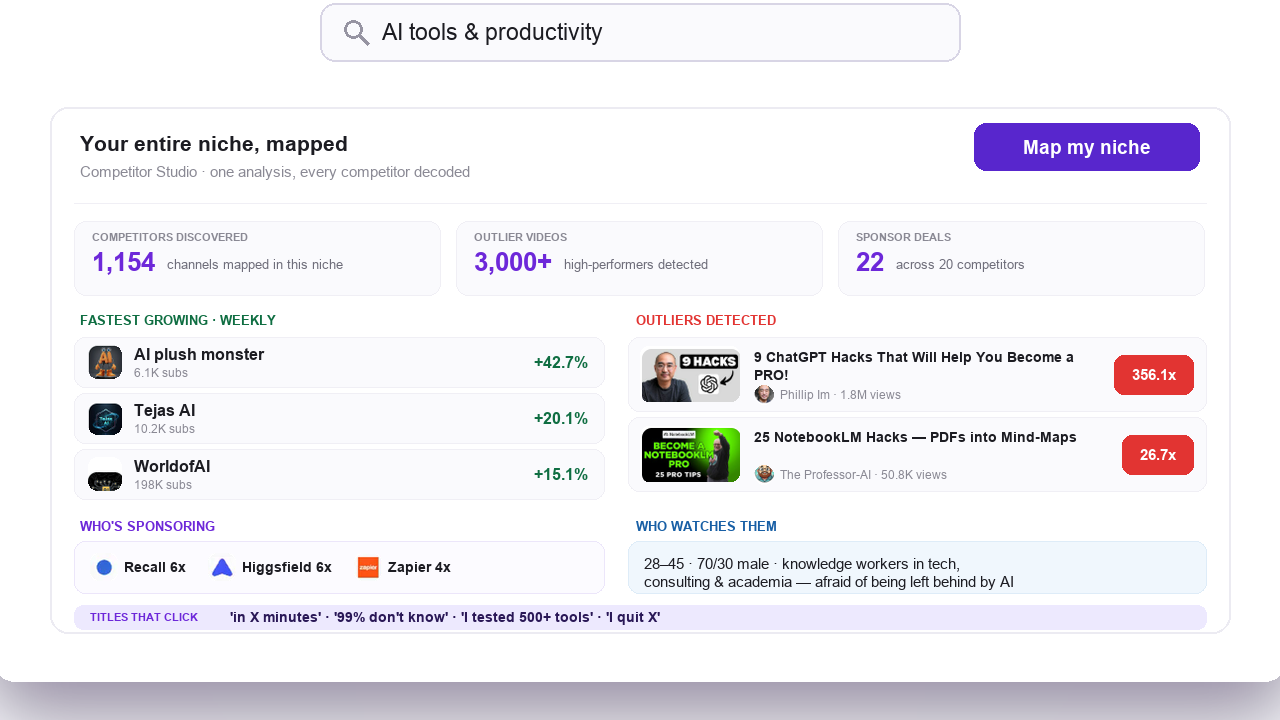
Not Another Competitor Tracker. A Niche Intelligence Engine.
Most YouTube tools let you track a handful of competitors by hand. Competitor Studio maps the entire competitive field for you. It then layers on psychographics, sponsor mapping, and monetization data that tracker tools don't offer.
| Typical Competitor Analysis | Competitor Studio | |
|---|---|---|
| Scope | Analyze one channel at a time | Scans thousands of channels per query |
| Competitors | You manually pick 3-20 to track | We auto-discover them: fastest-growing, emerging, most active |
| Audience | Basic demographics (age, gender) | Psychographic segments with psychology profiles |
| Insights | What happened (metrics and stats) | Why it works + what to do next |
| Monetization | Not covered | Full funnel and monetization breakdown with channel examples |
| Sponsors | Not covered | Sponsor mapping with categories and trends |
| Comments | Moderation on your own channel | Niche-wide comment intelligence with actionable signals |
| Outliers | Top 10-20 videos from tracked channels | 1,000-5,000+ outlier videos across the entire niche with scoring |
How Competitor Studio Compares
Most YouTube tools offer some form of competitor tracking or outlier detection. Competitor Studio goes further. It maps the entire niche from a single channel. It also layers on audience psychographics, sponsor data, and monetization funnels.
| Feature | OutlierKit Competitor StudioBest Value | VidIQ | TubeBuddy | 1of10 | Social Blade |
|---|---|---|---|---|---|
| Best for | Experts, coaches and their agencies mapping a whole niche from one seed channel | Keyword research and tracking your own channel's growth | A/B testing, bulk operations, and channel management | Fast outlier video discovery by keyword | Public channel stats and growth history |
| Niche-wide auto-scanning (thousands of channels from one seed) | Core feature | Manual add (up to 20) | Limited niche view | Keyword search only | |
| Auto competitor discovery (fastest-growing, emerging, most active) | Multi-dimensional | Manual add | Manual add | Basic via Niche Explorer | |
| Outlier video detection | 1,000-5,000+ with niche context | Advanced filters | Content Standouts | Core feature (millions tracked) | |
| Audience psychographics (viewer segments, psychology profiles) | Segment-level profiles | Basic demographics only | |||
| Content preferences & engagement triggers | |||||
| Sponsor intelligence (sponsor mapping, categories, trends) | |||||
| Funnels & monetization mapping (with channel examples) | With channel examples | ||||
| Comment intelligence (niche-wide requests, pain points, praise) | Niche-wide with attribution | Own channel only | Own channel only | ||
| Performance benchmarking vs niche median | View rate, growth, conversion | Limited | Niche Leaderboard | Basic stats |
Feature notes reflect our own audit of publicly available versions of each tool as of March 2026. The psychographics, sponsor, and monetization rows are where we genuinely differ from every rival listed; we update this table as competitors ship new features.
Every Tool Finds Outliers. Only Competitor Studio Tells You Why They Worked.
VidIQ, TubeBuddy, and 1of10 all offer outlier detection, and they do it well. Where Competitor Studio differs is context. We surface outlier videos inside a complete niche intelligence layer. That layer shows who the audience segments are and what drives them to click. It shows what sponsors are paying for in this space. It shows how channels in the niche actually monetize. And it shows what the comment signals say about unmet audience needs. Other tools show you the outlier. Competitor Studio shows you the ecosystem that made it an outlier.
Competitor Studio Plans and Pricing
Competitor Studio is available on Pro and Max plans. Each analysis costs 50 credits (10 credits to refresh). It delivers a complete niche intelligence report across all 8 modules. The free trial gives 30 credits, and connecting the MCP connector adds 20, so a trial can cover one run. No credit card required.
Hobby
For solo creators getting started
- 100 credits/month
- Outlier video detection (2 credits)
- Keyword research (2 credits)
- Video script analysis (10 credits)
- Single-channel competitor analysis (10 credits)
- Deep Research (20 credits)
- Competitor Studio not included. It is available on Pro and Max
Pro
$49.92/month billed annually
For growing channels and small teams. Includes Competitor Studio
- 500 credits/month
- Competitor Studio (50 credits per analysis, 10 to refresh, run up to 10/month)
- Outlier video detection (2 credits)
- Keyword research (2 credits)
- Video script analysis (10 credits)
- Single-channel competitor analysis (10 credits)
- Deep Research (20 credits)
- MCP and API access
Max
$166.58/month billed annually
For agencies, brands, and teams running multiple channels
- 2,000 monthly research credits
- Competitor Studio (50 credits per analysis, 10 to refresh, run up to 40/month)
- Integrate up to 50+ YouTube channels
- All Pro features included
- Advanced Competitor Identification and Research
- Update Data on Demand
- API Access (live)
- MCP Access (live)
Managing multiple client niches? The Max Plan's 2,000 credits/month supports 40 full Competitor Studio analyses. That is enough for an entire agency portfolio. Extra credits cost $19 per 100. Brand and marketing teams get the same value: scan the incumbents in your category before launching a channel, and use Sponsor Intelligence to see which creators already attract sponsor money before pitching partnerships.
Carry the niche into Claude afterwards
The deep Competitor Studio scan runs in the OutlierKit app, because it stitches psychographics, sponsor mapping, and monetization into one report. The MCP connector covers the research primitives, so you can interrogate the same niche from a chat once the scan is done. Add https://outlierkit.com/mcp in Claude, sign in with Google, and you can pull any video's transcript, pull its comments, get a video analyzed with its outlier score against the channel baseline, find the top outliers in a niche, find channels similar to a seed channel, and check YouTube keyword search volumes.
Calls cost 2 to 10 credits from the same balance, with no per-day limits and no per-tool quotas. Read the MCP server guide.
What Creators Say About OutlierKit
How creators, agency teams, and brand managers use OutlierKit for data-driven competitive intelligence.
“Great addition to my stack and simple to use. Hit an issue and the team worked hard to fix it. Great product, hardworking team.”
“Been creating for years, running multiple YouTube channels. OutlierKit is the first tool that actually improved our view counts almost instantly. The competition analysis revealed gaps we never knew existed.”
“OutlierKit has drastically reduced my time to plan content for my SaaS YouTube channel. The deep research feature revealed insights I'd overlooked earlier. A must-have if you're serious about YouTube as an acquisition channel.”
“I find it very helpful for identifying trends in DevOps and Cloud topics, comparing video performance, and understanding what worked and what didn't. Highly recommend it.”
Verified Ratings Across Platforms
Frequently Asked Questions About Competitor Studio
All you need to know about OutlierKit's niche-wide YouTube competitor analysis tool.
Basics
What is Competitor Studio?
How is Competitor Studio different from regular competitor analysis?
How many channels does Competitor Studio analyze per query?
Features
What are audience psychographics?
How does Sponsor Intelligence work?
What does the Funnels & Monetization module show?
What is Comment Intelligence?
Pricing & Usage
How many credits does a Competitor Studio analysis cost?
Is Competitor Studio available on all plans?
Can I run multiple niche analyses?
Comparisons
How is Competitor Studio different from VidIQ's YouTube competitor analysis features?
How do you analyze a YouTube competitor?
What are the best free YouTube competitor analysis tools?
How to analyze competitor tags on YouTube?
Does any other tool offer sponsor and monetization intelligence?
Do VidIQ, TubeBuddy, and 1of10 have outlier detection?
How to find competitor ads on YouTube?
Competitor Studio Connects Your Entire YouTube Toolkit
Competitor Studio is the intelligence layer. It makes every other OutlierKit tool more powerful. Explore the tools it connects to.
Competitor Analysis Tool
Analyze any single YouTube channel's strategy, top videos, and growth patterns. Useful once you've picked a specific competitor to study.
Outlier Finder
Quick outlier video searches by keyword or channel. Find content performing 5-10x above average in any niche.
Video Analyzer
Break down any single video's hooks, pacing, script structure, and performance. Learn why specific videos succeed.
Deep Research
AI-powered content ideas, titles, and strategies. All tailored to your channel and niche data.
Niche Research
Discover profitable, underserved content niches before committing. Validate the opportunity before you invest.
Title Generator
Turn a proven topic into 16 titles ranked against real breakout videos, then write the description, hashtags and chapters.
Script Review
Paste the script you wrote and get a score and what to fix before you record, so you reshoot less.
OutlierKit API
Access Competitor Studio data through code. Build niche intelligence into your own workflows, dashboards, and automation pipelines.
See Competitor Studio in action: B2B IT Consulting Case Study
An IT consulting firm used Competitor Studio to map 40+ channels. They found 11 uncontested keywords. Then they built a content strategy with zero overlap against established players.
Read the full case studyReady to use Competitor Studio?
Follow our step-by-step tutorial. It covers all 8 modules. It takes you from entering a seed channel to pulling clear insights from every intelligence report.
Read the 10-Step TutorialOr see where Competitor Studio fits in the bigger picture: the complete YouTube growth strategy playbook.

Ready to analyze your competitors' entire niche?
Use OutlierKit's YouTube competitor analysis tool to see where your channel stands in its niche. Experts, coaches, agencies and brand teams all run the same scans.
Start Free. No Credit Card