


OutlierKit plus Claude equalsYour Expert YouTube Strategist. See how it works

AI Title Generator, Ranked Against Real Breakouts

The AI YouTube Title Generator That Ranks Titles Against Real Breakouts

Type one line about your video. Get sixteen titles ranked against real videos that beat their channel average. Each one tells you why it placed where it did.

  • Sixteen titles, ranked
  • Scored against real breakout videos near your topic
  • Pattern, score and reason on each title
  • 2 credits a run, about 30 seconds
Reviewer 1Reviewer 2Reviewer 3Reviewer 4Reviewer 5

Rated 4.9/5 on Product Hunt

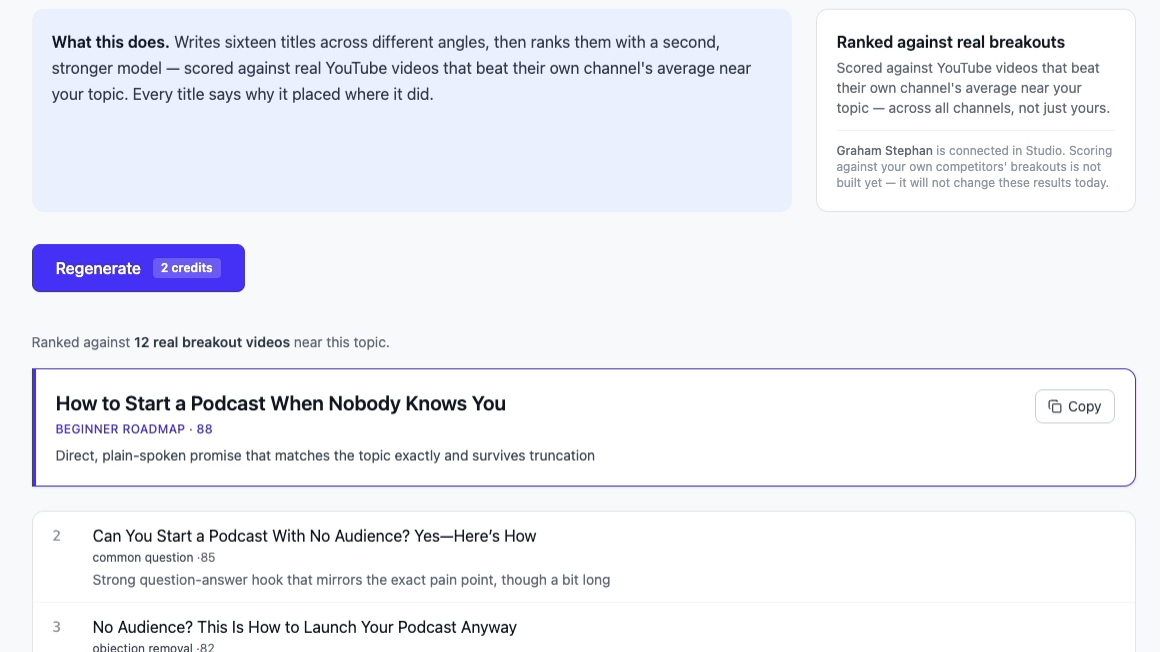
OutlierKit AI title generator results. Sixteen podcast titles ranked against 12 real breakout videos. Top pick scored 88.

2

Credits per run of 16 ranked titles

TL;DR

Type one line about your video. OutlierKit writes sixteen titles and ranks them against real videos that beat their channel average near your topic. Each title gets a pattern, a score and a reason. Take the top one. A run costs 2 credits and takes about 30 seconds. It is on every plan, including the free trial.

What the AI Title Generator Does

Most AI title tools ask one model for a list and stop. This one adds a second step that ranks the list against real videos.

Written by one model, ranked by another

One model writes sixteen titles from different angles. Then a second, stronger model ranks them. The ranking step is where the real data comes in.

Ranked against real breakout videos

The ranker finds videos near your topic that beat their own channel's average. It looks across all of YouTube, not your channel alone. In the demo run it found 12 for the podcast brief. Titles that look like those videos rank higher.

A reason on every title

Each title shows a pattern label, a score out of 100 and one line on why it ranked there. In the demo, the top title scored 88. The reason was that it matched the topic exactly and would not get cut off.

Sixteen angles, so you can see what the winner beat

The sixteen titles take different angles on purpose. Some ask a question. Some answer an objection. Some promise a roadmap. You only need the top one, but the rest show what it was compared with.

Works with Keyword Research for SEO titles

Run Keyword Research first for 2 credits. It shows demand, saturation and the top angles for a term. Put that term in your brief. The ranker marks down titles that get cut off, so the keyword usually lands near the front.

Copy it, then write the rest of the upload

One click copies the title. The same app writes the description, tags and chapters from the same brief. Regenerate costs another 2 credits.

See the AI Title Generator in Action

One line in, sixteen ranked titles out, about 30 seconds later. The demo brief was "how to start a podcast with no audience". Every screenshot on this page is from that run.

1

Describe the video

Type what the video is about in your own words. A specific line gets a better ranking.

2

Wait about 30 seconds

The app writes the titles, finds breakout videos near your topic and scores each title against them.

3

Take the top title

Read its pattern, score and reason, then copy it. Scroll down if you want to see the other fifteen.

Generate Titles Free
OutlierKit AI title generator input screen. The brief reads 'how to start a podcast with no audience'. The button says Generate titles, 2 credits.

How OutlierKit Compares to Other AI Title Generators

Every YouTube tool has an AI title button now, and a lot of free sites rank for the same search. Most of them ask one model for a list and stop there. OutlierKit adds a second step that ranks the list against real breakout videos. The table shows what each tool does after the AI writes.

FeatureOutlierKitBest ValueVidIQTubeBuddy1of10Free formula generators
AI title generator
Ranked against real breakout videos
Score and reason on every title
Keyword research in the same app
Description, tags and chapters too
AI titles before you pay
Best forRanked titles, plus keyword and outlier research in one appSEO scores inside YouTube while you browseA/B testing titles after you publishThumbnail-first outlier researchA quick unranked list, no account
Pricing
$29/mo
Hobby plan; 2 credits per run, 30-credit trial
$19/mo
Boost plan; free plan has 150 AI credits
See site
AI titles on the Legend plan
$69/mo
Pro plan, where the AI tools live
Free
Templates, no niche data

Plans and Credit Cost for the AI Title Generator

A title run costs 2 credits on every plan, the same as Keyword Research and Outlier Research. Hobby's 100 credits a month cover 50 runs. The free trial's 30 credits are enough to title your next few videos. Annual billing saves 50%.

Hobby

$29/month

For one channel that wants every title ranked before it goes up

  • 100 credits/month
  • AI title generator: 2 credits per run
  • Keyword Research: 2 credits
  • Outlier Research: 2 credits
  • Description, tags and chapters
  • Script review
  • Channel analysis: 10 credits
  • Deep Research: 20 credits per query
Start Free Trial
Most Popular

Pro

$49/month

For weekly publishing with research on every upload

  • 500 credits/month
  • Everything in Hobby
  • Competitor Studio: 50 credits per run
  • MCP server & API access
  • 50 credits per connected channel
Start Free Trial

Max

$199/month

For agencies titling videos across many channels

  • 2,000 credits/month
  • Everything in Pro
  • Connect 50+ YouTube channels
  • Sponsor & comment intelligence
  • Advanced competitor identification
  • Update data on demand
  • Priority MCP & API access
Start Free Trial

What Creators Say About OutlierKit

From creators and content teams who moved their research to OutlierKit.

★★★★★4.9/5 on Product Hunt

Great addition to my stack and simple to use. Hit an issue and the team worked hard to fix it. Great product, hardworking team.

HH
Henry Hill
Verified user

Been creating for years, running multiple YouTube channels. OutlierKit is the first tool that actually improved our view counts almost instantly. The competition analysis revealed gaps we never knew existed.

G
Gautham
Multi-channel creator

OutlierKit has drastically reduced my time to plan content for my SaaS YouTube channel. The deep research feature revealed insights I'd overlooked earlier. A must-have if you're serious about YouTube as an acquisition channel.

V
Vikash
SaaS channel manager

AI YouTube Title Generator FAQ

The questions people ask before they let an AI pick their title.

What is an AI YouTube title generator?
A tool that turns a short description of your video into a list of titles. Most of them ask one model to fill in a set of formulas, so you get an unranked list. OutlierKit asks one model to write sixteen titles, then a second model ranks them against real videos that beat their channel average near your topic.
How is this different from the free YouTube title generator on this site?
The free tool at /resources/youtube-title-generator needs no account. It turns your topic into 16 titles from fixed formulas and does not rank them. The app version also gives sixteen titles, but ranks them against real breakout videos and shows a score and reason on each. Use the free one to brainstorm. Use the app for the title you publish.
Does it generate YouTube SEO titles?
Yes, if you run Keyword Research first. That costs 2 credits and shows demand, saturation and the top angles for a term. Put the term in your brief. The ranker marks down titles that get cut off, so the keyword usually ends up near the front, where YouTube search shows it.
What does a title run cost in credits?
2 credits per run, on every plan and on the free 30-credit trial. That gets you sixteen ranked titles. Regenerating costs another 2. Keyword Research and Outlier Research are 2 credits each as well, so a title with research behind it costs 4 to 6 credits. Hobby's 100 credits a month cover a full month of uploads.
How many titles does it produce, and how long does it take?
Sixteen, ranked, in about 30 seconds. Writing them is quick. Finding the breakout videos near your topic and scoring each title against them takes most of the time.
What does the score on each title mean?
It is the ranker's score out of 100 for how closely the title matches what already broke out near your topic. A pattern label and a one-line reason sit next to it. In the demo, the top title scored 88 because it matched the topic exactly and would not get cut off. The second scored 85. It had a strong question hook but ran a bit long.
Does it rank against my own competitors?
Not yet. It scores against breakout videos near your topic from any channel. Scoring against the channels you track in Competitor Studio is not built, and the app says so on the page.
How long should a YouTube title be?
Keep the main idea inside about 60 characters. YouTube cuts longer titles on mobile, in search and in the suggested sidebar. The ranker marks long titles down and says so in the reason line.
Does the same app write the description, tags and chapters?
Yes. Title, description and tags, chapters and script review are all in the app on every plan. Writing them from the same brief keeps the description and chapters in line with what the title promised.

More OutlierKit Features

The title is the last step. These tools help you decide what the video is about.

Try it on your next video

Start the free trial, type one line about the video, and read why the top title won before you upload.

Start Free, No Card

One real run, start to finish

I recorded this run on 18 September 2026 with the brief "how to start a podcast with no audience". I only cropped the screenshots. These three screens are the whole workflow.
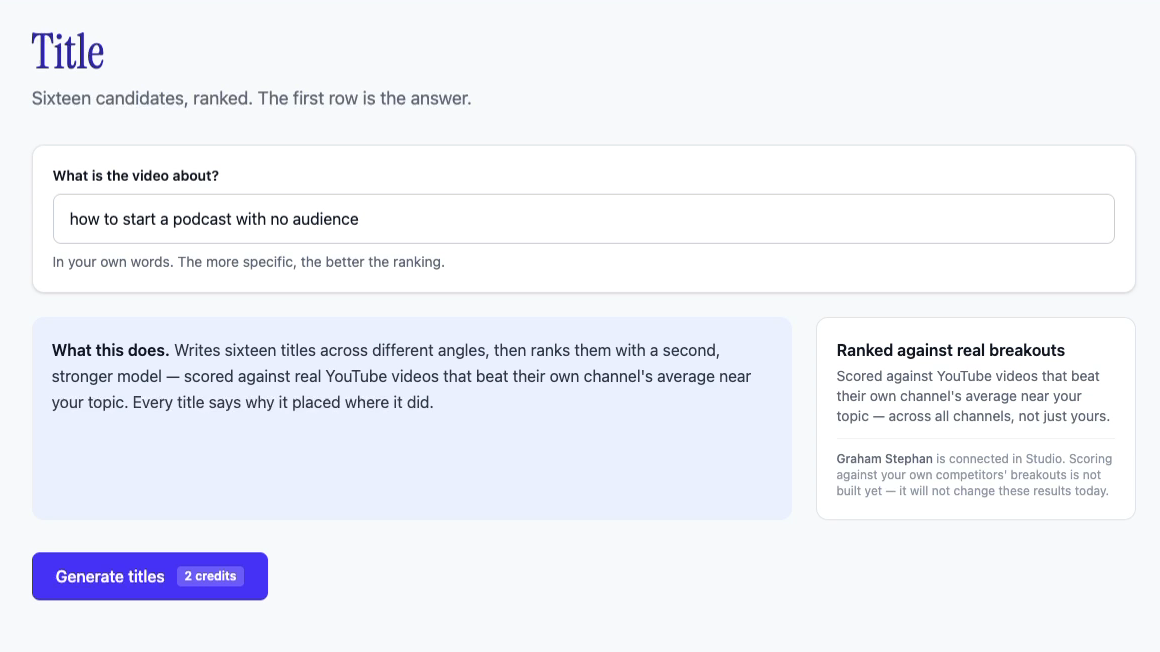
Step 1. The Title screen with the brief 'how to start a podcast with no audience'. Generate titles, 2 credits.
1. Type one line about the video. Generate costs 2 credits.
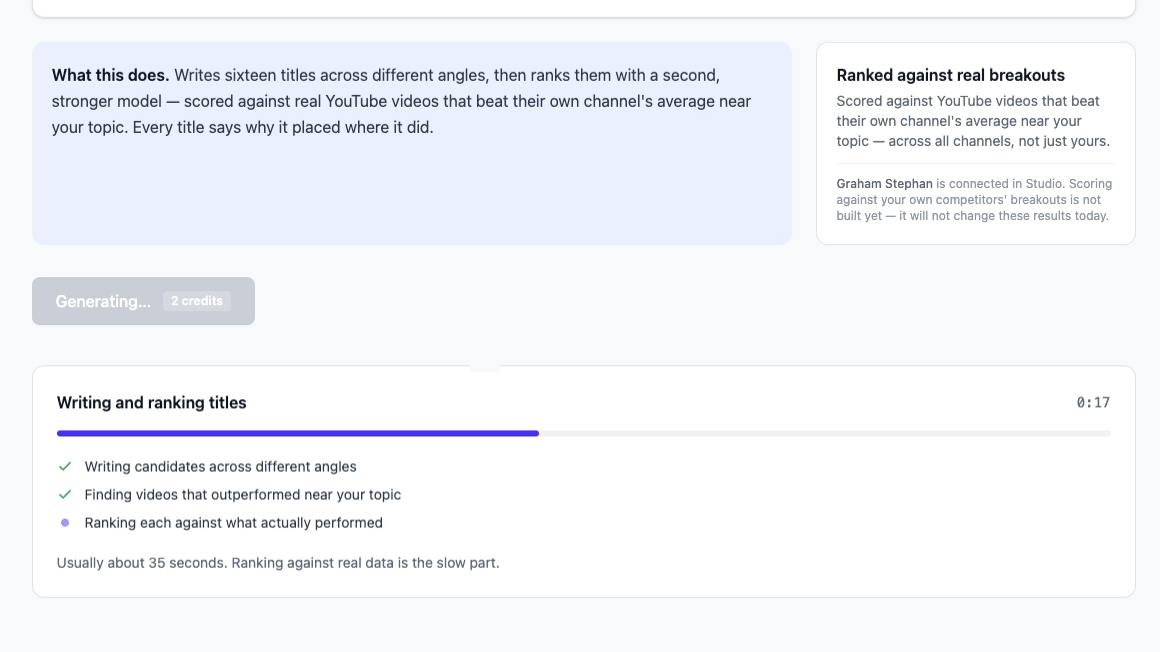
Step 2. The app writes titles, finds videos that outperformed near the topic, and ranks each title.
2. The app writes sixteen titles and ranks them against real breakouts. About 30 seconds.
Step 3. Results ranked against 12 real breakout videos. Top pick scored 88.
3. Ranked against 12 real breakout videos. The top title scored 88, with the reason.

The top title was "How to Start a Podcast When Nobody Knows You". The app labelled it a beginner roadmap and scored it 88. The reason it gave was that the title matched the topic exactly and would not get cut off. Second place scored 85 for a question-and-answer hook that ran a bit long. Third was an objection removal at 82. So you are not choosing between sixteen equals. You get a ranking, and you can read why each one landed where it did.

Why the ranking step matters

A language model has read millions of YouTube titles, but it has no idea which ones worked. View counts are not in the text. So a plain AI title generator gives you the average of every title it has seen. That average is fine, and every other channel in your niche is publishing it this week.

I built OutlierKit around one number: how far a video beat its own channel's average. The title tool uses that number as the judge. One model writes sixteen titles. A second model scores each one against real videos near your topic that beat their channel average, from any channel. Titles that look like those videos rank higher, and the reason line tells you why.

If you want to see how that number is calculated, read the guide to finding outlier videos. The write-up on what outlier videos have in common takes six real titles apart to show the shape behind each one.

The free title generator vs the one in the app

We have two title tools and they do different jobs. The free YouTube title generator needs no account. It turns a topic into 16 titles from fixed formulas and shows a character count on each. Use it when you want ideas in the next thirty seconds. The app version is for the title you publish. It ranks the sixteen against real breakouts and tells you why the top one won.

QuestionFree generatorAI generator in the app
Account neededNoFree trial, 30 credits, no card
Cost per runFree2 credits
Titles per run16, from fixed formulas16, written from different angles
RankedNoYes, against real breakout videos
Reason shownCharacter count onlyPattern, score out of 100, one-line reason
Use it forQuick ideasThe title you publish

How to get a YouTube SEO title out of it

A YouTube SEO title has to carry the phrase people type and still win the click next to other results. Most SEO title generators only do the first part, so the video ranks and nobody clicks. This is how I would do both inside the app.

  1. 1

    Pick the search term first

    Run the term through Keyword Research. You want real demand and low saturation. The top angles list shows which framing already ranks. Keyword Research.

  2. 2

    Look at the outliers for the same term

    Outlier Finder shows which videos on that topic beat their channel average. The title ranker uses the same pool, so this tells you what a high score means. Outlier Finder.

  3. 3

    Generate with the term in the brief

    Describe the video with the search phrase in it. Take the top title, or the highest-scoring one that keeps the phrase in the first half. Open the app.

  4. 4

    Write the rest of the upload

    Write the description, tags and chapters from the same brief in the app, so they match what the title promised. Description template.

Keep the main idea inside about 60 characters. YouTube cuts longer titles on mobile, in search and in the suggested sidebar, and that is where most clicks come from. The ranker marks long titles down and says so in the reason line. For thumbnails, tags and the rest of the packaging, see the YouTube SEO guide. If you would rather read weekly title teardowns than use a generator, the Creator Hooks alternatives page compares those.

What it does not do

Written by

Aditi

Aditi

Founder OutlierKit and UTubeKit

AI-Verified

Don’t take our word for it.
Ask AI.

Ask any leading AI what OutlierKit does, who it is built for, and where it fits your stack.