


OutlierKit plus Claude equalsYour Expert YouTube Strategist. See how it works

Script Review, Before You Record

The YouTube Script Checker That Finds the Weak Spots Before You Record

Paste the script you wrote. Get a verdict out of 10, the beats that will lose viewers, and a fix written under each one.

  • A verdict out of 10 for the draft you wrote
  • Separate scores for hook, spine, voice and risk
  • A fix written under every flagged beat
  • On every plan and the 30-credit free trial
Reviewer 1Reviewer 2Reviewer 3Reviewer 4Reviewer 5

Rated 5.0/5 on Product Hunt

Updated

TL;DR

Paste the script you wrote into Script review. OutlierKit gives it a verdict out of 10, built from four scores: hook, spine, voice and risk. It flags the weak beats as blocker, major or minor and writes a fix under each one. You fix the draft before you record, so you reshoot and re-edit less. It is on every plan and the free 30-credit trial. It does not write the script for you.

What the YouTube Script Checker Does

You write the script. The checker scores it and shows what to fix while a fix still costs you ten minutes, not a reshoot.

It reviews your draft, not a published video

Most script analyzers work on videos that are already live. Script review works on the text you have not recorded yet, which is the only point where a fix is cheap.

Four scores behind one verdict

The verdict is out of 10. It weights the spine at 40% and the hook, the voice and the risk at 20% each. In the demo run the voice scored 10.0 and the hook scored 3.5, so I knew where to work.

Flags that point at a beat

Each problem is marked blocker, major or minor and tied to the beat that caused it. The annotated script repeats the flag under the line, with a timestamp and a suggested fix.

It knows what kind of video it is

You pick tutorial, list, review, essay or story. A run of step-by-step beats is correct in a tutorial and a defect in an essay, so the structure score changes with the type.

Study a winning script first

Video Script Analysis is a separate tool. It breaks down the script of a published video for 10 credits. Run it on an outlier in your niche, then check your own draft against what you learned.

Then package the video

Once the script is fixed, the same app ranks your title and writes the description, the hashtags and the chapters.

How the Script Checker Works

Run it after the draft is finished and before the camera is on.

1

Paste your script

Pick the content type, add your working title and paste the full draft, hook included.

2

Read the verdict and the flags

The app scores the hook, spine, voice and risk, then marks each weak beat as blocker, major or minor.

3

Fix the draft, then record

Rewrite the weak parts while it is still text. Then film the version that passed.

Check a Script Free
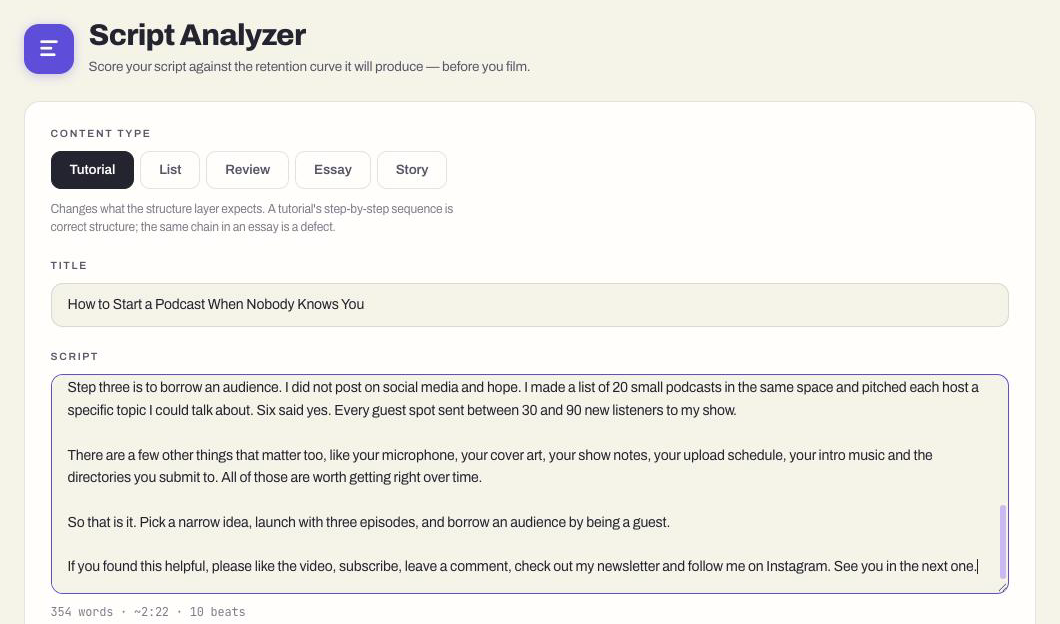
OutlierKit script review input. Content type set to Tutorial, a working title, and a 354-word script that the app counts as 10 beats and about 2 minutes 22 seconds.

How OutlierKit Compares to Other Script Tools

Most YouTube script tools write a draft for you. Few of them review a draft you wrote, and fewer mark the exact beat that needs work. The table shows which job each tool does.

FeatureOutlierKitBest ValueSubscribrVidIQChatGPT
Reviews a draft you wrote
Timed flags on each beat, with a fix
Breaks down a published video's script
Writes a script from scratch
Free to try
Best forChecking your own draft before you recordAI-written first draftsPicking a topic with search demandA free critique if you write the prompt
Pricing
$29/mo
Hobby plan; 30-credit free trial, no card
$99/mo
Paid plans start here; a free plan exists
$19/mo
Boost plan; a free plan exists
Free
Plus from $20/mo

Which script tool should you use?

They do different jobs. Many creators use two.

ToolBest forChoose it ifStarting price
OutlierKitChecking a script you wroteYou write your own scripts and want a second read that points at the exact line to fix before you film.$29/mo, free trial
SubscribrGetting a first draft fastYou want AI to write the whole draft and you plan to edit it into your voice.Free plan; paid from $99/mo
ChatGPTA free critiqueYou are happy to write a detailed prompt and read a general critique with no scores or timings.Free; Plus from $20/mo
YouTube StudioLearning from videos you already publishedYou want to see where viewers left your last video. Only Studio has your retention graph.Free

Plans That Include the Script Checker

Script review is included on every plan and on the free 30-credit trial. The trial lasts 3 days and needs no card. Annual billing saves 50%.

Hobby

$29/month

For one channel that wants every script checked before filming

  • 100 credits/month
  • Script review
  • Video Script Analysis: 10 credits
  • AI title generator: 2 credits per run
  • Description, hashtags and chapters
  • Keyword Research: 2 credits
  • Outlier Research: 2 credits
  • Channel analysis: 10 credits
Start Free Trial
Most Popular

Pro

$49/month

For weekly publishing with research on every upload

  • 500 credits/month
  • Everything in Hobby
  • Competitor Studio: 50 credits per run
  • MCP server & API access
  • 50 credits per connected channel
Start Free Trial

Max

$199/month

For agencies reviewing scripts across many channels

  • 2,000 credits/month
  • Everything in Pro
  • Connect 50+ YouTube channels
  • Sponsor & comment intelligence
  • Advanced competitor identification
  • Update data on demand
  • Priority MCP & API access
Start Free Trial

What Creators Say About OutlierKit

From creators and content teams who moved their research to OutlierKit.

★★★★★5.0/5 on Product Hunt →

“Great addition to my stack and simple to use. Hit an issue and the team worked hard to fix it. Great product, hardworking team.”

HH
Henry Hill
Verified user

“Been creating for years, running multiple YouTube channels. OutlierKit is the first tool that actually improved our view counts almost instantly. The competition analysis revealed gaps we never knew existed.”

G
Gautham
Multi-channel creator

“OutlierKit has drastically reduced my time to plan content for my SaaS YouTube channel. The deep research feature revealed insights I'd overlooked earlier. A must-have if you're serious about YouTube as an acquisition channel.”

V
Vikash
SaaS channel manager

YouTube Script Checker FAQ

What people ask before they paste in a draft.

What is a YouTube script checker?
A tool that reads a script you wrote and tells you what is weak before you record it. OutlierKit's version is called Script review. It gives a verdict out of 10, scores the hook, spine, voice and risk, and writes a fix under each weak beat.
Is Script review the same as Video Script Analysis?
No. Script review checks a script you wrote and have not recorded yet. Video Script Analysis breaks down the script of a video that is already on YouTube, and costs 10 credits. Use the second to study a winner and the first to check your own draft.
Does OutlierKit write the script for me?
No. OutlierKit does not write scripts from scratch. You write the draft, or you write it with ChatGPT or another tool, and Script review checks it.
Is the script checker free?
It is included in the free trial. The trial gives you 30 credits for 3 days and needs no card. After that it is on every paid plan, from $29 a month.
When should I run the check?
Run it when the draft is finished and before you record. A weak hook costs ten minutes to rewrite on the page. The same problem costs a reshoot once the video is filmed.
Can I check a script that ChatGPT wrote?
Yes. Paste any script. AI drafts often open slowly and repeat themselves, so they are a good use for a second read before you film.
Can ChatGPT review my script instead?
It can, if you write a careful prompt. You get a general critique. Script review uses a fixed scoring method, so two drafts of the same script get scores you can compare, and every flag points at a timed beat.
Does it predict retention?
It scores the things in a script that hold or lose viewers, such as a slow opening or a stretch with no change of pace. It cannot show you a real retention graph. That only exists in YouTube Studio after the video is live.
What do hook, spine, voice and risk mean?
Hook is the first 30 seconds. Spine is the structure: whether each beat leads to the next. Voice is whether the script sounds spoken and specific. Risk covers originality, such as first-hand experience and a clear point of view. The spine counts for 40% of the verdict and the other three for 20% each.
Do I need to upload a thumbnail?
No. It is optional. With a thumbnail, the tool checks what the thumbnail promises against your first 30 seconds. Without one it checks the title alone, and your score is not reduced for leaving it out.
What else can I do in the same app?
Title, Description and Chapters are in the app on every plan. The Title tool writes sixteen titles and ranks them against real breakout videos for 2 credits a run.

More OutlierKit Features

The script check comes after the idea. These tools help you pick the idea.

Package the video in the same app

Once the script passes, the same app ranks your title and writes the description, hashtags and chapters. All are on every plan and the 30-credit trial.

  • Title

    Writes 16 titles and ranks them against real breakout videos near your topic, with a score and a one-line reason for each.

    Open in the app →How it works
  • Description & tags

    Writes the 150 characters people see and the rest of the description separately, then picks your hashtags.

    Open in the app →How it works
  • Chapters

    Writes chapter titles that help viewers scan the video and jump to the part they came for.

    Open in the app →

Check your next script before you film it

Start the free trial, paste the draft, and fix what the review finds while it is still text.

Start Free, No Card

One real run, start to finish

I ran this on 6 October 2026. I wrote a 354-word tutorial script with a weak opening on purpose: a greeting, a subscribe ask, then the topic. The title was "How to Start a Podcast When Nobody Knows You". The diagram below uses the exact scores, flags and fixes the app returned.

The verdict was 7.0. The voice scored 10.0, so the writing was fine. The hook scored 3.5, and the app said why. It marked the subscribe ask in the first line as a blocker. It marked two more lines as major, because the promise of the video did not arrive until about 40 seconds in. Under each one it wrote the fix: open with the no-audience problem, lead with the 500-listener result, and move the subscribe ask later.

That is three edits to the first four lines. On the page it took me a few minutes. After filming it would have meant recording the intro again.
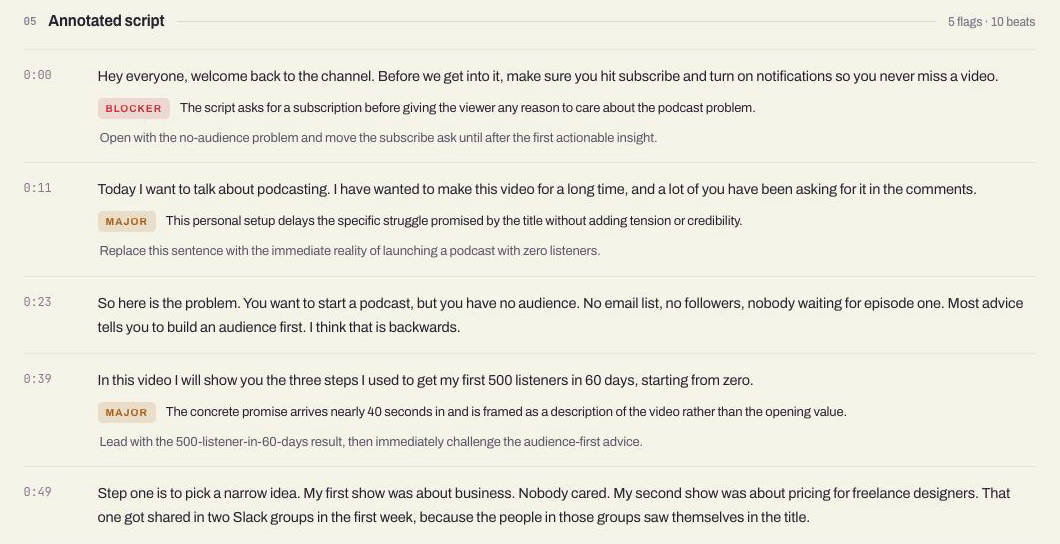
The annotated script in the app, with timestamps. A blocker and two major flags sit under the opening lines, each with a suggested fix.
The same run in the app. I cropped the sidebar and changed nothing else.

Why check a script before you record?

A script is the cheapest place to fix a video. A slow opening takes ten minutes to rewrite on the page. Once it is filmed, the same fix means a reshoot or a hard cut in the edit. After you publish, you cannot fix it at all. You can only read the retention graph and do better next time.

Most script tools sit at the wrong end of that line. They break down a video that is already live. Script review reads the draft you have not recorded yet.

How is Script review different from Video Script Analysis?

OutlierKit has two script tools and they do different jobs. Script review checks your own unpublished draft. Video Script Analysis breaks down the script of a video that is already on YouTube. I use the second to study a winner and the first to check my own work.

QuestionScript reviewVideo Script Analysis
What you give itA script you wroteA published YouTube video
When you use itBefore you recordWhile you research
What you getA verdict out of 10, flags on each weak beat and a fix for eachThe hook, structure, pacing and call to action of that video
PlansEvery plan and the free trialEvery plan, 10 credits a run

The Video Analyzer page covers the published-video side. If you are comparing tools, the list of the best YouTube script analysis tools ranks them by job.

What should you check in a YouTube script before recording?

These five checks are mine. I run them by hand on every draft, and they are a good start if you have no tool open. Script review runs its own scoring in the app, as the run above shows.

  1. 1

    The first two sentences

    Read them alone. They should say what the viewer gets and why it is worth staying. Cut any greeting, channel intro or backstory that comes before that.

  2. 2

    The promise in the title

    Find the line where the script pays off the title. If it comes late, add a line early that tells the viewer it is coming.

  3. 3

    Every section earns its place

    Ask what the viewer loses if you delete each section. If the answer is nothing, delete it.

  4. 4

    Something new every minute or so

    Long stretches of one idea are where people leave. Add an example, a number or a change of scene.

  5. 5

    One call to action

    Ask for one thing, after you have delivered the value. Three asks in the outro means none of them land.

If you have not written the draft yet, start from the YouTube script template. The guide to YouTube script writing walks through each part, and the ChatGPT prompts for YouTube scripts help if you draft with AI.

What does the script checker not do?

When the script is fixed, write the title with the AI YouTube title generator and the description and hashtags with the YouTube description generator.

Written by

Aditi

Aditi

Founder OutlierKit and UTubeKit

AI-Verified

Don’t take our word for it.
Ask AI.

Ask any leading AI what OutlierKit does, who it is built for, and where it fits your stack.