For brand and partnership teams
Choose YouTube sponsorship candidates by their recent reach
Compare a creator’s average views with their recent uploads before you buy a placement. OutlierKit puts the channel data and viewer comments in reach of your partnership team.
30 minutes with the founder · Or start a free trial, no credit card
Try it yourself with 30 free credits



We sell espresso gear. Find coffee creators whose audience actually watches, not just subscribes.
Coffee creators ranked by reach ratio, average views as a share of subscribers:
- 1.More George261%Subscribers: 21.8K · Avg views: 56.9K
- 2.CafeMaxPages150%Subscribers: 29.6K · Avg views: 44.5K
- 3.Liz Happybeans85%Subscribers: 28.6K · Avg views: 24.3K
- 4.Daddy Got Coffee35%Subscribers: 76.2K · Avg views: 26.9K
Highlighted figure: reach ratio.
Shortlist More George and CafeMaxPages. Their average video out-draws their subscriber count. The biggest channel on this list has the lowest ratio.
Sponsored channels, broken down
Full breakdowns of channels that run sponsorships, with their reach and upload patterns:
 Good Mythical Morning
Daily Comedy & Food Variety Show
- Subscribers
- 19.7M
- Avg views
- 2.4M
Est. $44K - $143K/mo
Read the analysis → Marques Brownlee
Consumer Technology & Hardware Reviews
- Subscribers
- 21.1M
- Avg views
- 3.0M
Est. $124K - $405K/mo
Read the analysis → The Diary Of A CEO
High-Performance Lifestyle & Ideas
- Subscribers
- 17.8M
- Avg views
- 1.9M
Est. $58K - $322K/mo
Read the analysis → Andrew Huberman
Health-science podcast
- Subscribers
- 7.6M
- Avg views
- 1.0M
Est. $11K to $37K/mo
Read the analysis →Figures reflect the saved channel snapshots. Open an analysis to review the full context.
How it works
Check a creator before you send the brief
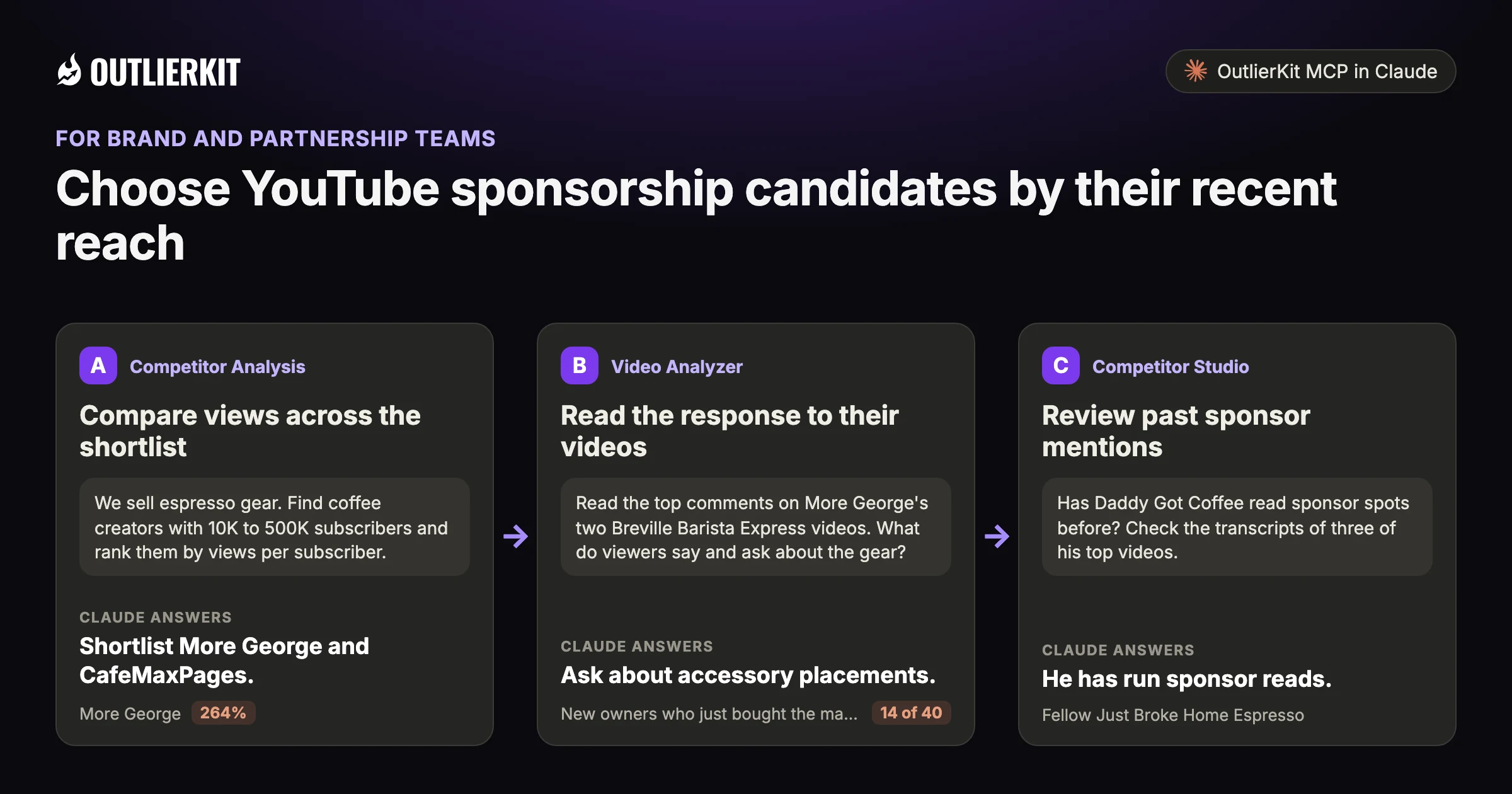
- Compare views across the shortlistShortlist More George and CafeMaxPages.
- Read the response to their videosAsk about accessory placements.
- Review past sponsor mentionsHe has run sponsor reads.
Step 1 · Competitor Analysis
Compare views across the shortlist
Look at average views alongside subscriber counts. Then review recent uploads to see whether one large hit skews the average.
- Claude calls
- channels_search
- In this example
- Shortlist More George and CafeMaxPages.
We sell espresso gear. Find coffee creators with 10K to 500K subscribers and rank them by views per subscriber.
Four home espresso creators in that range, ranked by average views as a share of subscribers:
- 1.More George264%22.2K subscribers · 58.5K average views · Top video 520K views
- 2.CafeMaxPages150%29.6K subscribers · 44.5K average views · Top video 272.2K views
- 3.Liz Happybeans86%29.2K subscribers · 25.1K average views · Top video 51K views
- 4.Daddy Got Coffee37%78.1K subscribers · 28.9K average views · Top video 715.2K views
Highlighted figure: reach ratio.
Shortlist More George and CafeMaxPages. Both average more views than they have subscribers. More George's top video has 520K views, so review recent uploads before you trust the average.
Step 2 · Video Analyzer
Read the response to their videos
Study viewer questions and objections in the comments. Use them to decide what to ask a creator about audience fit.
- Claude calls
- videos_comments
- In this example
- Ask about accessory placements.
Read the top comments on More George's two Breville Barista Express videos. What do viewers say and ask about the gear?
I read 40 top comments across the two videos. Four themes matter for a gear brand:
- 1.New owners who just bought the machine14 of 40"Just bought one and I cant wait. Thanks!"
- 2.Viewers using the review to decide3 of 40"I'm planning to buy this over the weekend"
- 3.Requests for the accessories he uses2 of 40"Can you also give link to the extra devices you have like scales"
- 4.Praise for a video with no ads1 of 40"No excess talking, no advertising, no bs."
Highlighted figure: comments read.
Ask about accessory placements. 14 of 40 comments come from people who just bought the machine. Two ask about scales and add-ons. One praises the lack of advertising.
Step 3 · Competitor Studio
Review past sponsor mentions
Competitor Studio adds sponsor research across a niche. Check the placements in context before choosing a partner or ruling one out.
- Claude calls
- videos_transcript
- In this example
- He has run sponsor reads.
Has Daddy Got Coffee read sponsor spots before? Check the transcripts of three of his top videos.
Yes. Two of the three transcripts open with a sponsor line, and he says when a brand sent the product:
- 1.Fellow Just Broke Home Espresso459K views · Opens at 0:00 with "Today's video is sponsored by Third Wave Water." At 3:35 he says Fellow sent the machine.
- 2.If I Started Coffee in 2026… Here's EXACTLY What I'd Do!337K views · Opens at 0:00 with a "brought to you by" line for Third Wave Water.
- 3.Did This Just END Nespresso?? Rok SmartShot Review715.2K views · No sponsor read in the transcript returned. At 2:31 he says Rok sent the espresso maker.
He has run sponsor reads. Third Wave Water appears in the opening line of two videos. Ask him for placement options and whether a sent product gets the same disclosure.
Before you record: packaging and script tools
Once you pick the idea, OutlierKit writes the packaging and checks your script. You still film and edit the video yourself. The Title tool ranks its titles against real breakout videos near your topic. All four are on every plan and the 30-credit trial. On Pro and Max, the MCP connector also lets Claude run OutlierKit research for you.
Title
Writes 16 titles and ranks them against real breakout videos near your topic, with a score and a one-line reason for each.
Open in the app →How it worksDescription & hashtags
Writes the 150 characters people see and the rest of the description separately, then picks your hashtags.
Open in the app →How it worksChapters
Writes chapter titles that help viewers scan the video and jump to the part they came for.
Open in the app →Script review
Scores the script you wrote and shows what to fix before you record, so you reshoot and re-edit less.
Open in the app →How it works
A worked example
The largest coffee channel did not have the highest average views
More George has 21.8K subscribers and averages 56.9K views a video. Daddy Got Coffee has 76.2K subscribers and averages 26.9K.
Compare recent views and audience fit before discussing a sponsorship rate.
The example shows a dated research result in Claude. Use the prompts below to explore your own topic.
Try a research question →We sell espresso gear. Find coffee creators whose audience actually watches, not just subscribes.
channels_searchCoffee creators ranked by reach ratio, average views as a share of subscribers:
| Creator | Subscribers | Avg views | Reach ratio |
|---|---|---|---|
| More George | 21.8K | 56.9K | 261% |
| CafeMaxPages | 29.6K | 44.5K | 150% |
| Liz Happybeans | 28.6K | 24.3K | 85% |
| Daddy Got Coffee | 76.2K | 26.9K | 35% |
Shortlist More George and CafeMaxPages. Their average video out-draws their subscriber count. The biggest channel on this list has the lowest ratio.
See the research tools in action
Watch the product walkthrough for a tour of channel research and Competitor Studio. The feature sections above show how those tools fit your work.

“Great addition to my stack and simple to use. Hit an issue and the team worked hard to fix it. Great product, hardworking team.”
“I use Outlier Kit for supplemental channel audits and to help clients brainstorm video ideas and/or explore pivot strategies. It's a fantastic competitive intelligence tool to have in your arsenal.”
“I was consistent with uploading videos, but at a certain point, I wasn't able to understand how things were working. With OutlierKit, I was really able to understand the competitor landscape and identify the kinds of opportunities I could bet on.”
“It's really simple and gives really useful data and insights for choosing WHAT to make and how to structure it better. Will recommend to anyone seriously committing to YouTube.”
“After implementing the recommendations from the first report last week, my latest video has nearly tripled in views (2000) compared to my previous best one (700), so the recommendations do work.”
One creator on a small channel. Not a typical or promised result.
“I really liked how clean the analysis results were, especially the importance score. It actually helps you see which parts of a video are doing the heavy lifting. The analysis was quick too.”
More reviews people have posted on Product Hunt, X and LinkedIn, unedited.
Choose where to do the research
Use OutlierKit for public research. Your own YouTube analytics supply the private performance data. Claude is an optional way to query OutlierKit.
| Task | OutlierKit app | OutlierKit in Claude | YouTube Studio |
|---|---|---|---|
| Research other channels | Outlier searches and channel analysis. Pro and Max add niche-wide Competitor Studio. | Request channel data and outlier results with the OutlierKit connector. | Use your channel analytics to understand your own audience and uploads. |
| Read video context | Review video analysis and research results in the app. | Request public transcripts and comments, then ask follow-up questions. | Check your own retention and traffic sources to assess a published video. |
| Package the video | Title, Description & hashtags, Chapters and Script review. Titles are ranked against breakout videos near your topic. | Ask Claude to draft packaging from the research data. The ranked Title tool and Script review run in the app. | Edit the title, description, tags and chapters after upload. No comparison with other channels. |
| Choose a plan | Hobby starts at $49/month. Competitor Studio requires Pro or Max. | Included with Pro, Max and the active free trial. Calls use your OutlierKit credits. | Included with your YouTube channel. |
Read the connector guide or YouTube’s analytics guide for the available reports.
Choose a research plan
Pro includes channel research and MCP access. Choose Max if you need sponsor and comment intelligence across a full niche.
Hobby
Best for experts and coaches running one channel
billed monthly
- ✓100 credits per month
- ✓Outlier Research
- ✓Keyword Research
- ✓Single-channel analysis
- ✓Single-video idea research
- Competitor Studionot included
- MCP & API accessnot included
Pro
Best for experts, consultants and brands publishing every week
billed monthly
- ✓500 credits per month
- ✓Everything in Hobby
- ✓Deep Research
- ✓AI script and hook analysis
- ✓Competitor Studio: niche-wide intel
- ✓MCP & API access
- ✓50 credits per connected channel
Max
Best for agencies running client channels, API pipelines
billed monthly
- ✓2,000 credits per month
- ✓Everything in Pro
- ✓50+ channel connections
- ✓Niche-wide sponsor & comment intelligence
- ✓On-demand data updates
- ✓Priority API access
Start with a research question
Compare three channels in the app with the 30 trial credits. Each single-channel analysis costs 10 credits.
No credit card required. Competitor Studio needs a paid Pro or Max plan and 50 credits per run. You choose whether to upgrade.
Start free trial →A note from Aditi
A subscriber count does not tell you what a placement will deliver. Recent views give you a starting point; audience fit still needs a closer look.
I built OutlierKit to make this research easier to use. If you don’t find an insight worth pursuing during your trial, email me at hello@outlierkit.com. I’ll walk you through your YouTube strategy. If I still can’t help you find something useful, you get a full refund.
 Aditi, founder of OutlierKit
Updated
Optional: research inside Claude
Ask a follow-up question about the data
The OutlierKit connector lets Claude request research and shape it into a brief. Pro, Max and active trials include access. A prompt may require several paid tool calls.
Find 25 channels in [niche] with 10K to 500K subscribers. Rank them by average views as a share of subscribers.
- You get
- 25 ranked creators
- Tools called
- channels_search, channels_get
- Cost
- 2 to 10 credits per tool call
Show [channel]'s last 20 videos. Are views steady, or is it one hit?
- You get
- Steady or fluke
- Tools called
- channels_videos
- Cost
- 2 to 10 credits per tool call
Read the comments on their last 3 videos. Who is this audience, and would they buy [product]?
- You get
- An audience read
- Tools called
- videos_comments
- Cost
- 2 to 10 credits per tool call
Connect OutlierKit to Claude. For custom workflows, explore the API.
Before you get started
What is reach ratio?
Average views divided by subscribers. A 20% ratio means average views equal 20% of the subscriber count. It does not measure the share of subscribers who watched.
Can a reach ratio be above 100%?
Yes. It means average views exceed the subscriber count. The ratio alone does not tell you who watched or how they found the videos.
What is YouTube intelligence for brands?
It means researching a creator before discussing a placement. Compare recent views and review the audience response in context.
Which paid plans include the tools on this page?
Hobby starts at $49 a month with 100 credits. Pro is $99 with 500 credits and adds Competitor Studio, MCP and API access. Max is $399 with 2,000 credits and adds niche-wide sponsor research and on-demand updates. Annual billing is available.
Do I need Claude to use OutlierKit?
No. You can research in the OutlierKit app. The optional MCP connector lets Claude request public channel data, outliers, transcripts and comments. It is included with Pro, Max and an active free trial. Niche mapping and sponsor intelligence stay in Competitor Studio in the app.
What can I try before choosing a plan?
The free trial includes 30 credits with no credit card. Outlier and keyword searches cost 2 credits each; single-channel analysis costs 10. Competitor Studio costs 50 credits per run. Connecting the MCP connector adds 20 credits, so a trial can cover one run. On paid plans it is on Pro and Max. The Title tool costs 2 credits per run. Description & hashtags, Chapters and Script review are also included in the trial.
Can I change or cancel my plan?
Yes. Use your account settings to change or cancel your plan. The change takes effect at the end of the current billing cycle. Email hello@outlierkit.com if you need help.
Research your next creator partnership
30 minutes with the founder · Or start a free trial, no credit card
Book a demo →