For PR and communications teams
Put your YouTube coverage in context
Show each placement’s views alongside its channel’s usual performance. OutlierKit gives your report a reference point beyond the raw view count.
30 minutes with the founder · Or start a free trial, no credit card
Try it yourself with 30 free credits




Score these four Nintendo Switch 2 reviews against each channel's average. Which placement landed hardest?
Four reviews of the same console, each against its channel's normal:
- 1.Nick Alvizo2.9×Subscribers: 11.8K · Views: 2.6K
- 2.Adrenaline2.1×Subscribers: 1.23M · Views: 135K
- 3.HappyConsoleGamer1.6×Subscribers: 343K · Views: 105K
- 4.Digital Foundry1.4×Subscribers: 1.53M · Views: 246K
Highlighted figure: vs channel average.
Compare absolute reach and relative performance. Digital Foundry drew the most views but ran closest to its normal. The 11.8K-subscriber channel beat its average almost 3 times.
Media and commentary channels, broken down
Full breakdowns of news, legal and tech commentary channels that shape coverage:
 Fox News
News & politics
- Subscribers
- 15.4M
- Avg views
- 184.7K
Est. $391K to $1.27M/mo
Read the analysis → LegalEagle
Legal explainers
- Subscribers
- 3.9M
- Avg views
- 1.2M
Est. $37K to $121K/mo
Read the analysis → ColdFusion
Tech & business deep dives (faceless)
- Subscribers
- 5.2M
- Avg views
- 982.6K
Est. $17K to $56K/mo
Read the analysis → TBPN
TBPNTech-business live show
- Subscribers
- 126.0K
- Avg views
- 15.2K
Est. $697 to $4,000/mo
Read the analysis →Figures reflect the saved channel snapshots. Open an analysis to review the full context.
How it works
Give each placement a useful reference point
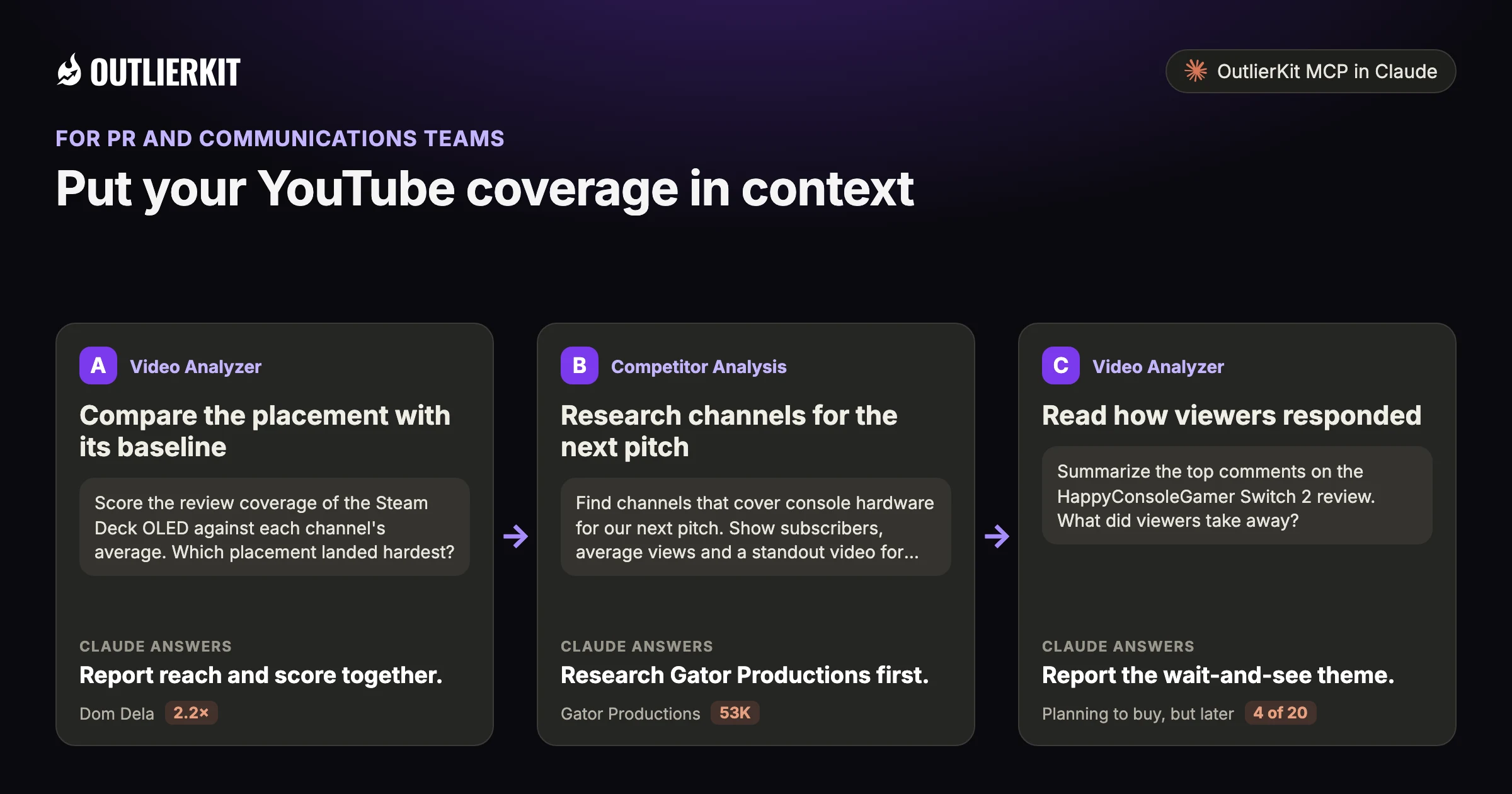
- Compare the placement with its baselineReport reach and score together.
- Research channels for the next pitchResearch Gator Productions first.
- Read how viewers respondedReport the wait-and-see theme.
Step 1 · Video Analyzer
Compare the placement with its baseline
Show absolute views and the outlier score together. They answer different questions about reach and relative performance.
- Claude calls
- outliers_search
- In this example
- Report reach and score together.
Score the review coverage of the Steam Deck OLED against each channel's average. Which placement landed hardest?
Four Steam Deck OLED videos beat their channel's average. Ranked by score:
- 1.Dom Dela2.2×The Steam Deck OLED Changed Gaming For Me · 3.8K subscribers · 7.8K views
- 2.EternalDeck2.1×The Steam Deck OLED is still so good in 2026. · 724 subscribers · 2.9K views
- 3.Jon Valiagas1.8×Is the Steam Deck OLED Worth It in 2026? · 98.4K subscribers · 324K views
- 4.Zaff's Productions1.2×NOW IS THE TIME - Steam Deck OLED · 5.1K subscribers · 19K views
Highlighted figure: vs channel average.
Report reach and score together. Jon Valiagas delivered the reach, 324K views at 1.8 times its average. Dom Dela scored highest at 2.2 with 7.8K views. They answer different questions.
Step 2 · Competitor Analysis
Research channels for the next pitch
Review recent coverage on channels relevant to your story. Look at the subject fit before choosing who to contact.
- Claude calls
- channels_search
- In this example
- Research Gator Productions first.
Find channels that cover console hardware for our next pitch. Show subscribers, average views and a standout video for each.
Three console hardware channels worth a closer look, with each one's average views per video:
- 1.Gator Productions53K144K subscribers. Console hardware comparisons. "Is PS4 more powerful than Nintendo Switch 2?" drew 194.5K views, 3.8× its average.
- 2.Dan Does Chats16.7K78.8K subscribers. Hands-on tests of retro and emulation consoles. "THE BEST EMULATION CONSOLES on Amazon" drew 28.2K views, 1.7× its average.
- 3.Skycaptin510K139K subscribers. Frame rate and resolution reviews across PlayStation, Xbox, PC and Nintendo. "Marvel Rivals PS4 Gameplay Review" drew 52.6K views, 4.5× its average.
Highlighted figure: average views per video.
Research Gator Productions first. It averages 53K views per video, the highest of the three, and its Switch 2 comparison reached 194.5K. Its top video is in Spanish, so confirm the language fits.
Step 3 · Video Analyzer
Read how viewers responded
Study comments on the placement for recurring questions. Quote them in context instead of treating them as a survey of the whole audience.
- Claude calls
- videos_comments
- In this example
- Report the wait-and-see theme.
Summarize the top comments on the HappyConsoleGamer Switch 2 review. What did viewers take away?
I read the 20 top comments. Four themes repeat:
- 1.Planning to buy, but later4 of 20"I’ll definitely upgrade, but I’m in no rush."
- 2.Praise for the review itself4 of 20"NOW THIS IS THE REAL REVIEW IVE BEEN WAITING FOR!!!"
- 3.A new console for older games3 of 20"It's weird that I got a new console just to play older games..."
- 4.Owners who are enjoying it3 of 20"Amazing console and can't wait to see what Nintendo has in store for us."
Highlighted figure: comments read.
Report the wait-and-see theme. Four of the 20 top comments plan to buy later, citing price, a backlog or a future OLED model. The video has 1,089 comments, so quote these as context.
A worked example
The highest view count and highest relative score belonged to different reviews
Digital Foundry's Switch 2 review has 246K views, the most of the four. Against Digital Foundry's own average, it scores 1.4.
Nick Alvizo’s review has 2.6K views and scores 2.9. It has fewer views but a higher score relative to its channel. The campaign goal determines which result matters more.
The example shows a dated research result in Claude. Use the prompts below to explore your own topic.
Try a research question →Score these four Nintendo Switch 2 reviews against each channel's average. Which placement landed hardest?
videos_getvideos_getvideos_getvideos_getFour reviews of the same console, each against its channel's normal:
| Channel | Subscribers | Views | vs channel average |
|---|---|---|---|
| Nick Alvizo | 11.8K | 2.6K | 2.9× |
| Adrenaline | 1.23M | 135K | 2.1× |
| HappyConsoleGamer | 343K | 105K | 1.6× |
| Digital Foundry | 1.53M | 246K | 1.4× |
Compare absolute reach and relative performance. Digital Foundry drew the most views but ran closest to its normal. The 11.8K-subscriber channel beat its average almost 3 times.
See the research tools in action
Watch the product walkthrough for a tour of channel research and Competitor Studio. The feature sections above show how those tools fit your work.

“Great addition to my stack and simple to use. Hit an issue and the team worked hard to fix it. Great product, hardworking team.”
“I use Outlier Kit for supplemental channel audits and to help clients brainstorm video ideas and/or explore pivot strategies. It's a fantastic competitive intelligence tool to have in your arsenal.”
“I was consistent with uploading videos, but at a certain point, I wasn't able to understand how things were working. With OutlierKit, I was really able to understand the competitor landscape and identify the kinds of opportunities I could bet on.”
“It's really simple and gives really useful data and insights for choosing WHAT to make and how to structure it better. Will recommend to anyone seriously committing to YouTube.”
“After implementing the recommendations from the first report last week, my latest video has nearly tripled in views (2000) compared to my previous best one (700), so the recommendations do work.”
One creator on a small channel. Not a typical or promised result.
“I really liked how clean the analysis results were, especially the importance score. It actually helps you see which parts of a video are doing the heavy lifting. The analysis was quick too.”
More reviews people have posted on Product Hunt, X and LinkedIn, unedited.
Choose where to do the research
Use OutlierKit for public research. Your own YouTube analytics supply the private performance data. Claude is an optional way to query OutlierKit.
| Task | OutlierKit app | OutlierKit in Claude | YouTube Studio |
|---|---|---|---|
| Research other channels | Outlier searches and channel analysis. Pro and Max add niche-wide Competitor Studio. | Request channel data and outlier results with the OutlierKit connector. | Use your channel analytics to understand your own audience and uploads. |
| Read video context | Review video analysis and research results in the app. | Request public transcripts and comments, then ask follow-up questions. | Check your own retention and traffic sources to assess a published video. |
| Package the video | Title, Description & hashtags, Chapters and Script review. Titles are ranked against breakout videos near your topic. | Ask Claude to draft packaging from the research data. The ranked Title tool and Script review run in the app. | Edit the title, description, tags and chapters after upload. No comparison with other channels. |
| Choose a plan | Hobby starts at $49/month. Competitor Studio requires Pro or Max. | Included with Pro, Max and the active free trial. Calls use your OutlierKit credits. | Included with your YouTube channel. |
Read the connector guide or YouTube’s analytics guide for the available reports.
Choose a research plan
Pro includes channel research and MCP access. Max adds comment and sponsor intelligence across a full niche.
Hobby
Best for experts and coaches running one channel
billed monthly
- ✓100 credits per month
- ✓Outlier Research
- ✓Keyword Research
- ✓Single-channel analysis
- ✓Single-video idea research
- Competitor Studionot included
- MCP & API accessnot included
Pro
Best for experts, consultants and brands publishing every week
billed monthly
- ✓500 credits per month
- ✓Everything in Hobby
- ✓Deep Research
- ✓AI script and hook analysis
- ✓Competitor Studio: niche-wide intel
- ✓MCP & API access
- ✓50 credits per connected channel
Max
Best for agencies running client channels, API pipelines
billed monthly
- ✓2,000 credits per month
- ✓Everything in Pro
- ✓50+ channel connections
- ✓Niche-wide sponsor & comment intelligence
- ✓On-demand data updates
- ✓Priority API access
Start with a research question
Use the 30-credit trial for three single-channel analyses, or combine outlier searches with MCP requests.
No credit card required. Competitor Studio needs a paid Pro or Max plan and 50 credits per run. You choose whether to upgrade.
Start free trial →A note from Aditi
A useful coverage report keeps the campaign’s goal in view. Relative performance adds context; it does not replace reach or audience fit.
I built OutlierKit to make this research easier to use. If you don’t find an insight worth pursuing during your trial, email me at hello@outlierkit.com. I’ll walk you through your YouTube strategy. If I still can’t help you find something useful, you get a full refund.
 Aditi, founder of OutlierKit
Updated
Optional: research inside Claude
Ask a follow-up question about the data
The OutlierKit connector lets Claude request research and shape it into a brief. Pro, Max and active trials include access. A prompt may require several paid tool calls.
Here are our placements: [links]. Score each one against its channel's average.
- You get
- A coverage scorecard
- Tools called
- videos_get, channels_get
- Cost
- 2 to 10 credits per tool call
Find 20 channels covering [topic] whose last 10 videos perform steadily.
- You get
- A press list
- Tools called
- channels_search, channels_videos
- Cost
- 2 to 10 credits per tool call
Summarize the comments on [link]. What did viewers believe after watching?
- You get
- An audience read
- Tools called
- videos_comments
- Cost
- 2 to 10 credits per tool call
Connect OutlierKit to Claude. For custom workflows, explore the API.
Before you get started
Will it find every video that mentions us?
No. It scores coverage you know about and finds creators to pitch. Keep your monitoring tool for mention alerts.
Why not just report views?
Report views too. The score adds context by comparing a placement with the channel baseline. It does not measure unique viewers or campaign impact.
What is YouTube intelligence for PR teams?
It means measuring YouTube coverage against each channel's normal views. 50K views is a win on one channel and a flop on another.
Which paid plans include the tools on this page?
Hobby starts at $49 a month with 100 credits. Pro is $99 with 500 credits and adds Competitor Studio, MCP and API access. Max is $399 with 2,000 credits and adds niche-wide sponsor research and on-demand updates. Annual billing is available.
Do I need Claude to use OutlierKit?
No. You can research in the OutlierKit app. The optional MCP connector lets Claude request public channel data, outliers, transcripts and comments. It is included with Pro, Max and an active free trial. Niche mapping and sponsor intelligence stay in Competitor Studio in the app.
What can I try before choosing a plan?
The free trial includes 30 credits with no credit card. Outlier and keyword searches cost 2 credits each; single-channel analysis costs 10. Competitor Studio costs 50 credits per run. Connecting the MCP connector adds 20 credits, so a trial can cover one run. On paid plans it is on Pro and Max. The Title tool costs 2 credits per run. Description & hashtags, Chapters and Script review are also included in the trial.
Can I change or cancel my plan?
Yes. Use your account settings to change or cancel your plan. The change takes effect at the end of the current billing cycle. Email hello@outlierkit.com if you need help.
Review your latest YouTube coverage
30 minutes with the founder · Or start a free trial, no credit card
Book a demo →