Understand Why Any Video Succeeded or Failed
Analyze any YouTube video to uncover the keywords it ranks for, engagement patterns, script effectiveness, and what made it resonate with audiences. Get actionable insights to replicate success.
- Analyze any video instantly
- See ranking keywords
- AI script & hook analysis
- Engagement pattern insights





Rated 5.0/5 on Product Hunt
Updated
10
Credits per run on every plan
What the Video Analyzer Examines
Six analysis layers, from keyword rankings to hook effectiveness, run on any public video.
Keyword Ranking Analysis
See exactly which keywords any video ranks for in YouTube search and how well it ranks for each. Our analysis reveals the search terms driving traffic to the video, estimated search positions, and the keyword optimization techniques used in the title, description, and tags. This intelligence helps you understand the SEO strategy behind successful videos and identify opportunities to target similar keywords with your own content.
AI Script Analysis
Our AI analyzes the video's script (extracted from captions) to evaluate hook effectiveness, content structure, storytelling techniques, and audience retention strategies. We identify the specific moments designed to keep viewers watching: pattern interrupts, open loops, and value delivery timing. This script analysis reveals the writing techniques that separate viral content from average videos, giving you a blueprint to improve your own scripts.
Hook Effectiveness Score
The first 30 seconds determine whether viewers stay or leave. Our hook analysis evaluates opening techniques (pattern interrupts, curiosity gaps, promise statements, preview elements) to score how effectively the video captures attention. We compare against thousands of analyzed hooks to identify what works in each niche. Learn exactly how top creators grab attention and apply those techniques to your own videos.
Engagement Pattern Mapping
Understand how viewers interacted with the video through our engagement pattern analysis. We examine like-to-view ratios, comment sentiment and frequency, reply engagement, and share estimates to map the video's audience response. High engagement videos have predictable patterns: specific content types spark comments, emotional beats drive likes, and utility drives shares. Learn these patterns to create more engaging content.
Thumbnail & Title Analysis
Deconstruct the clickability factors of any video's packaging. Our analysis evaluates thumbnail composition, color psychology, text usage, and emotional appeal alongside title structure, power words, and curiosity triggers. We estimate click-through rate potential and identify the specific elements that make viewers click. Use these insights to A/B test your own thumbnails and titles with data-backed hypotheses.
Performance Benchmarking
Compare any video's performance against relevant benchmarks: the channel's average, niche standards, and similar content from competitors. Our benchmarking reveals whether a video over or underperformed expectations and identifies the factors that contributed to its relative success. This contextual analysis helps you understand what 'good' looks like for different content types and set realistic performance goals for your own videos.
See Video Analysis in Action
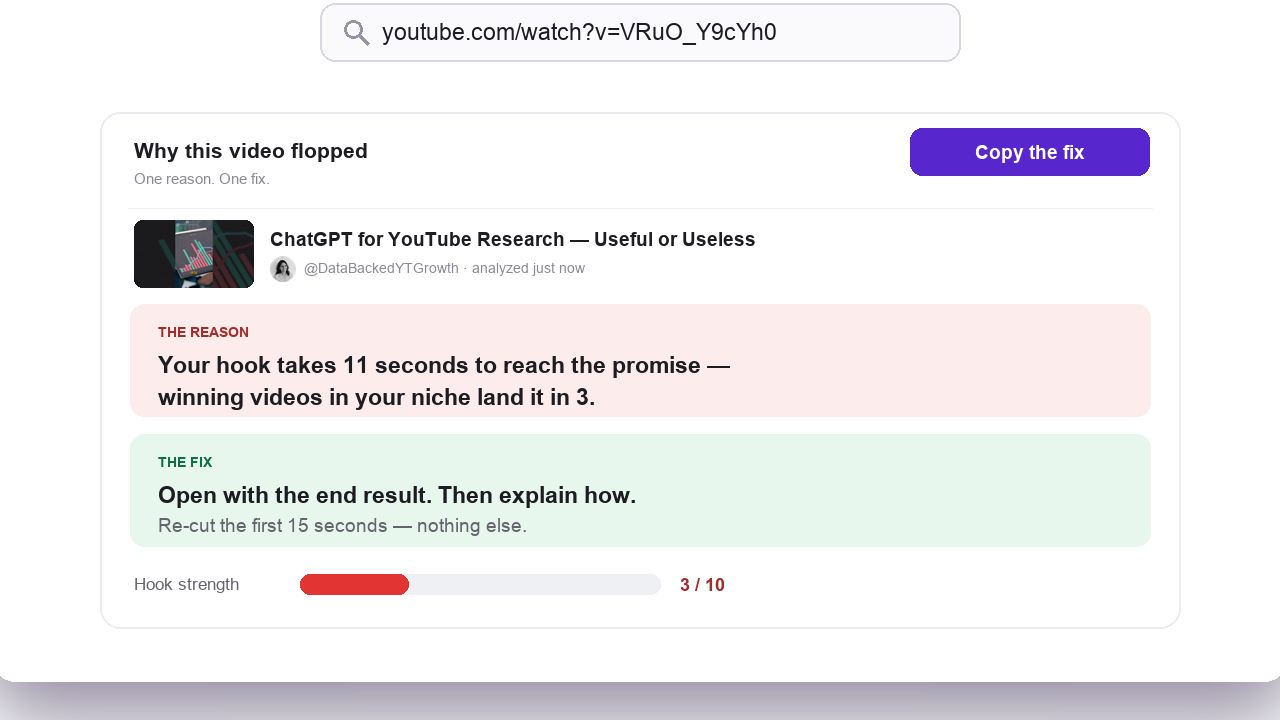
Watch how easy it is to analyze any YouTube video and extract actionable insights. Simply paste a video URL and get a comprehensive breakdown in seconds.
Paste any video URL
Enter any YouTube video link to start the analysis.
Get instant insights
See keywords, script analysis, engagement patterns, and more.
Apply to your content
Use the insights to improve your own videos.
How OutlierKit Compares to Other YouTube Analysis Tools
Each tool wins somewhere. YouTube Studio wins first-party analytics on your own channel, and VidIQ is strong for in-browser data while you browse. OutlierKit's edge is cross-channel, video-level breakdowns: script, hooks, keywords, and benchmarks for any public video, including your competitors'. Outlier-first tools like 1of10 and ViewStats cover breakout discovery and real-time tracking; the table below compares video analysis.
| Feature | OutlierKitBest Value | VidIQ | TubeBuddy | YouTube Studio | Social Blade |
|---|---|---|---|---|---|
| Keyword Ranking Analysis | |||||
| AI Script Analysis | |||||
| Hook Effectiveness Score | |||||
| Engagement Pattern Mapping | |||||
| Thumbnail & Title Analysis | |||||
| Performance Benchmarking | |||||
| Outlier Detection | |||||
| Best for | Experts, coaches and agencies breaking down why a public video won or flopped | In-browser keyword and competitor data while you browse | A/B testing thumbnails and bulk operations across channels | First-party analytics on your own channel (free) | Channel history and subscriber stats over time |
| Pricing | $49/mo Hobby plan | $19/mo Boost plan | $27/mo Legend, billed annually | Free Your channel only | $3.99/mo Basic plan |
Which video analysis tool should you choose?
Pick by the job. OutlierKit breaks down any public video. The others win on your own analytics, SEO data or channel stats.
| Tool | Best for | Choose it if |
|---|---|---|
| OutlierKit | Breaking down why any public video won: script, hooks, keywords and benchmarks | you are an expert or coach who studies competitor videos before scripting your own |
| VidIQ | Keyword scores and competitor data in the browser | you want SEO data while you browse YouTube |
| TubeBuddy | Thumbnail A/B tests and bulk edits to your uploads | you want to test packaging and manage your own channel |
| YouTube Studio | First-party retention and traffic data | you only need analytics for your own channel, free |
| Social Blade | Subscriber and view history over time | you want quick public stats on a channel's growth |
Plans and Credit Costs for Video Analysis
Video Analyzer costs 10 credits per run on every plan, so Hobby's 100 monthly credits cover about 10 analyses. Deep Research (20 credits per query) is also on every plan. Credits refresh monthly on your billing date, and annual billing saves 50%.
Hobby
For experts and coaches analyzing videos for one channel
- 100 credits/month
- Video script analysis: 10 credits per run
- Outlier Research: 2 credits
- Keyword Research: 2 credits
- Channel analysis: 10 credits
- Deep Research: 20 credits per query
- Title, description, hashtags & chapters
- Script review
Pro
For experts, consultants and brands analyzing every weekly upload
- 500 credits/month
- Video script analysis: 10 credits per run
- Everything in Hobby
- Competitor Studio: 50 credits per run
- MCP server & API access
- 50 credits per connected channel
Max
For agencies analyzing videos across client channels
- 2,000 credits/month
- Everything in Pro
- Connect 50+ YouTube channels
- Sponsor & comment intelligence
- Advanced competitor identification
- Update data on demand
- Priority MCP & API access
What Creators Say About OutlierKit
What creators and analysts say after using OutlierKit to study why videos win.
★★★★★5.0/5 on Product Hunt →“Great addition to my stack and simple to use. Hit an issue and the team worked hard to fix it. Great product, hardworking team.”
“Been creating for years, running multiple YouTube channels. OutlierKit is the first tool that actually improved our view counts almost instantly. The competition analysis revealed gaps we never knew existed.”
“OutlierKit has drastically reduced my time to plan content for my SaaS YouTube channel. The deep research feature revealed insights I'd overlooked earlier. A must-have if you're serious about YouTube as an acquisition channel.”
Verified Ratings Across Platforms
Frequently Asked Questions About YouTube Video Analysis
We have answered the most common questions about video analysis: what it covers, how the AI reads a script, and how accurate the keyword estimates are.
What is YouTube video analysis?
Why should I analyze other people's videos?
How does AI script analysis work?
What keywords can I see a video ranking for?
What makes a hook effective according to the analysis?
How do engagement patterns indicate video quality?
Can I analyze videos from channels of any size?
How do I use video analysis insights practically?
What's the difference between analyzing my videos and competitors'?
How accurate is the keyword ranking data?
Can video analysis help improve my watch time?
More OutlierKit Features
Video analysis is just one piece of the puzzle. Explore all the tools to grow your channel.
How to Analyze Video Content
Step-by-step guide to analyzing any YouTube video's content, script, performance metrics, SEO, and engagement patterns.
Keyword Research
Find high-volume, low-competition keywords to rank your videos and grow your channel organically.
Competitor Analysis
Deep-dive into any YouTube channel. See their best videos, growth patterns, and content strategy.
YouTube Channel Analyzer
See any channel's median views, outlier videos, and similar channels in one report.
Before you record: packaging and script tools
Once you pick the idea, OutlierKit writes the packaging and checks your script. You still film and edit the video yourself. The Title tool ranks its titles against real breakout videos near your topic. All four are on every plan and the 30-credit trial. On Pro and Max, the MCP connector also lets Claude run OutlierKit research for you.
Title
Writes 16 titles and ranks them against real breakout videos near your topic, with a score and a one-line reason for each.
Open in the app →How it worksDescription & hashtags
Writes the 150 characters people see and the rest of the description separately, then picks your hashtags.
Open in the app →How it worksChapters
Writes chapter titles that help viewers scan the video and jump to the part they came for.
Open in the app →Script review
Scores the script you wrote and shows what to fix before you record, so you reshoot and re-edit less.
Open in the app →How it works
Ready to understand what makes videos succeed?
Use OutlierKit to understand why videos win, then apply the same playbook to your next upload.
Start Free, No Credit Card