YouTube Channel Analyzer: See Why Any Channel Grows or Stalls
Paste a channel URL and get its growth trend, median views, best videos against its own average, and the similar channels it competes with. Works on any public channel, yours or a competitor's.
- Any public channel
- Median views, not just totals
- Outlier videos ranked
- Similar channels compared





Rated 5.0/5 on Product Hunt
Updated
10
Credits per channel
TL;DR
OutlierKit's channel analyzer reports any public channel's subscribers, video count, growth trend, 30-day and 90-day median views, the videos that beat its own average, an estimated audience profile, and similar channels. One analysis costs 10 credits, so the 30-credit free trial covers three channels with no card.
What the Channel Analyzer Shows
Paste any public channel URL. One run fills six tabs, and each one answers a different question about the channel.
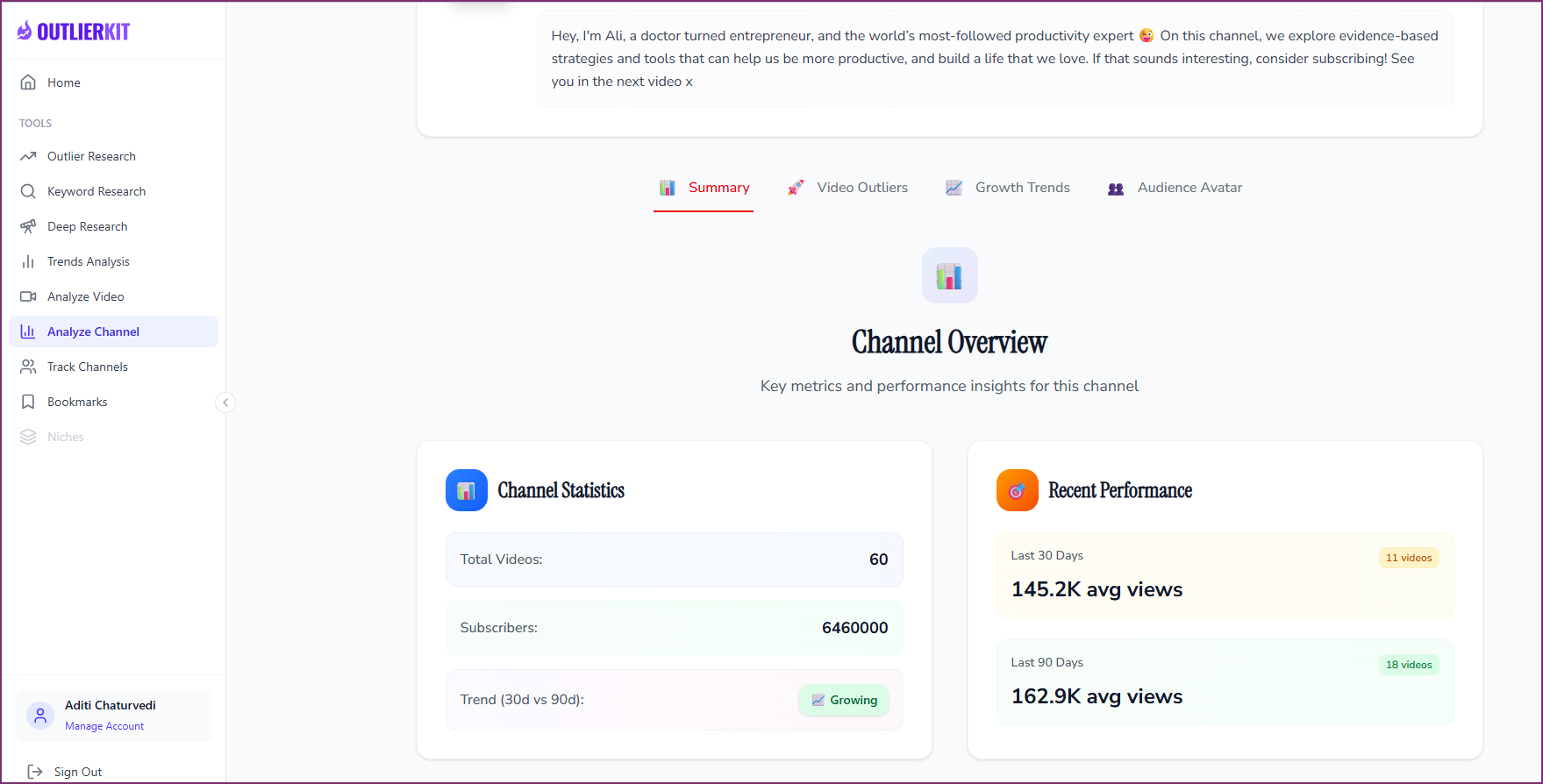
Channel Overview
Subscribers, total videos, and the trend direction, plus median views over the last 30 and 90 days. Median views tell you what a normal upload gets, which a single viral hit can't distort the way an average can.
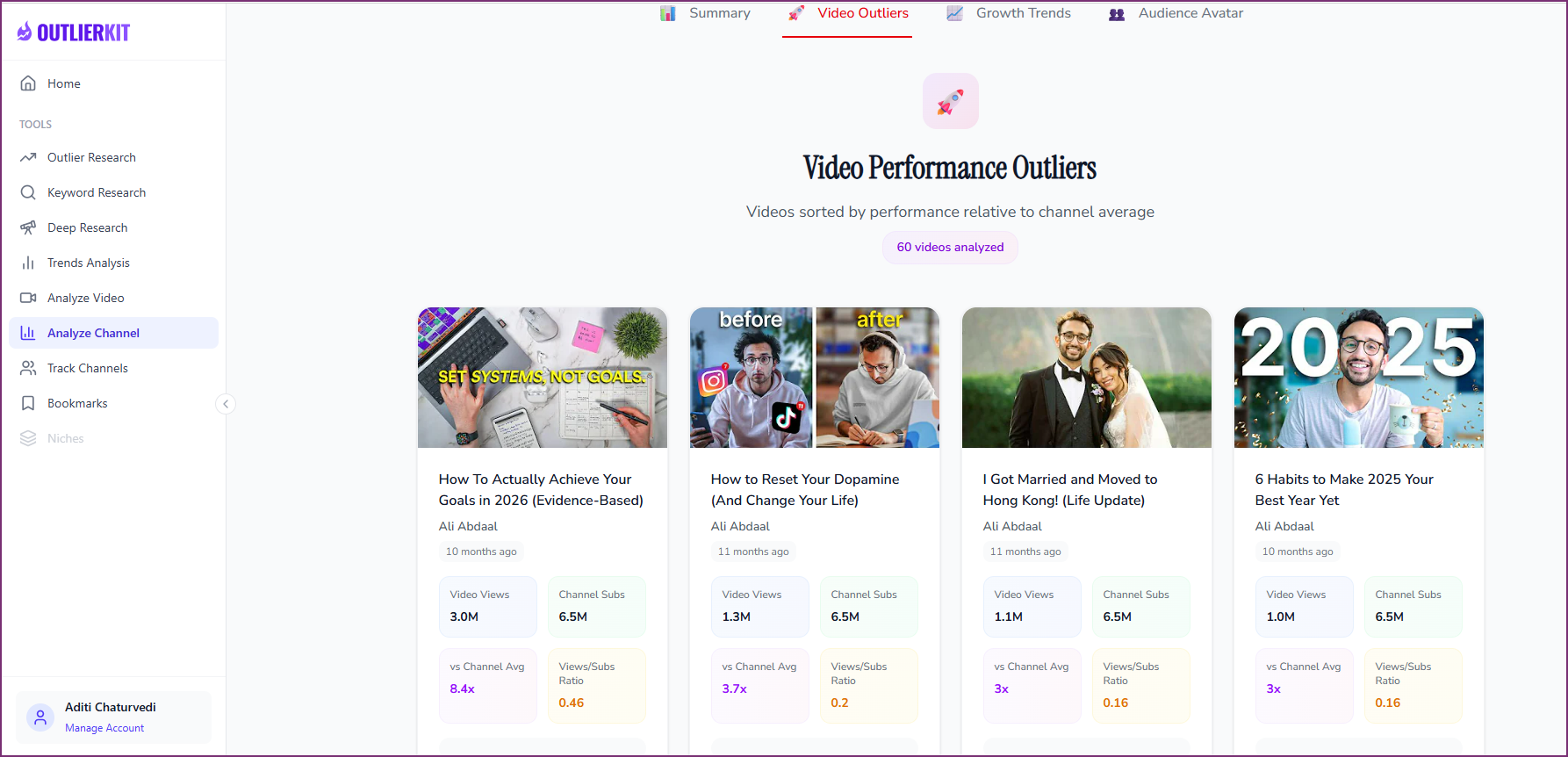
Video Outliers
Every video ranked by how far it beat or missed the channel's own average. The top outliers show which topics and formats the audience actually wants, so you study the winners instead of the whole upload list.
Growth Trends
A chart of how the channel grew over time. Spikes and flat stretches line up with the uploads around them, so you can see which change in content or format moved the numbers.
Audience Analytics
An estimated profile of who watches, inferred from the channel's content, engagement, and public data. Treat it as directional: only the channel owner sees exact demographics in YouTube Studio.
Audience Avatar
A written description of the channel's target viewer: what they care about, what they want from the channel, and which topics pull them in. Use it to check if a competitor serves the same viewer you want.
Similar Channels
Channels close to this one in topic and size, and how this channel compares with them. It's the quickest way to build a competitor list for a niche you are entering.
Analyze a Channel in Three Steps
Open Analyze Channel in the app, paste a channel URL, and read the report. Past runs stay in History, so you can return to the last 10 channels you analyzed.
Paste a channel URL
Any public YouTube channel works, including your own.
Read the overview
Check median views and the trend before you look at any single video.
Open the outliers
Study the videos that beat the channel's average and note what they share.
How OutlierKit Compares to Other Channel Analyzers
Each tool does one part of the job best. YouTube Studio is the only source of real retention and demographics, but only for your own channel. Social Blade is the free standard for public growth history. OutlierKit's edge is the outlier ranking, median views, and similar channels in one report.
| Feature | OutlierKitBest Value | Social Blade | VidIQ | YouTube Studio |
|---|---|---|---|---|
| Works on any public channel | ||||
| Growth history | ||||
| Outlier videos vs channel average | ||||
| Audience profile | ||||
| Similar channels | ||||
| Real retention data | ||||
| Best for | Why a channel grows: median views, outlier videos, similar channels | Free public growth history and daily stats | Channel stats and keyword data while you browse YouTube | Real retention and demographics for your own channel |
| Pricing | $29/mo Hobby plan; 10 credits per channel | Free Paid from $59.99/yr | Free Boost $19/mo | Free Your channel only |
Which YouTube channel analyzer should you use?
Pick by the question. Most creators use YouTube Studio for their own numbers and one outside tool for everyone else's.
| Tool | Best for | Choose it if |
|---|---|---|
| OutlierKit | Why a channel grows: median views, outlier videos, similar channels | you are studying competitors before you pick topics |
| Social Blade | Public subscriber and view history, free | you only need a quick look at a channel's growth curve |
| VidIQ | Channel stats and keyword scores in the browser | you want SEO data on channels while you browse |
| YouTube Studio | Real retention, traffic, and demographics | you are analyzing your own channel |
Plans and Credit Costs for Channel Analysis
Channel analysis costs 10 credits per run on every plan. The free trial is 30 credits with no card, enough for three channels. Hobby's 100 monthly credits cover about 10 analyses. Tracking several competitors side by side is Competitor Studio, which is on Pro and Max at 50 credits per run.
Hobby
For analyzing a handful of competitors each month
- 100 credits/month
- Channel analysis: 10 credits per run
- Video script analysis: 10 credits
- Outlier Research: 2 credits
- Keyword Research: 2 credits
- Deep Research: 20 credits per query
Pro
For tracking a full competitor set
- 500 credits/month
- Everything in Hobby
- Competitor Studio: 50 credits per run
- MCP server & API access
- 50 credits per connected channel
Max
For agencies analyzing channels at volume
- 2,000 credits/month
- Everything in Pro
- Connect 50+ YouTube channels
- Sponsor & comment intelligence
- Priority MCP & API access
What Creators Say About OutlierKit
What creators and analysts say after using OutlierKit to study channels.
★★★★★5.0/5 on Product Hunt →“Great addition to my stack and simple to use. Hit an issue and the team worked hard to fix it. Great product, hardworking team.”
“Been creating for years, running multiple YouTube channels. OutlierKit is the first tool that actually improved our view counts almost instantly. The competition analysis revealed gaps we never knew existed.”
“OutlierKit has drastically reduced my time to plan content for my SaaS YouTube channel. The deep research feature revealed insights I'd overlooked earlier. A must-have if you're serious about YouTube as an acquisition channel.”
Verified Ratings Across Platforms
YouTube Channel Analyzer FAQ
Straight answers on what a channel analysis shows, what it costs, and what no outside tool can see.
What does a YouTube channel analyzer show?
Can I analyze any YouTube channel?
How much does a channel analysis cost?
Is there a free YouTube channel analyzer?
Is the audience data exact?
Can a channel analyzer see another channel's retention or revenue?
How is this different from a channel audit or Competitor Studio?
Why median views instead of average views?
More Ways to Study Channels
Channel analysis is one view. These tools cover the jobs around it.
YouTube Channel Audit
Turn your own channel's data into a prioritized fix list.
Competitor Analysis
Reverse-engineer a competitor's strategy and track it over time.
Video Analyzer
Break down one video's script, hook, keywords, and views against its channel average.
How to Analyze a Channel
Step-by-step help for every tab of the Channel Analyzer.
Then make the video in OutlierKit
Once you pick the idea, the same app writes the packaging and checks your script. Each tool works from real breakout videos near your topic, not generic AI output. All four are on every plan and the 30-credit trial.
Title
Writes 16 titles and ranks them against real breakout videos near your topic, with a score and a one-line reason for each.
Open in the app →How it worksDescription & tags
Writes the description and tags from the same brief, so they match what the title promises.
Open in the app →Chapters
Writes chapter titles that help viewers scan the video and jump to the part they came for.
Open in the app →Script review
Scores the script you wrote and shows what to fix before you record, so you reshoot and re-edit less.
Open in the app →
See what any channel's best videos have in common
Paste a channel URL, find the videos that beat its average, and use them to pick your next topic.
Start Free, No Credit Card