OutlierKit MCP Server: YouTube Outlier Research Inside Claude
The OutlierKit MCP server is live. It is a remote connector, so there is nothing to install. You paste one URL into Claude, sign in with Google, and Claude gets ten read-only YouTube research tools. It can search our outlier index, find channels that look like a seed channel, pull a transcript or a comment thread, and check what people actually search for. All of it happens in the chat, with no exports and no copy and paste.
The same OutlierKit data produced our top 1% subscriber lines for 20 niches, a pull of about 500 API credits, and the 14 free viral ideas reports built from outlier searches. Ask Claude the same questions about your own niche.
TL;DR
The connector URL is https://outlierkit.com/mcp Add it once in Claude and the tools work in every chat.
You sign in with OAuth 2.1 through WorkOS AuthKit, using the Google account tied to your OutlierKit login. There is no API key to copy.
You need Pro or higher, or the 3-day free trial. Signup gives you 30 free credits with no card. Connecting the MCP connector adds 20 more.
Each tool call costs 2 to 10 credits, from the same balance the app uses. Most tools cost 2, channel tools cost 5, and outliers_refresh costs 10 because it queries YouTube live.
It suits creators who research inside Claude, agency teams doing client work, and developers wiring YouTube data into their own agents.
Choose this if you run an agency
Set the connector up once, and every client check-in, report, and pitch pulls live research from the same chat.
Choose this if you build agents
Prototype the tool sequence in Claude, then ship the same data through the REST API.
Skip this if you want free tooling
Community transcript servers cost nothing. This one spends credits and needs Pro after the 3-day trial.
Want a walkthrough before you wire it into client work?
Book a 30-minute demo with the founder. We'll connect it live against your niche and cover multi-seat and platform pricing.

The full walkthrough: connecting the MCP server to Claude and running a real niche research session with it.
One remote connector, ten read-only tools, and the same credit balance your OutlierKit app already uses
How do you connect OutlierKit MCP to Claude?
OutlierKit runs a remote MCP server, not a package you install. You add the URL once, sign in with Google, and the tools are available in every Claude chat from then on.
Connector URL
https://outlierkit.com/mcp
Claude (web and desktop)
- 1Open claude.ai, then Settings, then Connectors.
- 2Click Add custom connector.
- 3Paste https://outlierkit.com/mcp and click Add. Leave any auth fields blank.
- 4Click Connect. A WorkOS window opens. Sign in with Google and approve.
- 5The connector shows as Connected with its tools listed. Enable it in a chat from the tools menu and ask away.
Use the Google account tied to your OutlierKit login. That is how the connector matches your plan and credits.
Claude Code
One command, then approve the OAuth prompt:
claude mcp add outlierkit --transport http https://outlierkit.com/mcp
Other MCP Clients
Any client that supports remote MCP servers over HTTP with OAuth can point at the same URL. Clients that only run local stdio servers cannot connect, because there is no local package to run. If your tooling needs a key-based integration instead, the OutlierKit REST API reaches the same data with a bearer token.
Requirements
- ✓Pro or higher, or the 3-day free trial. MCP access is included.
- ✓A Google account tied to your OutlierKit login, for the sign-in step.
- ✓Credits on your balance. Every tool call spends from the same pool the app uses.
Full connector reference: outlierkit.com/mcp/docs
What are the ten OutlierKit MCP tools?
Every tool is read-only and returns structured JSON. Each call costs 2 to 10 credits. Claude picks the right one and chains calls on its own, so you can ask a research question in plain language and let it work out the sequence.
Outliers
outliers_search2 creditsSemantic search across our indexed outlier videos. Returns the most relevant outlier videos plus their parent channel context. Fast, because it does not call YouTube.
outliers_refresh10 creditsFetches fresh videos live from YouTube, ranks them by outlier score, and returns them in the same shape as outliers_search. Use it when you need more results or newer ones. Semantic similarity is null on this path. The fetched outliers are saved to the index in the background, so later searches can find them. Pro plan or higher.
Channels
channels_search5 creditsSemantic search across our indexed outlier channels. Returns matching channels plus their top outlier videos.
channels_similar5 creditsGive it a seed channelId and it returns the most semantically similar channels in our index. Set sizeSimilarity to true to also sort by subscribers and average views per video, which finds channels in the same weight class as the seed.
channels_get5 creditsFetch one channel by internal id or YouTube channelId. Serves cached data when it is fresh, otherwise fetches live and refreshes the cache. A source field tells you which path it took.
channels_videos5 creditsRecent uploads from a channel. Always fetched live from YouTube, so the list is current.
Videos
videos_get2 creditsFetch one video by internal id or YouTube videoId. Cache first, live fallback. For videos we have not seen before, the outlier score is computed in the background and shows up on later requests.
videos_transcript2 creditsFetch a video transcript. Cached on the first fetch, since transcripts do not change, so repeat requests are fast.
videos_comments2 creditsComments for a video. Always fetched live from YouTube and never cached.
Keywords
keywords_research2 creditsExpand seed keywords into a ranked list of related YouTube search keywords with monthly search volumes. Results are deduplicated and sorted by volume. Use minVolume and limit to narrow them.
Cached versus live. outliers_search and videos_transcript read from our index, so they are fast. channels_videos and videos_comments always hit YouTube, so they are current. channels_get and videos_get try the cache first and fall back to live. Knowing which is which tells you when a result might lag reality.
How is OutlierKit MCP different from YouTube transcript MCP servers?
There are over 40 YouTube MCP servers in community directories, and nearly all of them do the same thing. They wrap yt-dlp or the YouTube Data API v3 and hand back transcripts, comments, and basic metadata. That is genuinely useful, and it is free. What it cannot give you is an opinion about which videos matter. OutlierKit serves the same primitives plus its own analytics layer on top: the outlier scores our engine computes, a semantic index you can search in plain language, and keyword volume data. This section covers the free community servers. The commercial YouTube MCPs get their own comparison in the next one.
Community servers return what YouTube publishes. OutlierKit returns that plus the scoring and search layer we built on it.
| Capability | Transcript MCP Servers | OutlierKit MCP | Note |
|---|---|---|---|
| Video transcript extraction | ✓ | ✓ | videos_transcript, cached on first fetch |
| Video metadata (views, likes, duration) | ✓ | ✓ | videos_get, cache first with a live fallback |
| Video comments | ✓ | ✓ | videos_comments, always live |
| Outlier scores computed per video | ✗ | ✓ | Our engine scores against channel baseline |
| Semantic search over an outlier index | ✗ | ✓ | Ask in plain language, not by video ID |
| Similar-channel discovery by embedding | ✗ | ✓ | channels_similar, optional size matching |
| Live outlier refresh ranked by score | ✗ | ✓ | outliers_refresh, 10 credits |
| Keyword volumes for YouTube search | ✗ | ✓ | keywords_research, sorted by volume |
| Works without a Google Cloud project | ✗ | ✓ | No YouTube Data API quota to manage |
| Free to run | ✓ | ✗ | OutlierKit is free during the 3-day trial, then needs Pro |
Honest take on when you need both. Because OutlierKit serves transcripts and comments itself, most YouTube research runs fine on this connector alone. Keep a free transcript server around if you work with videos outside our index a lot, or if you want an unmetered path for bulk caption pulls. Credits are worth spending on the scoring and search layer, not on captions you could fetch for nothing.
How does OutlierKit MCP compare with vidIQ, NexLev, and TubeLab?
Free community servers are one side of the field. Three commercial YouTube tools now run MCP servers of their own: vidIQ, NexLev, and TubeLab. The verdict up front: vidIQ and NexLev are both bigger than ours by tool count, and TubeLab is cheaper to start. What OutlierKit has is the metering model, a published price per tool with no daily caps, and the scored outlier index behind the tools. Every fact below is verified August 2026 from the vendors' own pages.
| OutlierKit MCP | vidIQ MCP | NexLev MCP | TubeLab MCP | |
|---|---|---|---|---|
| Tools available | 10 | Around 50 | 60+ | 11 |
| Metering model | 2 to 10 credits per call by tool (live refresh 10) | Credits shared with all its AI features, most calls 5 credits | Per-tool quotas instead of credits | Lookups free, searches 2 to 5 credits |
| Per-day limits or per-tool quotas | None | None per day; the shared pool is monthly | Every tool has a daily cap that resets every 24 hours | None published; credits are the only meter |
| When you run out | Top up $10 per 100 credits any time | No top-ups; AI tools pause until the next cycle, per their help center | Wait for the daily reset | Top-ups exist; prices are behind a login |
| Plan needed and price | Pro, $49/mo. Open to all during the 3-day free trial | Officially Max, $49/mo or $468/yr; free on all plans only "during our launch period," no end date published | Free for a limited time; the price after that is not stated, and public pricing is not visible | Starter, $29/mo, or $24/mo billed yearly |
| Unique data | Scored outlier index, semantic search, keyword volumes | Generative production tools plus Instagram and TikTok | Faceless niche and RPM data | Niche finder index |
On price transparency, three of the four publish their plans; NexLev is the one that does not, so it is the one you cannot budget for. On lock-in, our top-ups are public at $10 per 100 credits, TubeLab prices its top-ups behind a login, and vidIQ has none.
Each server reviewed in full
This table is the summary. For one vendor at a time, with the connector URLs, the full tool lists, and the credit math worked out, read our NexLev MCP server review, vidIQ MCP server review, and TubeLab MCP server review. For the whole field, including the tools that still have no connector, see every YouTube MCP server compared. And if you landed here looking for a 1of10 MCP server, there is not one.
Evaluating OutlierKit MCP for production use?
Book a 30-minute demo with the founder. We'll run the tools live against your use case and cover multi-seat and platform pricing.
What stays in the OutlierKit app?
The connector covers the research primitives. The deep analysis modules still run in the app, where they can take their time over a whole niche. That split is worth knowing before you plan a workflow around Claude.
| Job | Where it runs |
|---|---|
| Search scored outliers by topic | MCP connector |
| Find channels similar to a seed | MCP connector |
| Read a transcript or comment thread | MCP connector |
| Keyword volumes for titles | MCP connector |
| Niche-wide competitor mapping | Competitor Studio, in the app |
| Audience psychographic segments | Competitor Studio, in the app |
| Sponsor mapping and monetization | Competitor Studio, in the app |
| Write and rank titles for your next video | Title, in the app |
| Description and tags, chapters, script review | Make tools, in the app |
The workflow that gets the most out of both: run a Competitor Studio scan in the app for the strategic picture, then keep Claude open with the connector on for everything you want to chase afterwards. The app-side scan adds:
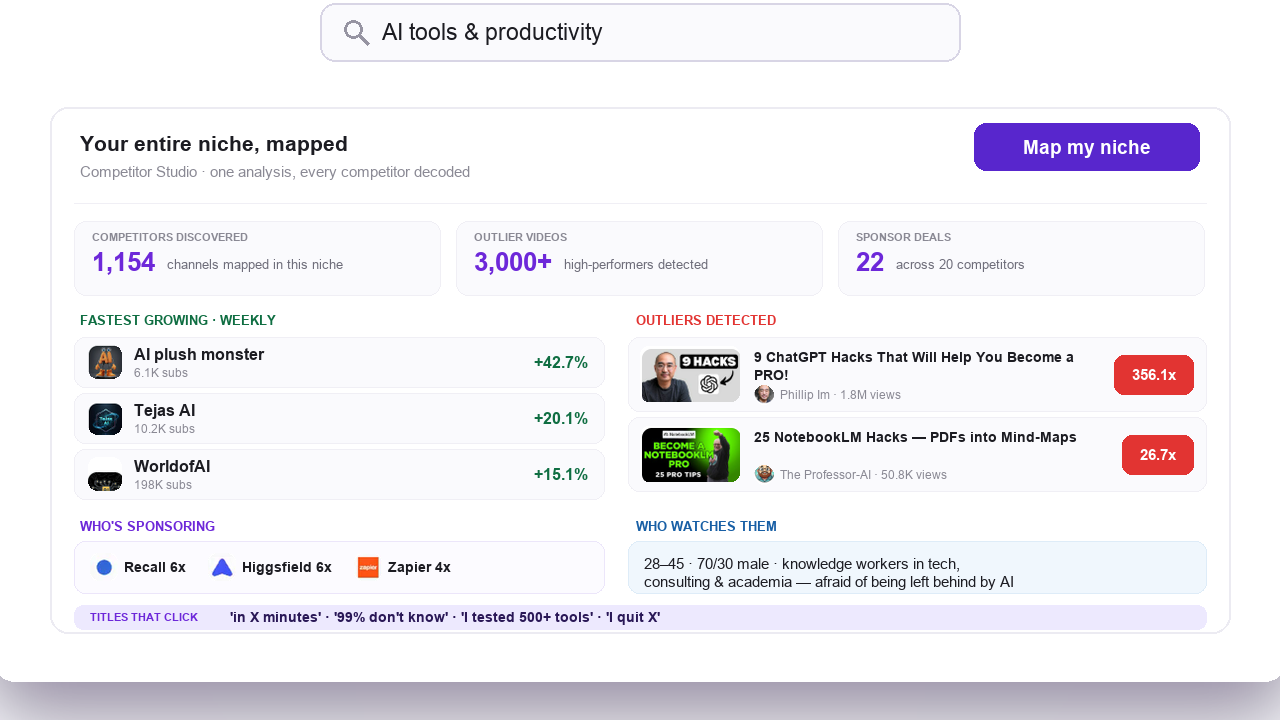
Niche mapping: thousands of competitors identified from one seed channel
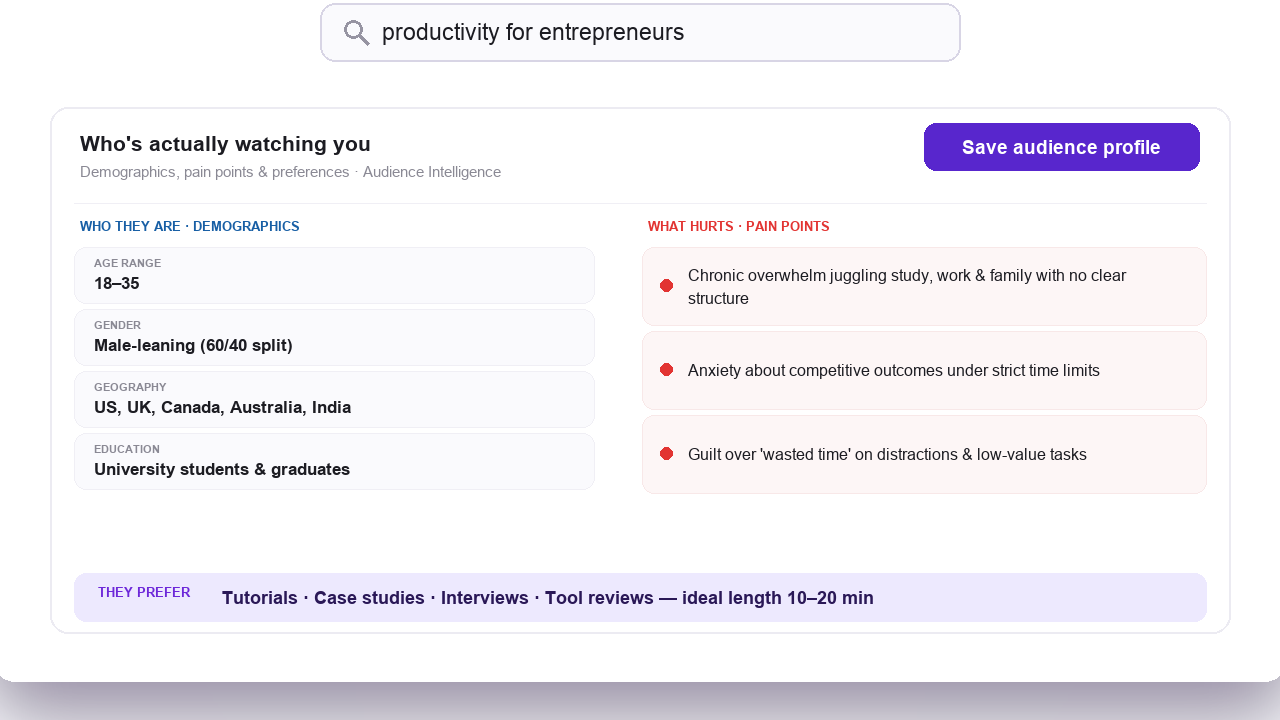
Audience psychographics: segment-level drivers and pain points
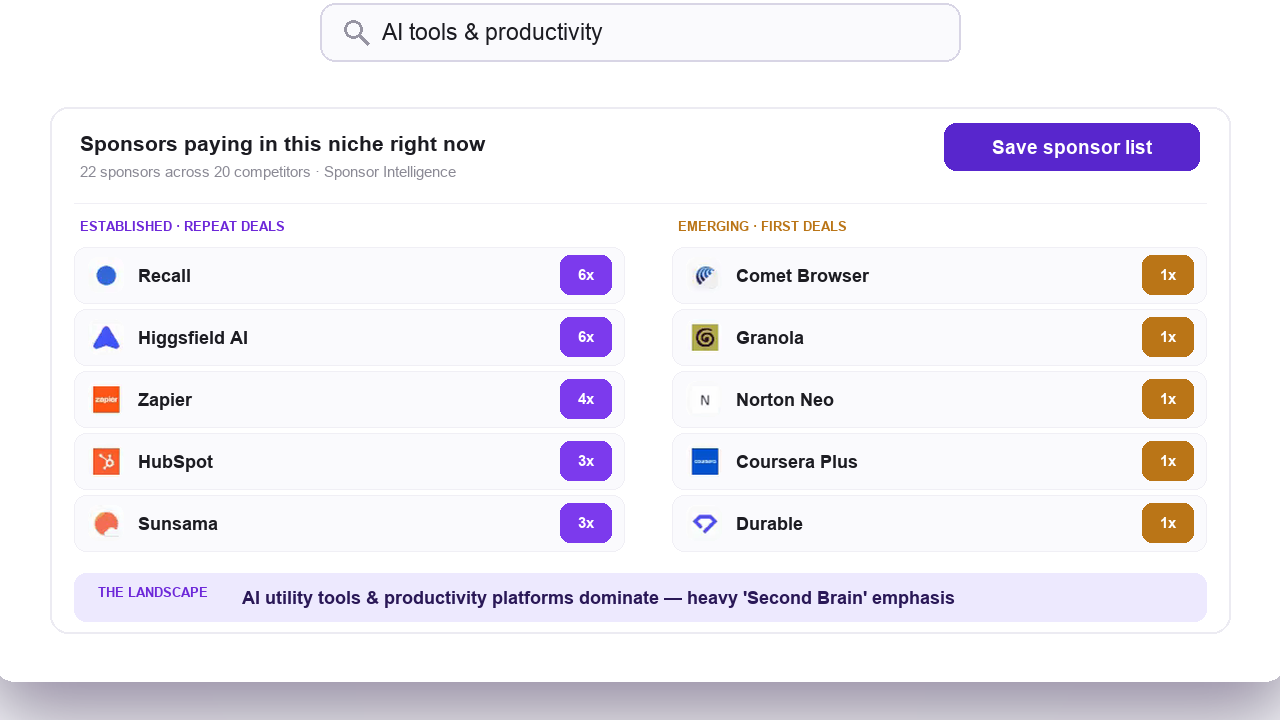
Sponsor intelligence: brand and category coverage across the entire niche
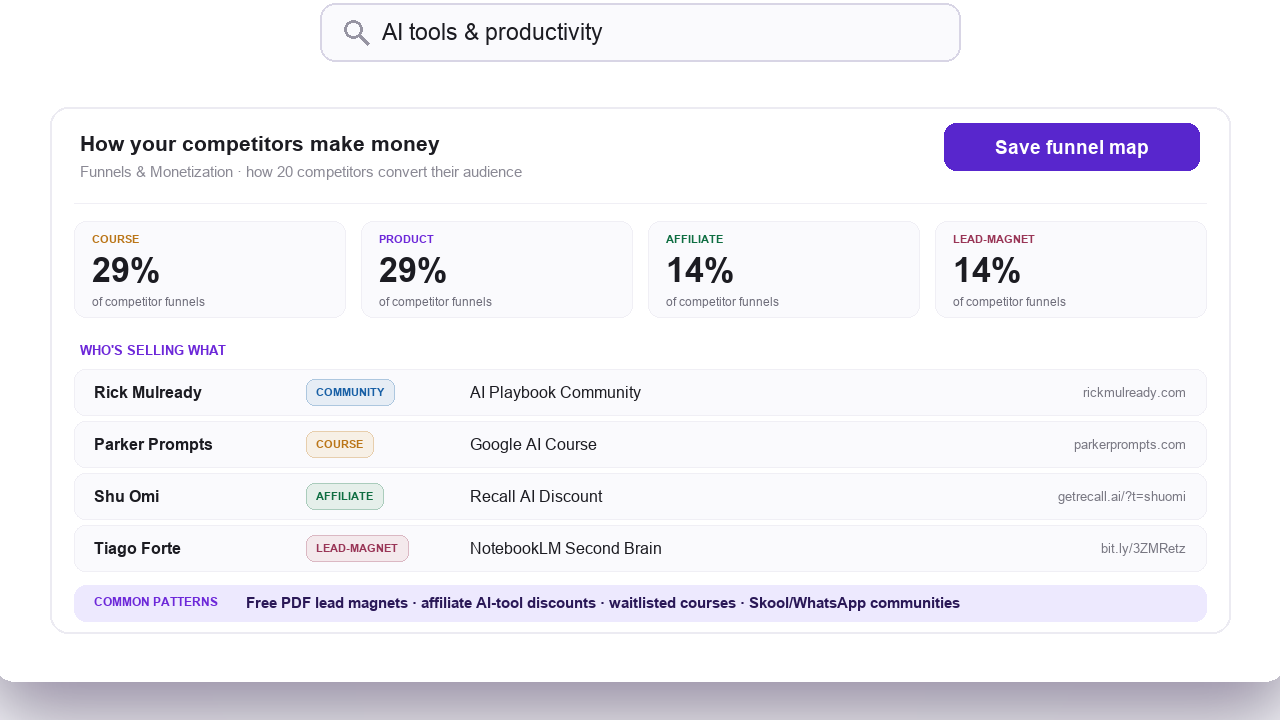
Monetization mapping: revenue funnels and strategy breakdowns
What can you ask Claude once the connector is on?
You do not name the tools. Claude reads what is available and picks. These are the shapes of question that work well, with the tools each one usually reaches for.
outliers_search"Search OutlierKit for outlier videos about personal finance for people in their twenties. Look at the top 10, then tell me what the titles and framings have in common."
outliers_refresh"The indexed results for AI coding tools feel thin. Run a live refresh on that topic, then show me the highest outlier scores from the last month."
channels_similar"Take this channel as a seed and find the most similar channels in OutlierKit, matched on size as well. For each one, show me its top outlier video."
videos_get, videos_transcript, videos_comments"Pull this video, its transcript, and its comments. Tell me how the first 30 seconds is structured. Then tell me what the comments say people wanted more of."
keywords_research"Expand "faceless youtube channel" into related keywords with at least 1,000 monthly searches. Then write 10 title options for the three highest-volume ones."
channels_videos, outliers_search"Pull the last two weeks of uploads from these five channels. Flag anything that reads like an outlier, then check OutlierKit for similar breakouts in the same niche."
A tip that saves credits: ask for the search first, look at what comes back, then ask for transcripts or comments on the two or three videos worth reading. Asking for everything up front spends credits on videos you will skip.
Who uses OutlierKit MCP, and for what?
🏢YouTube Agencies
- •At client intake, run the Competitor Studio scan in the app, then keep Claude open to chase every thread the scan surfaces.
- •For weekly check-ins, pull recent uploads from each client's competitor set and ask Claude what broke out and why.
- •For reports, the data arrives as JSON in the same chat where you write, so the numbers in the deck match the tool.
- •Before a pitch, research the prospect's niche in the ten minutes before the call.
📈Businesses Using YouTube for Lead Generation
- •Before committing budget to video, check whether anything in the space is actually breaking out. One outliers_search call answers it.
- •For planning, pair outlier search with keyword volumes and have Claude turn the overlap into a calendar.
- •Watch what your competitors ship each week. The comments on their breakout videos are where your buyers' unanswered questions surface.
💻Developers Building YouTube AI Tools
- •You skip the Google Cloud project, the API key rotation and the daily YouTube quota.
- •For custom agents, point your own MCP-capable client at the same URL to give it YouTube research.
- •Work out the tool sequence in Claude, then rebuild it on the REST API once it is stable.
- •The connector works with any MCP client, so it outlives whichever model you use this quarter.
What does OutlierKit MCP cost, and which plans get it?
MCP access is included on Pro and above. Anyone can use it during the 3-day free trial. Signup gives you 30 free credits with no card, and connecting the MCP connector adds 20 more. There is no separate MCP fee and no add-on to buy. What you are really budgeting is credits, because each tool call spends 2 to 10 from the same balance the OutlierKit app uses.
| Call | Cost | Why |
|---|---|---|
| outliers_search, videos_get, videos_transcript, videos_comments, keywords_research | 2 credits | Video, transcript, comment and keyword lookups |
| channels_search, channels_similar, channels_get, channels_videos | 5 credits | Channel search, similarity and channel data |
| outliers_refresh | 10 credits | Queries YouTube live, scores the results, and writes them back to the index |
Pro Plan · MCP included
$49/month
or $24.90/month billed annually
- ✓500 monthly research credits
- ✓All ten MCP tools, including outliers_refresh
- ✓REST API access as well
- ✓About 250 two-credit calls a month
Max Plan · MCP included
$199/month
or $83/month billed annually
- ✓2,000 monthly research credits
- ✓All ten MCP tools, including outliers_refresh
- ✓REST API access as well
- ✓Headroom for agency and multi-client work
Both plans also include the REST API, which reaches the same data with a bearer token. Current prices and your credit balance live in the OutlierKit app. If the balance looks wrong or the app will not load, the OutlierKit troubleshooting guide covers credit, login and rate-limit fixes.
Can you use OutlierKit MCP with n8n and automation tools?
The connector is built for a person talking to an agent. For anything on a schedule, use the OutlierKit REST API with n8n or similar. HTTP Request nodes give you retries, error branches, and control over where the data lands, which is what a weekly competitor report or a daily outlier alert actually needs.
Frequently Asked Questions
Is the OutlierKit MCP server available now?+
Yes. It is live. It is a remote MCP connector at https://outlierkit.com/mcp. You add that one URL in Claude, sign in with Google, and the ten tools are available in any chat. There is no download, no npm package, and no API key to paste.
What is an MCP server?+
MCP (Model Context Protocol) is an open standard created by Anthropic. It lets AI assistants call external tools through one shared interface. An MCP server publishes a set of tools the assistant can use. OutlierKit's server publishes ten YouTube research tools. Once it is connected, Claude can search our outlier index, pull a transcript, or check keyword volumes on its own. You never copy or paste the data by hand.
What plan do I need for MCP access?+
Pro or higher, or the 3-day free trial. MCP is a Pro feature, but it is open to everyone while the trial runs. Signing up gives you 30 free credits with no card. Connecting the MCP connector adds 20 more. Pro is $49/month with 500 monthly credits. Max is $199/month with 2,000. Billed annually, Pro is $299 a year and Max is $999 a year. MCP access is included at no extra cost. One tool, outliers_refresh, is Pro plan or higher because it queries YouTube live.
Do I need an API key to use the MCP server?+
No. The connector uses OAuth 2.1 through WorkOS AuthKit. You sign in with Google using the account tied to your OutlierKit login, and consent once. OutlierKit reads only your email address, so it can match your account and apply your plan and credits. The REST API, which does use an API key, is a separate way to reach the same data.
How many credits does each MCP tool call cost?+
Each call costs 2 to 10 credits depending on the tool. outliers_search, videos_get, videos_transcript, videos_comments and keywords_research cost 2 credits. channels_search, channels_similar, channels_get and channels_videos cost 5. outliers_refresh costs 10 because it fetches fresh videos live from YouTube. Credits come from the same balance the OutlierKit app uses, so a research session in Claude draws down the same pool as a session in the web app.
Does the connector get access to my YouTube channel?+
No. It reads your email address to match your OutlierKit account. It does not touch your YouTube channel, your Google account, or any private Google data. Every tool is read-only, and all of them call the OutlierKit API on your behalf.
Can I use it with Claude Code, Cursor, or another MCP client?+
Claude Code is supported directly: run claude mcp add outlierkit --transport http https://outlierkit.com/mcp. Any other client that supports remote MCP servers over HTTP with OAuth can connect to the same URL. Clients that only support local stdio servers cannot, because there is no local package to run.
Can I use OutlierKit MCP with n8n?+
The connector is built for interactive AI agents. For scheduled workflows in n8n, use the OutlierKit REST API with HTTP Request nodes. You get more control over scheduling, retries, error handling, and where the data lands.
How does OutlierKit MCP differ from youtube-mcp or mcp-youtube-analytics?+
Community YouTube MCP servers wrap the public YouTube Data API and yt-dlp, so they return captions and basic metadata. OutlierKit returns its own analytics layer on top of that: a proprietary index of outlier videos and channels, the outlier scores our engine computes, embeddings-based similarity search, and keyword volume datasets. OutlierKit also serves transcripts and comments, so for most YouTube research you do not need both.
Does vidIQ have an MCP server?+
Yes. vidIQ runs a remote MCP server at mcp.vidiq.com with around 50 tools, including generative production tools and Instagram and TikTok coverage. It is officially a Max plan feature at $49/month or $468/year, and it is free on all plans only during their launch period, which has no published end date. Most calls cost 5 credits from the same pool as vidIQ's other AI features, and there are no top-ups, so the AI tools pause until the next cycle when the pool runs out. OutlierKit meters differently: every tool has a published price from 2 to 10 credits per call, there are no daily limits, and you can top up $10 per 100 credits any time. Our full vidIQ MCP review at outlierkit.com/resources/vidiq-mcp/ has the server URL, the per-tool credit costs, and the plan math.
Do NexLev or TubeLab have MCP servers?+
Yes, both do. NexLev's MCP server has over 60 tools and is free for a limited time, but every tool has a daily cap that resets every 24 hours, and the price after the promo is not stated anywhere. TubeLab's MCP server has 11 tools; seven of them are free, and searches cost 2 to 5 credits. Its Starter plan is $29/month, or $24/month billed yearly. OutlierKit's difference is the metering: a published price for every tool, no per-tool daily caps, and public top-ups so you are never locked out mid-project. We review each one in full at outlierkit.com/resources/nexlev-mcp/ and outlierkit.com/resources/tubelab-mcp/.
Does the MCP server run a full Competitor Studio scan?+
No. Competitor Studio, with its audience psychographics, sponsor mapping, and monetization breakdowns, runs in the OutlierKit app. The MCP tools cover the research primitives: outlier search, live outlier refresh, channel and video lookups, similar-channel discovery, transcripts, comments, and keyword research. A practical split is to run the deep scan in the app, then use Claude to interrogate the niche around it.
The connector is live. Add it in two minutes.
Paste https://outlierkit.com/mcp into Claude's custom connector setting, sign in with Google, and start researching. Included on Pro and above, and open to all during the 3-day free trial.
Sources and method
OutlierKit's tool list, credit costs and plan rules come from the live connector and the app's own billing. Competitor figures come from each vendor's public MCP docs and pricing pages, checked in August 2026. The comparison weighs those documented terms, not a paid test of each server.
Sources
- OutlierKit MCP docs: the connector URL, tool list and plan requirement
- vidIQ MCP page
- vidIQ MCP help center article: credit costs and launch-period access
- NexLev: MCP page and daily quota table
- TubeLab MCP server docs: tool list and credit costs
Related YouTube MCP coverage
We review every YouTube MCP server on the same six questions: how many tools, what it costs per call, what the limits are, what data is unique to it, how you connect it, and who it suits.
- Every YouTube MCP server compared
Which YouTube tools run an MCP server, and which still do not
- NexLev MCP server review
60+ tools, free for now, with a daily quota on every tool
- vidIQ MCP server review
The widest tool set, priced from a shared AI credit pool
- TubeLab MCP server review
11 tools, seven of them free, searches cost 2 to 5 credits
- 1of10 MCP server
1of10 does not have one, so here is what to connect instead
