For newsroom video desks
See which angles draw viewers on rival YouTube news channels
Compare coverage of the same story before the next video meeting. OutlierKit surfaces outlier uploads and viewer questions your desk can investigate.
30 minutes with the founder · Or start a free trial, no credit card
Try it yourself with 30 free credits



Today's big story is the Red Sea and Hormuz escalation. Which angles are beating averages on rival news channels?
Three angles from the last 24 hours, ranked by how far each video beat its channel's recent uploads:
- 1.Energy and shipping15.1×Top video: After Hormuz, the Red Sea is blocked too · Channel: SBS News
- 2.How long it lasts13.7×Top video: War until at least 2029 · Channel: SBS News
- 3.Energy and shipping7.6×Top video: Houthis seize key Red Sea port · Channel: FRANCE 24 English
- 4.Strike updates6.2×Top video: Iran Houthi strike: Saudi, Qatar, US · Channel: India Daily Live
Highlighted figure: vs recent videos.
Lead with what it costs. Energy and shipping angles beat their channels' recent videos by 8 to 15 times. Strike-by-strike updates did about 5 to 6 times.
News and explainer channels, broken down
Full breakdowns of news and explainer channels at different sizes, with the format mix a desk can benchmark against:
 Fox News
News & politics
- Subscribers
- 15.4M
- Avg views
- 184.7K
Est. $391K to $1.27M/mo
Read the analysis → The Hill Report
US Political Commentary & Hearing Highlights
- Subscribers
- 7.2K
- Avg views
- 30.2K
Est. $2K to $6K/mo
Read the analysis → Capitol Report Daily
Faceless AI US political news
- Subscribers
- 3.2K
- Avg views
- 2.0K
 Johnny Harris
Documentary storytelling
- Subscribers
- 7.8M
- Avg views
- 2.3M
Est. $39K to $214K/mo
Read the analysis →Figures reflect the saved channel snapshots. Open an analysis to review the full context.
How it works
Bring audience research to the video meeting
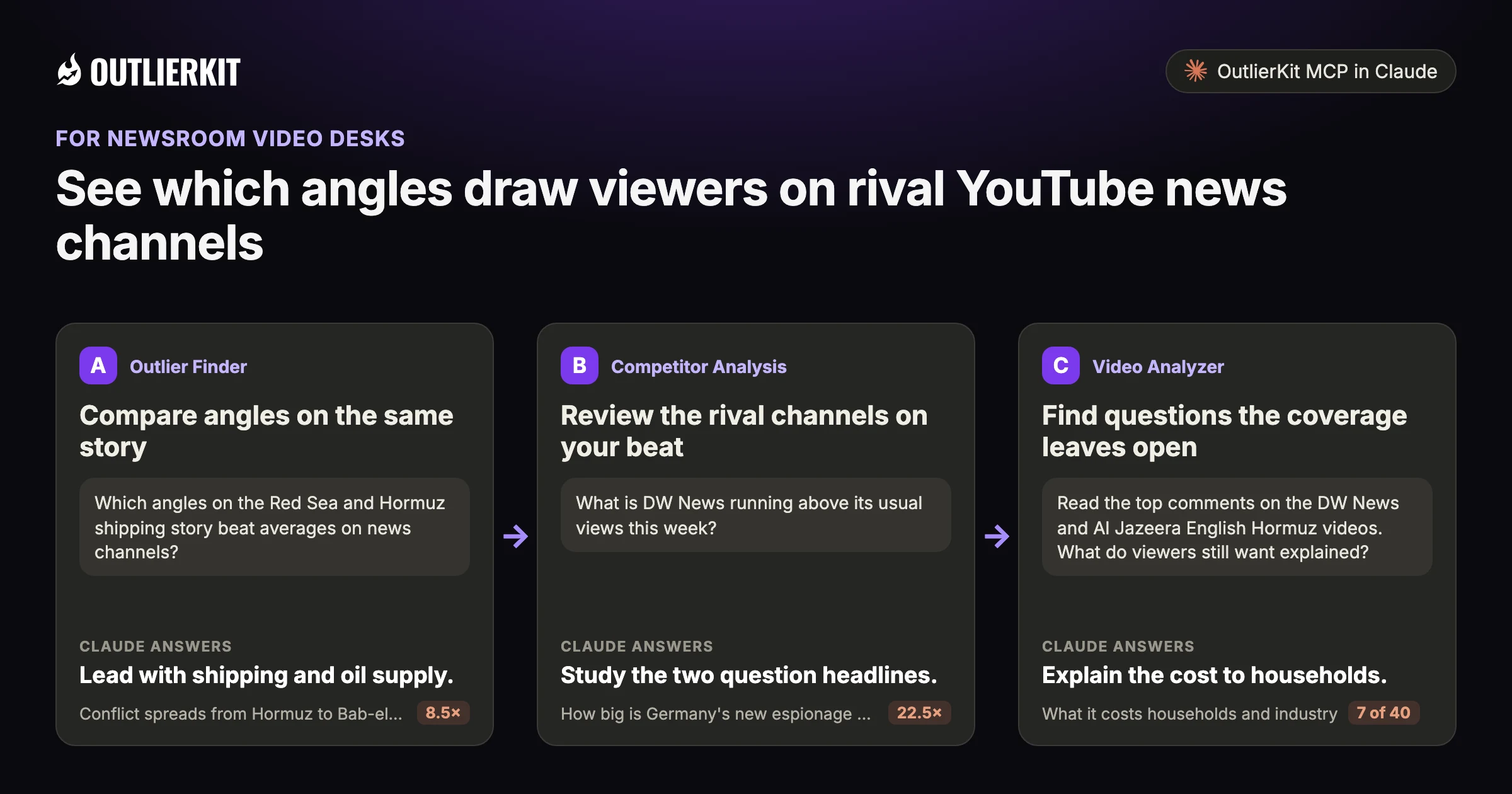
- Compare angles on the same storyLead with shipping and oil supply.
- Review the rival channels on your beatStudy the two question headlines.
- Find questions the coverage leaves openExplain the cost to households.
Step 1 · Outlier Finder
Compare angles on the same story
Search recent coverage and inspect the baseline for each result. Compare similar upload windows when choosing examples for the desk.
- Claude calls
- outliers_search
- In this example
- Lead with shipping and oil supply.
Which angles on the Red Sea and Hormuz shipping story beat averages on news channels?
Four Hormuz and Red Sea videos in the index beat their channels' recent uploads:
- 1.Conflict spreads from Hormuz to Bab-el-Mandeb, global oil prices surge8.5×MediaOne Gulf · 37.5K subscribers · 6.2K views
- 2.Strait of Hormuz crisis deepens, global oil supply at risk5.0×DD India · 1.1M subscribers · 3.8K views
- 3.Shipping crisis expands to Red Sea as Hormuz traffic stands still4.6×DW News · 6.5M subscribers · 32.3K views
- 4.Strait of Hormuz closed, Saudi Arabia shifts Gulf cargo to Red Sea2.5×SAMAA TV · 14.5M subscribers · 7.6K views
Highlighted figure: vs recent videos.
Lead with shipping and oil supply. All four results frame the story through shipping routes and oil supply. They drew 2.5 to 8.5 times their channels' recent videos.
Step 2 · Competitor Analysis
Review the rival channels on your beat
Track a defined set of news channels. Check the snapshot date before using a result in a time-sensitive editorial decision.
- Claude calls
- channels_videos
- In this example
- Study the two question headlines.
What is DW News running above its usual views this week?
Four of DW News's last 30 uploads sit well above the median for that set:
- 1.How big is Germany's new espionage scandal?22.5×DW News · 6.5M subscribers · 943K views · posted 1 day ago
- 2.Could Russia's deadly plague lab incident spark another pandemic?15.6×DW News · 6.5M subscribers · 655K views · posted 2 days ago
- 3.Ukraine turns to AI as Russia's drones get faster6.6×DW News · 6.5M subscribers · 278K views · posted 23 hours ago
- 4.Germany's jobless youth3.7×DW News · 6.5M subscribers · 155K views · posted 21 hours ago
Highlighted figure: vs median of last 30 uploads.
Study the two question headlines. The espionage and plague lab videos drew 943K and 655K views. The median for these 30 uploads is 42K. Newer uploads are still collecting views.
Step 3 · Video Analyzer
Find questions the coverage leaves open
Read comments for points viewers want explained. Treat them as reporting leads to check, not verified facts.
- Claude calls
- videos_comments
- In this example
- Explain the cost to households.
Read the top comments on the DW News and Al Jazeera English Hormuz videos. What do viewers still want explained?
Across 40 top comments, four points come up that the coverage could explain or check:
- 1.What it costs households and industry7 of 40"working in automotive industry we are feeling the pain here in Europe"
- 2.Ship damage claims to verify2 of 40"2 tankers hit and abandoned in red sea. One on fire"
- 3.How long the closure lasts2 of 40"The strait is going to be closed for years."
- 4.What moves through the strait besides oil1 of 40"What else besides oil goes through this straight?? FOOD!"
Highlighted figure: comments read.
Explain the cost to households. Seven of 40 comments were about prices, freight and fuel. Treat the tanker claims as leads to check, not facts.
Before you record: packaging and script tools
Once you pick the idea, OutlierKit writes the packaging and checks your script. You still film and edit the video yourself. The Title tool ranks its titles against real breakout videos near your topic. All four are on every plan and the 30-credit trial. On Pro and Max, the MCP connector also lets Claude run OutlierKit research for you.
Title
Writes 16 titles and ranks them against real breakout videos near your topic, with a score and a one-line reason for each.
Open in the app →How it worksDescription & hashtags
Writes the 150 characters people see and the rest of the description separately, then picks your hashtags.
Open in the app →How it worksChapters
Writes chapter titles that help viewers scan the video and jump to the part they came for.
Open in the app →Script review
Scores the script you wrote and shows what to fix before you record, so you reshoot and re-edit less.
Open in the app →How it works
A worked example
Cost-led Red Sea coverage stood out in the September sample
On 10 September 2026, the Red Sea story ran on news channels everywhere. Videos that led with oil and shipping beat their channels' recent uploads by 8 to 15 times. Strike-by-strike updates on the same story did about 5 to 6 times.
The cost angle is worth reviewing alongside the desk’s reporting priorities.
The example shows a dated research result in Claude. Use the prompts below to explore your own topic.
Try a research question →Today's big story is the Red Sea and Hormuz escalation. Which angles are beating averages on rival news channels?
outliers_searchoutliers_searchvideos_getThree angles from the last 24 hours, ranked by how far each video beat its channel's recent uploads:
| Angle | Top video | Channel | vs recent videos |
|---|---|---|---|
| Energy and shipping | After Hormuz, the Red Sea is blocked too | SBS News | 15.1× |
| How long it lasts | War until at least 2029 | SBS News | 13.7× |
| Energy and shipping | Houthis seize key Red Sea port | FRANCE 24 English | 7.6× |
| Strike updates | Iran Houthi strike: Saudi, Qatar, US | India Daily Live | 6.2× |
Lead with what it costs. Energy and shipping angles beat their channels' recent videos by 8 to 15 times. Strike-by-strike updates did about 5 to 6 times.
See the research tools in action
Watch the product walkthrough for a tour of channel research and Competitor Studio. The feature sections above show how those tools fit your work.

“Great addition to my stack and simple to use. Hit an issue and the team worked hard to fix it. Great product, hardworking team.”
“I use Outlier Kit for supplemental channel audits and to help clients brainstorm video ideas and/or explore pivot strategies. It's a fantastic competitive intelligence tool to have in your arsenal.”
“I was consistent with uploading videos, but at a certain point, I wasn't able to understand how things were working. With OutlierKit, I was really able to understand the competitor landscape and identify the kinds of opportunities I could bet on.”
“It's really simple and gives really useful data and insights for choosing WHAT to make and how to structure it better. Will recommend to anyone seriously committing to YouTube.”
“After implementing the recommendations from the first report last week, my latest video has nearly tripled in views (2000) compared to my previous best one (700), so the recommendations do work.”
One creator on a small channel. Not a typical or promised result.
“I really liked how clean the analysis results were, especially the importance score. It actually helps you see which parts of a video are doing the heavy lifting. The analysis was quick too.”
More reviews people have posted on Product Hunt, X and LinkedIn, unedited.
Choose where to do the research
Use OutlierKit for public research. Your own YouTube analytics supply the private performance data. Claude is an optional way to query OutlierKit.
| Task | OutlierKit app | OutlierKit in Claude | YouTube Studio |
|---|---|---|---|
| Research other channels | Outlier searches and channel analysis. Pro and Max add niche-wide Competitor Studio. | Request channel data and outlier results with the OutlierKit connector. | Use your channel analytics to understand your own audience and uploads. |
| Read video context | Review video analysis and research results in the app. | Request public transcripts and comments, then ask follow-up questions. | Check your own retention and traffic sources to assess a published video. |
| Package the video | Title, Description & hashtags, Chapters and Script review. Titles are ranked against breakout videos near your topic. | Ask Claude to draft packaging from the research data. The ranked Title tool and Script review run in the app. | Edit the title, description, tags and chapters after upload. No comparison with other channels. |
| Choose a plan | Hobby starts at $49/month. Competitor Studio requires Pro or Max. | Included with Pro, Max and the active free trial. Calls use your OutlierKit credits. | Included with your YouTube channel. |
Read the connector guide or YouTube’s analytics guide for the available reports.
Choose a research plan
Max includes on-demand updates and 2,000 monthly credits. It suits desks that revisit the same channels throughout the week.
Hobby
Best for experts and coaches running one channel
billed monthly
- ✓100 credits per month
- ✓Outlier Research
- ✓Keyword Research
- ✓Single-channel analysis
- ✓Single-video idea research
- Competitor Studionot included
- MCP & API accessnot included
Pro
Best for experts, consultants and brands publishing every week
billed monthly
- ✓500 credits per month
- ✓Everything in Hobby
- ✓Deep Research
- ✓AI script and hook analysis
- ✓Competitor Studio: niche-wide intel
- ✓MCP & API access
- ✓50 credits per connected channel
Max
Best for agencies running client channels, API pipelines
billed monthly
- ✓2,000 credits per month
- ✓Everything in Pro
- ✓50+ channel connections
- ✓Niche-wide sponsor & comment intelligence
- ✓On-demand data updates
- ✓Priority API access
Start with a research question
Use the trial for up to 15 outlier searches. A Competitor Studio run costs 50 credits. The trial gives 30, and connecting the MCP connector adds 20, so a trial can cover one run.
No credit card required. Competitor Studio needs a paid Pro or Max plan and 50 credits per run. You choose whether to upgrade.
Start free trial →A note from Aditi
An outlier tells a desk where attention went. Editorial judgment still decides what deserves coverage and which facts need checking.
I built OutlierKit to make this research easier to use. If you don’t find an insight worth pursuing during your trial, email me at hello@outlierkit.com. I’ll walk you through your YouTube strategy. If I still can’t help you find something useful, you get a full refund.
 Aditi, founder of OutlierKit
Updated
Optional: research inside Claude
Ask a follow-up question about the data
The OutlierKit connector lets Claude request research and shape it into a brief. Pro, Max and active trials include access. A prompt may require several paid tool calls.
Find YouTube videos from the last 48 hours about [story] that beat their channel's average. Group them by angle.
- You get
- Angles, ranked
- Tools called
- outliers_search
- Cost
- 2 to 10 credits per tool call
What is [channel] running above its average this week?
- You get
- Their winners
- Tools called
- channels_videos
- Cost
- 2 to 10 credits per tool call
Read the comments on the top 3 videos. What do viewers still want to know?
- You get
- Tomorrow's questions
- Tools called
- videos_comments
- Cost
- 2 to 10 credits per tool call
Connect OutlierKit to Claude. For custom workflows, explore the API.
Free sample report
Video ideas for newsrooms
Read the dated research and the source videos behind each idea. The report is available online or as a PDF, with no signup.
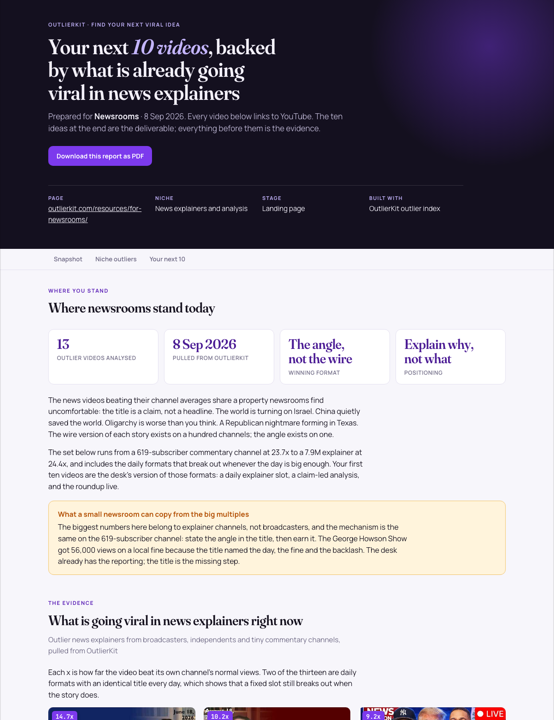 Preview, opens the full report
Before you get started
How fast does it see a breakout?
Check the date on each result before using it for breaking news. Max lets you request a data update on demand.
Does it cover news channels outside the US?
Yes. You can research public channels outside the US. Coverage varies, and Claude can translate the titles returned.
What is YouTube intelligence for newsrooms?
It means using YouTube performance data to decide which stories get a video, and in what shape. OutlierKit shows which angles beat averages on rival channels.
Which paid plans include the tools on this page?
Hobby starts at $49 a month with 100 credits. Pro is $99 with 500 credits and adds Competitor Studio, MCP and API access. Max is $399 with 2,000 credits and adds niche-wide sponsor research and on-demand updates. Annual billing is available.
Do I need Claude to use OutlierKit?
No. You can research in the OutlierKit app. The optional MCP connector lets Claude request public channel data, outliers, transcripts and comments. It is included with Pro, Max and an active free trial. Niche mapping and sponsor intelligence stay in Competitor Studio in the app.
What can I try before choosing a plan?
The free trial includes 30 credits with no credit card. Outlier and keyword searches cost 2 credits each; single-channel analysis costs 10. Competitor Studio costs 50 credits per run. Connecting the MCP connector adds 20 credits, so a trial can cover one run. On paid plans it is on Pro and Max. The Title tool costs 2 credits per run. Description & hashtags, Chapters and Script review are also included in the trial.
Can I change or cancel my plan?
Yes. Use your account settings to change or cancel your plan. The change takes effect at the end of the current billing cycle. Email hello@outlierkit.com if you need help.
Review coverage on your beat
30 minutes with the founder · Or start a free trial, no credit card
Book a demo →