The YouTube Packaging Workflow: One Idea, Four Steps
I took one video idea through every step of packaging before filming: a breakout to learn from, the title, the script and the description. Three separate tools gave me the same advice. Lead with the result.
By Aditi · Published November 12, 2026
Short answer
- Study a breakout video near your topic, to learn what earned the click and kept viewers.
- Pick a title whose angle has already worked near your topic.
- Check your script before you film, so the opening delivers the title's promise.
- Write the 150 characters of description people see, then hashtags and chapters.
Each step has free tools. In OutlierKit the four steps cost 26 credits for one video, and new accounts get 30 free, no card.
The video idea I tested
"How I paid off $40,000 of student debt in 18 months on a teacher's salary." I wrote a 311-word draft script with a typical opening: a channel greeting, then the story. Then I ran each step in the OutlierKit app on 6 November 2026. Every number below is the app's own output.
Step 1
Why study a breakout video before you write anything?
A breakout tells you what this audience already clicked and watched. I found one in the niche: "How I Paid Off $70k In 18 Months" by David Why. The channel had 533 subscribers. The video had 48,577 views, 339 times the channel's usual.
A small channel cannot push a video that far. The idea and the way it was made did the work. Video Analysis scored it on seven dimensions:
- Emotional Triggers 9.2, Promise Delivery 9, Hook Strength 8.5.
- Pattern Interrupts 6.5, the weakest score.
- First fix in the report: "Mention the $70k figure immediately."
So even a video that broke out could have led with its result sooner. That became the brief for my own video.
Free, no account
In OutlierKit
Step 2
How do you pick a title that has already worked?
I typed the idea into the Title tool. It wrote 16 titles and ranked them against 12 real breakout videos near the topic. The top three:
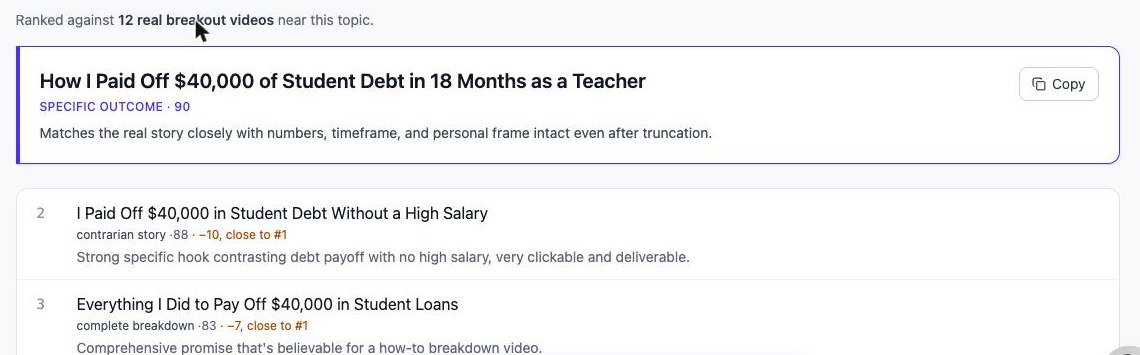
The winner, at 90, was "How I Paid Off $40,000 of Student Debt in 18 Months as a Teacher". The app's reason: the numbers, the timeframe and the personal frame still show even if the end gets cut. The result, $40,000, sits in the first 20 characters.
I also gave the same idea to six other title generators. Only two scored their titles, and one scored an off-topic title as Excellent. The full test is here.
Free, no account
In OutlierKit
Step 3
What should you check in a script before you film?
The opening. If the first lines do not deliver what the title promised, the viewer leaves. I pasted my 311-word draft into Script review. It scored 7.6 out of 10:
- Hook 5.0, Spine 8.0, Voice 10.0, Risk Moderate.
- Packaging: PASS. The title's promise shows up in the first 30 seconds.
- 14 flags, each tied to a part of the script, with a rewrite.
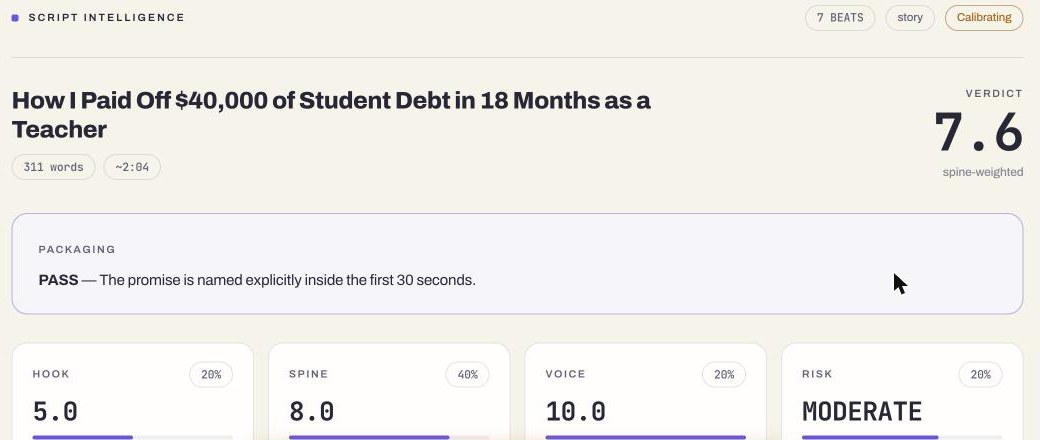
The one Blocker: the script opened with a channel greeting instead of the debt-payoff result. The fix it gave was a new first line: "I paid off $40,000 in student loans in 18 months on a teacher's salary."
That is a one-sentence fix before filming. After filming, it would mean a reshoot or a weak hook.
Free, no account
In OutlierKit
Step 4
What goes in the description, hashtags and chapters?
Search shows only the start of a description. The Description tool wrote that part separately, at 142 of the 150 visible characters:
A practical breakdown of the budgeting, spending cuts, and debt-payoff habits that helped me clear $40,000 in 18 months on a teacher's income.
It also picked 13 hashtags: 3 for YouTube to show next to the title and 10 more for the description. YouTube ignores every hashtag on a video with more than 60, and it shows up to 3 of them by the title.
The Chapters tool read the script and returned three chapters:
0:00 My $40,000 Student Debt
0:44 Budget Cuts and Loan Payments
1:38 Avoid This Repayment Mistake
They follow YouTube's three rules: start at 0:00, at least 3, each 10 seconds or longer. The times are estimates at 150 words per minute. The description and chapters are written from general rules, not from breakout data.
Free, no account
In OutlierKit
What did all four steps have in common?
Three separate tools, working on different inputs, gave the same advice:
| Step | Input | What it said |
|---|---|---|
| Video Analysis | Someone else's breakout | Mention the $70k figure immediately. |
| Title | My idea, in one line | Top pick puts $40,000 in the first 20 characters. |
| Script review | My 311-word draft | Blocker: open with the result, not a greeting. |
Lead with the specific result. Put it in the title, in the first line of the script and in the first line of the description. The viewer clicked for that promise. Keep it in front of them from the first second.
What does the workflow cost?
| Step | OutlierKit tool | Credits |
|---|---|---|
| 1. Study a breakout | Video Analysis | 10 |
| 2. Pick the title | Title | 2 |
| 3. Fix the script before filming | Script review | 10 |
| 4. Finish the packaging | Description & hashtags, Chapters | 4 |
| One video, end to end | All four steps | 26 |
New accounts get 30 free credits with no card, so the first video fits in the trial. Every step also has a free tool that needs no account, listed under each step above.
Packaging workflow FAQ
What is YouTube video packaging?+
Packaging is everything a viewer sees before and around the video: the title, the thumbnail, the description, the hashtags and the chapters. Most creators add it after filming. This workflow starts it before filming, so the script delivers what the title promises.
Can I follow this workflow for free?+
Yes, in two ways. Each step has free tools that need no account: a title checker, a title generator, a hashtag builder, a chapters tool and a script template. The OutlierKit tools for all four steps cost 26 credits for one video, and new accounts get 30 free credits with no card.
Why study a breakout video first?+
A breakout is a video that got many times its channel's usual views. YouTube does not push a video that far on clicks alone, so its title earned the click and its opening kept the viewer. Studying one tells you what to copy before you spend time on your own.
Is Script review the same as Video Analysis?+
No. Video Analysis breaks down a video that is already published, yours or anyone else's. Script review checks your own draft before you record it. Step 1 uses the first, step 3 uses the second.
Does this workflow use real retention data?+
No. None of these tools sees a video's retention graph. Video Analysis scores what is in the video, like the hook and the promise. Script review scores your draft against a fixed checklist. Breakout videos are the evidence that a title and opening held viewers, because YouTube kept pushing them.
How long does the whole workflow take?+
The tools take a few minutes in total. The Title tool took about 40 seconds in my run. Most of the time goes into reading the reports and rewriting your script, which is the point.
Where to start
Find breakout videos
The Outlier Finder lists videos that beat their channel in any niche.
Check a title for free
Length, phone preview, number placement and clutter, in your browser.
Check your script
A 10-point verdict and a fix for every flag, before you film.
Make your chapters
Check them against YouTube's rules or time them from a script.