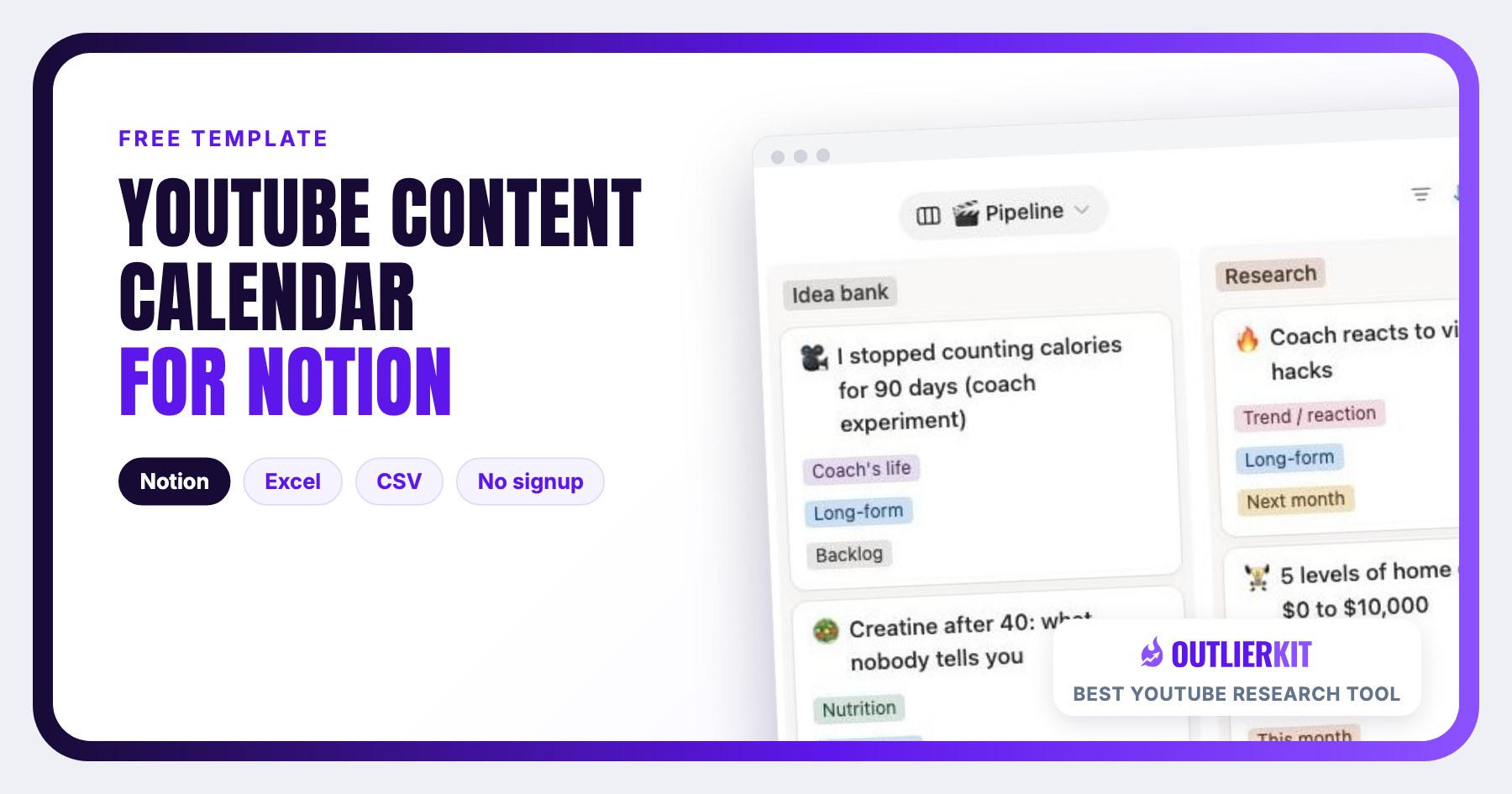
YouTube Content Calendar for Notion
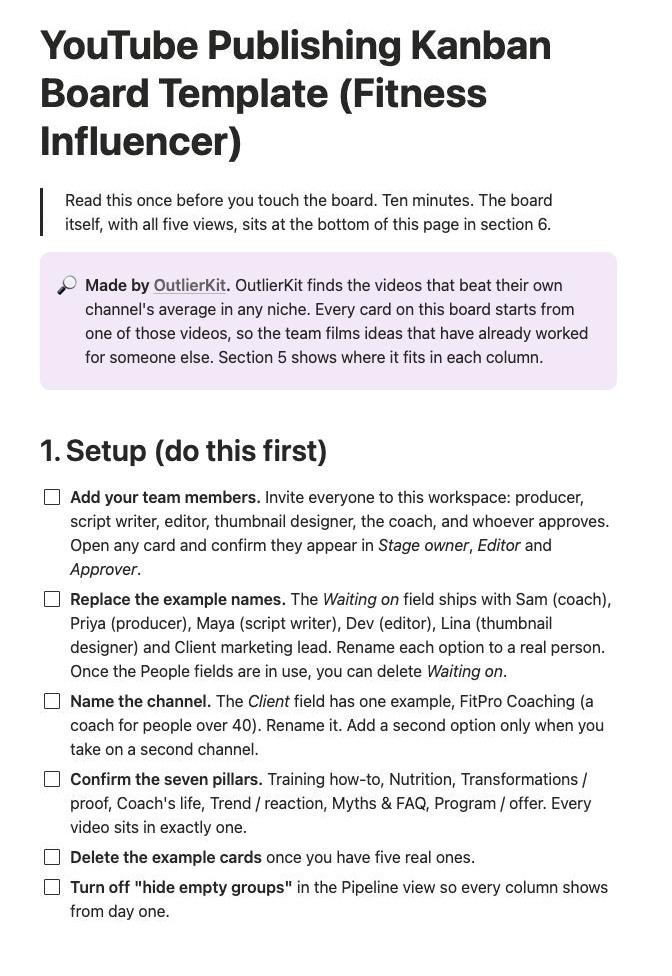
A calendar shows the date a video goes out. It does not show that the video has sat with the editor for nine days, or that the host never approved the script. This free Kanban board does. It has 12 columns, one owner per card, and a gate between every stage.
Published September 29, 2026. Last updated September 29, 2026.
Example cards for a fitness coach. They show how a filled board reads and do not describe a real channel.
TL;DR
- • The board has 12 columns, from Idea bank to Post-publish, plus Killed.
- • Every card has one owner, and the owner changes at every handoff.
- • A card moves right only when it passes a gate. The gate that matters most: no script until the title and thumbnail are chosen.
- • Blocked cards name the role and the person they wait on.
- • Free in Excel and CSV. The CSV imports into Notion, Airtable and Google Sheets.
What is a YouTube content calendar on a Kanban board?
A YouTube content calendar on a Kanban board is a publishing schedule where each video is a card that moves through production columns. It tracks the publish date like any calendar. It also tracks who holds the video today and what the video is waiting for.
A spreadsheet calendar works for one person. With a team it goes quiet between the dates. The script is late, and nobody sees it until the film day. The edit is on its third round, and the publish date still says Friday. A board puts those states on the screen.
I built this board from how working channel teams describe their week in their own videos and newsletters. The same three problems came up again and again: the host is the bottleneck, editors get vague briefs, and teams film before they have a title. Each gate on the board answers one of them. If you still need to decide what the channel publishes, start with the YouTube content strategy template and come back.
Free download
Download the YouTube content calendar template
Direct downloads, no email required. Both files hold the same 25 fields and the same example cards.
To bring the CSV into Notion, open Import in the sidebar or under Settings, choose CSV, and pick the file. Then add a Board view grouped by Stage.
Screenshots
What does the board look like in Notion?
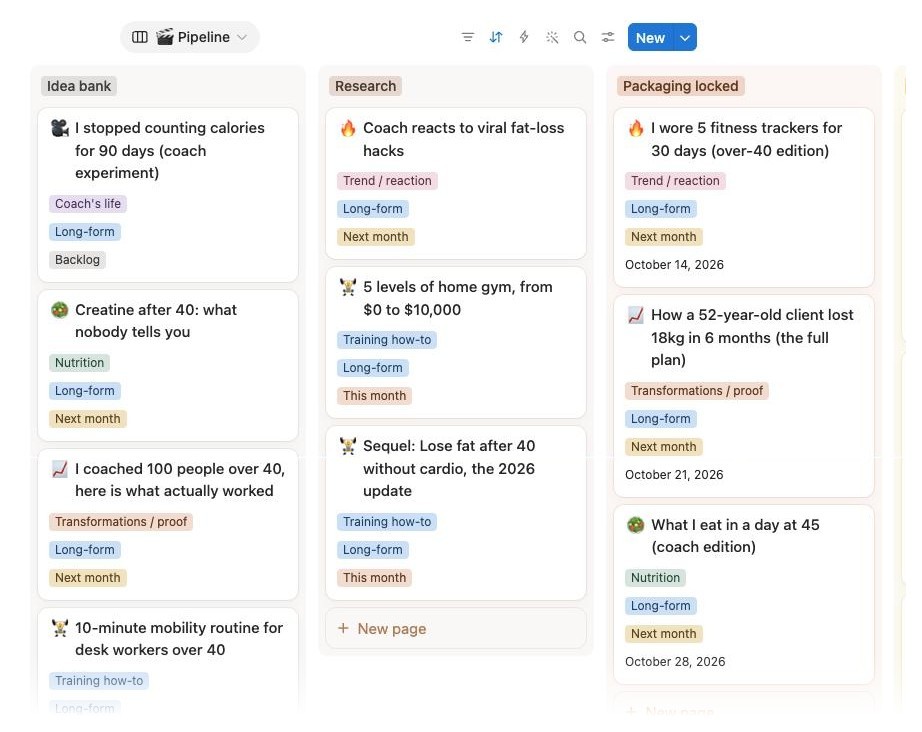
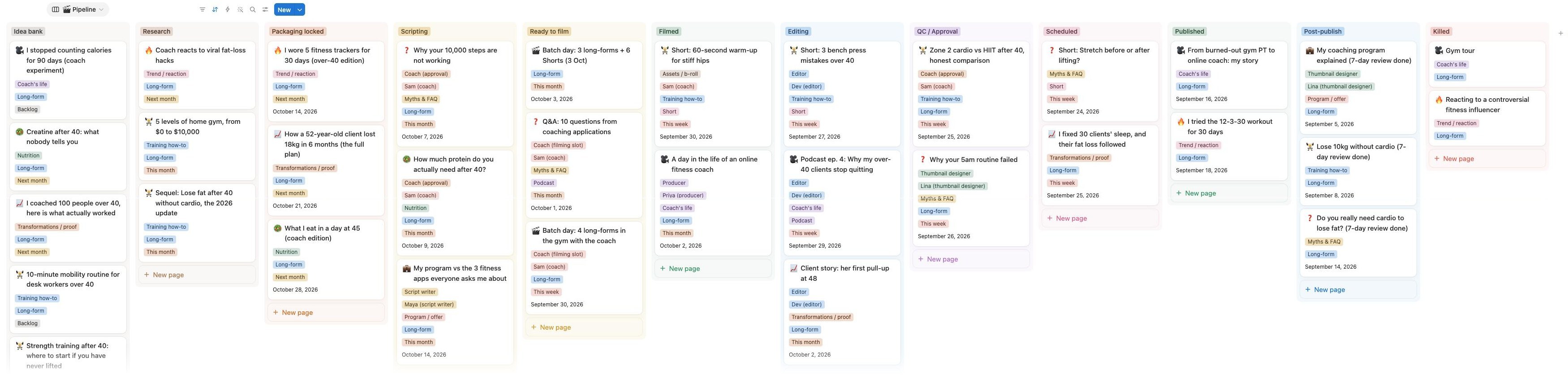
The board opens on the Pipeline view. Each column is a stage and each card is one video. The colored tags on a card show its pillar, format and publish window. Every screenshot comes from the template itself. FitPro Coaching is a made-up channel and all 32 cards are example data.
Which views come with the board?
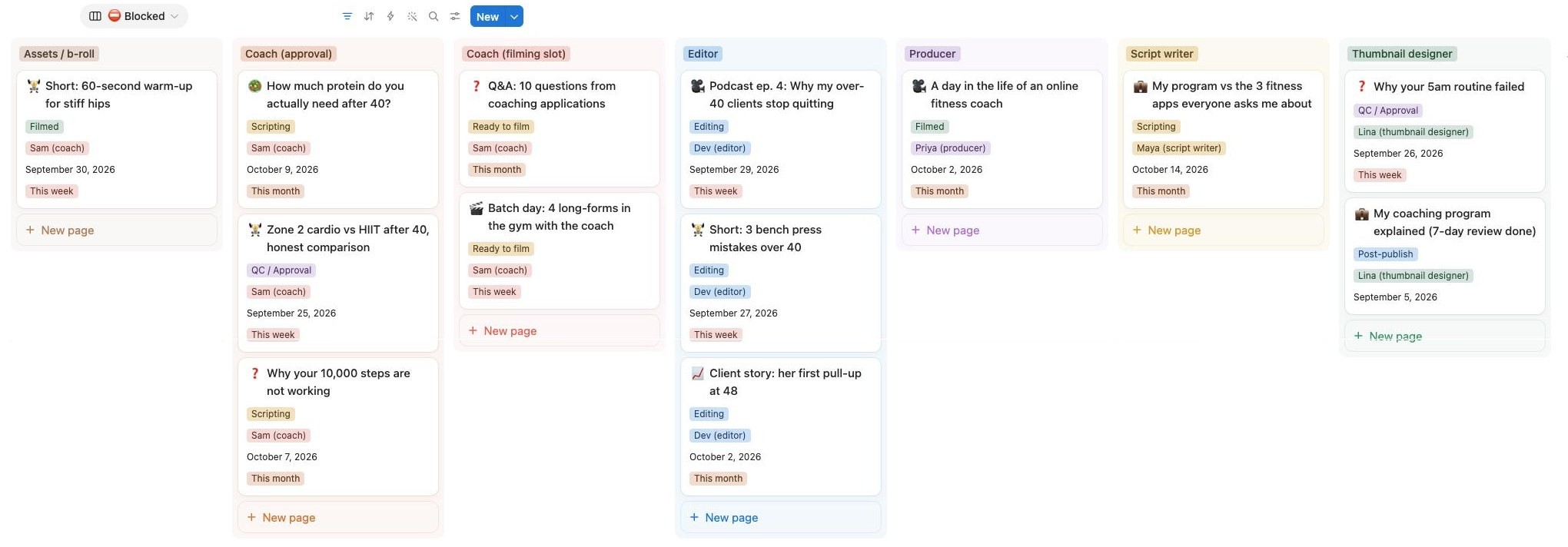
Five views ship with the board: Pipeline, Blocked, Publish calendar, Film days and 7-day review. Pipeline runs the week. Blocked and 7-day review run the two meetings.

The board
What are the 12 columns, and what moves a card forward?
Each column has one owner and one gate. A card moves right only when the gate is met. The only move to the left is from QC back to Editing.
| # | Column | Who owns it | Gate to leave |
|---|---|---|---|
| 1 | Idea bank | Anyone | Someone claims the card and sets a pillar. |
| 2 | Research | Producer | The card has an outlier reference, its multiplier and the research method. |
| 3 | Packaging locked | Producer | One chosen title, a thumbnail concept and a target publish date. |
| 4 | Scripting | Script writer | Script linked, the host has checked any claims, and the film date is booked. |
| 5 | Ready to film | Producer | Footage is uploaded and linked in the card. |
| 6 | Filmed | Producer | The editor brief is written and an editor is assigned. |
| 7 | Editing | Editor | A cut is delivered and the revision round is logged. |
| 8 | QC / Approval | Approver | One person signs off the title, thumbnail, description, chapters and end screen. |
| 9 | Scheduled | Producer | The video is live on the channel. |
| 10 | Published | Producer | Day 7 numbers are filled: views, click-through rate, average view duration and leads. |
| 11 | Post-publish | Producer | A follow-up is chosen, then one more look at day 30. |
| 12 | Killed | Whoever killed it | The reason is written in the card so nobody pitches it again. |
Why does the title get locked before anyone films?
Teams that publish every week settle the title and thumbnail before production starts. Colin and Samir describe this in their walkthrough of how they make videos. Most of their time goes to the idea and the packaging, and filming is the shortest step. A video that starts without a title gets one at upload, and by then the script can no longer change to match it.
Why does every card have one owner?
Handoffs are where videos stall. In the same video, Colin and Samir compare production to a relay race and say they are the ones who slow it down. Slidebean's founder gives the fix in his guide to building a company YouTube channel: pair a host with a producer, and let the producer run everything the host does not need to touch. On this board the host owns two columns out of 12.
Why does a card need a brief before editing?
Adam Franklin, who briefs editors at his agency, argues in his video on why edits fail that most bad edits start with an unclear brief. His template lists the raw files, the trims, where the editor has freedom, and a reference video. The Brief field on each card holds that link.
Why film in batches?
Busy hosts cannot film every week, and they can usually give one full day a month. The agency Humble and Brag recommends filming four or more videos in one session in its channel management guide. A filmed backlog also protects the team. Tintin Smith, who produced for a channel with a 13-person team, wrote in The Reality of YouTube that "burnout is your biggest threat."
What's inside
What goes on each card?
Each card has 25 fields. These 10 do most of the work. The rest are dates and links.
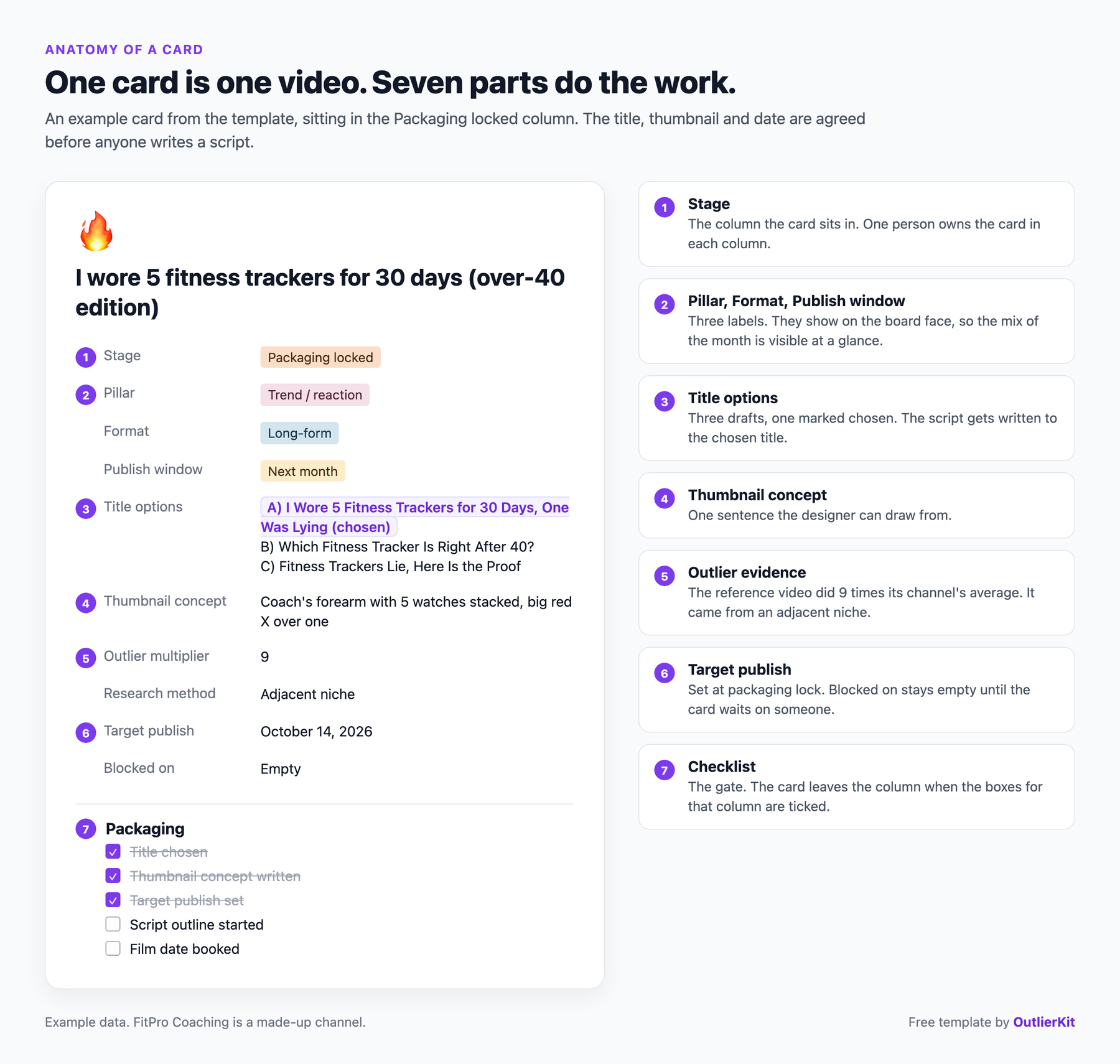
Stage owner
[The one person holding the card right now]
The owner changes every time the card changes column. A card with two owners has none, and a card with no owner sits until someone asks about it on a call.
Fill it in well: Reassign the owner in the same click that moves the card. If you move first and assign later, the card spends a day owned by the person who just finished with it.
Blocked on
[Host (filming slot) / Host (approval) / Producer / Script writer / Editor / Thumbnail designer / Assets / Sponsor]
The role the card is waiting for. Leave it empty when nothing is in the way. The Blocked view groups cards by this field, so Monday starts with the right conversations.
Fill it in well: Name the role, never a mood. "Waiting on feedback" tells nobody who to chase. "Host (approval)" tells everyone.
Waiting on
[The person: Sam, Priya, Maya, Dev, Lina]
The template ships with example names so the board reads correctly on first open. Replace them with your team on day one.
Fill it in well: If the same name shows up on more than three blocked cards, that person is your bottleneck. Move work off them before you add more videos.
Pillar
[Training how-to / Nutrition / Transformations / Coach's life / Trend / Myths & FAQ / Program]
Every video sits in exactly one content pillar. The example pillars fit a fitness coach. Rename them to the three to seven themes your channel owns.
Fill it in well: Count cards per pillar at the end of each month. A pillar with no cards for two months is one you have stopped making, whatever the strategy doc says.
Outlier reference and multiplier
[Link to the video this idea is modelled on, and how many times it beat its channel's average]
A card cannot leave Research without both. The reference is proof that the idea has already worked for someone. The multiplier says how well: 8 means the video got eight times its channel's usual views.
Fill it in well: Pick a reference from a channel near your size. A 3x outlier on a 20,000-subscriber channel tells you more than a 50x outlier on a channel with ten million.
Title options and thumbnail concept
[Two or three titles with the chosen one marked, plus one sentence describing the thumbnail]
These two fields are the gate into Scripting. The script gets written to deliver the title, which only works if the title exists first.
Fill it in well: If the team cannot agree on a title in ten minutes, the idea is not ready. Send the card back to Research or kill it.
Brief
[Link to the editor brief: raw files, trims, b-roll guidance, a reference video, the audience]
The brief is the gate out of Filmed. It gives the editor the raw files, what to cut, where they have freedom, and one finished video that shows the style you want.
Fill it in well: Write the brief the day you film, while you still remember which takes were good.
Revision round
[1, 2, 3]
Count every round of notes. Two rounds is normal. The number is there to show a pattern across videos, and one bad week proves nothing.
Fill it in well: Three rounds on the same video means the brief was unclear. Fix the brief template before you blame the editor.
Views, CTR and AVD at day 7, then Result
[Views / click-through rate / average view duration, then Winner, Baseline, Dud or Too early]
Fill these one week after publishing, from YouTube Studio. Judge the video against the channel's own average, then look once more at day 30 and stop.
Fill it in well: Decide what Winner means before the numbers arrive. "Twice the channel's average views at day 7" is a rule. "It did well" is an argument.
Follow-up and leads
[A/B thumbnail / Retitle / Sequel / Refresh year / Clip to Shorts, plus bookings or sales the video produced]
Every published video ends with a decision. Winners get a sequel card in the Idea bank. Duds get a new title or thumbnail. The leads field records what the video did for the business.
Fill it in well: Add "How did you find us?" to your booking form with YouTube as an option. Without it this field stays empty and the channel gets judged on views alone.
How do you fill the Research column?
The Research column asks for a video that beat its own channel's average, plus how many times it beat it. You can find one by hand. Open a channel in your niche, sort by most popular, and compare the top videos with the channel's usual views. It works, and it is slow.
OutlierKit (the tool I build) does that comparison across a whole niche. Search the topic in the outlier finder, sort by outlier score, and each result shows its multiplier. Paste the link and the number into the card. For the Packaging column, the AI title generator drafts title options from the patterns those outliers share. If you would rather start from formulas, the free title generator has them.
Agencies with several client channels will find access, reporting and onboarding covered in managing client YouTube channels. They can also run the same outlier search inside Claude through the OutlierKit connector, or book a 30-minute demo to see it on your own clients. You can start a free trial and fill the Research column for your first five cards.
How does a team run the board week to week?
The board needs two short meetings a week, 50 minutes in total. The rest of the week is production.
| When | What happens |
|---|---|
| Monday, 30 minutes | Add the week's best three outliers from your niche to the Idea bank. Then walk the board from right to left and clear blocked cards before you start anything new. |
| Tuesday to Thursday | Production. The writer and editor work their columns. No meetings. |
| Friday, 20 minutes | Open the 7-day review. Winners get a sequel card. Duds get a retitle or a new thumbnail. |
| Once a month | One batch film day with the host: four long videos plus Shorts. |
| Once a quarter | Compare pillars against what won, and drop the pillar that keeps losing. |
Keep one limit: no editor holds more than three cards in Editing at once. When a fourth arrives, move a publish date. For what the people in these roles do all week, see what a YouTube strategist does.
Is this the right template?
Who is this template for, and who should skip it?
Use it if
A producer running one channel with a small team
You have a host, an editor and maybe a writer or thumbnail designer. Videos stall between people and you find out on Friday. The board shows who holds each video today.
An agency managing several client channels
Add one option per client in the Client field and filter the board during each client call. The Blocked view shows which approvals the client owes you.
A founder or coach who only wants to film
You appear on the board twice: at filming and at final approval. Everything else moves without you.
Skip it if
You have not decided what the channel publishes
Use the YouTube content strategy template instead: it sets the positioning, pillars and 90-day plan that this board then executes.
You run a fitness channel and need the ideas themselves
Use the YouTube strategy playbook for fitness influencers instead: it covers demand by body goal, title patterns and a four-week series.
You work alone and need help structuring one video
Use the YouTube script template instead: a solo creator needs five columns at most, and the script is where the time goes.
You would pay someone to run all of this
Use the guide to hiring a YouTube agency instead: it covers costs, vetting and the contract terms to check.
How to use it
How do you set up the board in Notion?
Import the board
Download the CSV. In Notion, open Import, choose CSV and pick the file. Open the new database, add a Board view and group it by Stage.
Add your team and channel
Invite your team, then rename the example names in Waiting on. Rename the pillars to your channel's themes.
Fill Research with proof
For each idea, find a video that beat its channel's average. Paste the link and the multiplier into the card.
Lock packaging, then film
Choose one title and one thumbnail concept per card before anyone writes a script. Book a batch film day for the cards that pass.
Review at day 7
Fill views, click-through rate and average view duration one week after publishing. Pick a follow-up for every video.
Frequently Asked Questions
How do I import the CSV into Notion?
In Notion, open Import in the sidebar or under Settings and choose CSV. Pick the downloaded file. Notion creates a database with one row per video. Add a Board view, group it by Stage, and drag the columns into the order on this page. Change the Stage, Pillar, Blocked on and Result properties from text to Select so they show as colored tags.
Does the template work in Trello, Airtable or Google Sheets?
Yes. The CSV imports into Airtable and Google Sheets directly. Trello does not offer CSV import on every plan. If yours lacks it, create the 12 lists by hand and copy the card fields from the Excel file.
Do I need all 12 columns?
A team of three or more uses all 12. A solo creator can run five: Idea bank, Packaging locked, Filmed, Published and Post-publish. Keep Packaging locked as its own column however far you cut, because that gate stops you filming a video you cannot title.
How far ahead should a YouTube content calendar plan?
Plan four weeks in detail and leave the rest in the Idea bank. Four weeks covers one batch film day and its edits. A plan that runs longer than that tends to ignore what the last few videos taught you.
What is the difference between a content calendar and a content strategy?
A content strategy decides what the channel publishes and why: the audience, the pillars and the cadence. A content calendar schedules the videos that come out of those decisions. This board is a calendar with the production steps added, so it shows the date and also who is holding the video today.
Is the template free?
Yes. The Excel and CSV files download directly from this page with no email and no signup. You can copy, change and share them with clients.
Related Resources
YouTube Content Strategy Template
The plan this board executes: positioning, pillars and a 90-day calendar.
YouTube Strategy for Fitness Influencers
The ideas behind the example cards: demand by body goal and a four-week series.
How to Hire a YouTube Strategist
Rates, retainers and red flags for the person who would own the Research and Packaging columns.
All Free YouTube Templates
Script, audit, competitor and description templates, all free to download.
Real channel breakdowns
See these strategies in the wild: full data-backed analyses of channels in this niche, including outlier videos, upload cadence, and growth patterns.
OutlierKit Channel Analysis

Max Mezo
Hybrid Fitness & Endurance Athletics
- Subscribers
- 16.3K
- Avg views
- 48.1K
- Total views
- 19.2M
OutlierKit Channel Analysis

Gainz
Fitness & Internet Clips
- Subscribers
- 1.5M
- Avg views
- 6.6M
- Total views
- 3.7B
OutlierKit Channel Analysis

Andrew Huberman
Health-science podcast
- Subscribers
- 7.6M
- Avg views
- 1.0M
- Total views
- 503.6M
Stats are from our most recent snapshot of each channel. For live numbers, outlier videos, and up-to-date revenue estimates, run a fresh analysis on OutlierKit →

Fill the Research column before Monday's call
OutlierKit finds the videos that beat their own channel's average in your niche, so every card on the board starts from an idea that has already worked.
Try OutlierKit Free