Best YouTube Analytics Chrome Extension in 2026 (Ranked & Reviewed)
VidIQ is the best YouTube analytics Chrome extension in 2026 for keyword research and overlay data, and TubeBuddy is best for A/B testing. OutlierKit is the best free pick for outlier scores, with no account required.
| Feature | Rating | Key Insight |
|---|---|---|
| Best for Keywords | VidIQ · 4.5/5 (Chrome Web Store) | Tag analysis, views-per-hour, AI title ideas |
| Best for A/B Testing | TubeBuddy · 4.5/5 (Chrome Web Store) | Thumbnail and title split-testing, unique capability |
| Best Free Outlier Scores | OutlierKit · 5.0/5 (Chrome Web Store, 2 ratings) | Only extension we tested that shows outlier scores with no account |
| Best Views-Over-Time | Viewstats · 4.5/5 (Chrome Web Store) | Unique graph feature, but login failures and slowdowns reported |
The best YouTube analytics Chrome extension depends on what you need to see while browsing. VidIQ leads for keyword research and tag analysis. TubeBuddy is best for A/B testing and video optimization. OutlierKit is the only extension we tested that shows outlier scores (performance multipliers like 2.4x) on YouTube thumbnails for free with no account. Outlier scores matter because breakouts cluster by niche: our trending niches report found personal finance videos beat their own channel by 10x 16.7% of the time, against 3.1% in faceless automation.
Which extension fits your use case?
Best for Keyword Research
VidIQ
Tag analysis, VPH, AI ideas
Best for Video Optimization
TubeBuddy
A/B testing, SEO scores
Best Free Outlier Scores
OutlierKit
Outlier scores, no account needed
Best for Views-Over-Time Graphs
Viewstats
Growth graphs, thumbnail history
VidIQ: Best for keyword research and trend discovery for creators and marketing teams
Industry standard for keyword research with YouTube overlay
3M+ users
Free, Boost $19/mo, Max $49/mo
Free Tier
Limited free tier
Account Required
Yes
Best For
keyword research and trend discovery for creators and marketing teams
What It Shows on YouTube
- ✓VidIQ Score overlay on every video (composite SEO grade)
- ✓Tag analysis with search volume and competition data
- ✓Views per hour (VPH) tracking to spot trending videos
- ✓Estimated monthly earnings range
- ✓AI-generated video ideas sidebar
- ✓Competitor channel stats panel
Pros
- ✓Industry-leading keyword research and tag insights
- ✓Views per hour helps catch viral momentum early
- ✓AI Daily Ideas actively suggests video topics
- ✓Free tier provides genuine value for beginners
- ✓Deep integration with YouTube Studio
Cons
- −Most powerful features locked behind the paid Boost ($19/mo) or Max ($49/mo) plan
- −Can be overwhelming with data panels covering the YouTube UI
- −Causes noticeable page slowdown on lower-end hardware
- −Outlier tool available on web and in extension, though lacks contextual depth (no psychographics or monetization data)
- −Account login loops reported by some users
Verdict: VidIQ is the best all-round YouTube analytics Chrome extension, and the first pick for keyword-driven creators. The free tier is useful for basics, and it includes outlier scores in both its extension and web-based Outlier tool. The extension's full power (unlimited competitor tracking and AI ideas) requires a paid plan, from $19/mo for Boost.
TubeBuddy: Best for agencies optimizing client libraries with A/B testing and bulk SEO
15M+ users, best A/B testing and SEO optimization tools
15M+ users
Free - $27/mo (Pro $12, Legend $27, billed annually)
Free Tier
Limited free tier
Account Required
Yes
Best For
agencies optimizing client libraries with A/B testing and bulk SEO
What It Shows on YouTube
- ✓SEO score overlays on video cards while browsing
- ✓Keyword tags with competition scores alongside video
- ✓Videolytics panel with detailed channel and video stats
- ✓A/B thumbnail and title testing management
- ✓Bulk processing tools for batch edits
- ✓Competitor Scorecard comparisons
Pros
- ✓YouTube-certified partner since 2014, deeply trusted
- ✓A/B testing for thumbnails and titles is best in class
- ✓Bulk processing saves significant time for large channels
- ✓SEO Studio guides you through video optimization step by step
- ✓Free plan available for basic features
Cons
- −Most valuable features paywalled behind higher tiers
- −Login loop bugs frustrate users on occasion
- −Interface can overwhelm beginners with too many panels
- −Content Standouts (web-based) offers basic outlier metrics, but extension lacks outlier overlays
- −Less useful for research phase, stronger for optimization
Verdict: TubeBuddy ranks second: it is the best Chrome extension for optimizing videos you've already created. Its A/B testing and SEO tools are unmatched in the space. TubeBuddy's web-based Content Standouts feature provides basic outlier detection, though the extension itself focuses on optimization rather than outlier scoring.
OutlierKit: Best for spotting viral outliers while browsing any channel, free and with no account
Free outlier scores on any channel, no account required
2 Chrome Web Store ratings
Free
Free Tier
Completely free
Account Required
No
Best For
spotting viral outliers while browsing any channel, free and with no account
What It Shows on YouTube
- ✓Color-coded performance multipliers on every thumbnail (e.g., 2.4x, 0.8x)
- ✓Green badges for outliers (2.0x+), neutral for average (1.0x-2.0x), red for underperformers (below 1.0x)
- ✓Hover tooltip with detailed view breakdown relative to channel average
- ✓Click-through to deep analysis on OutlierKit.com
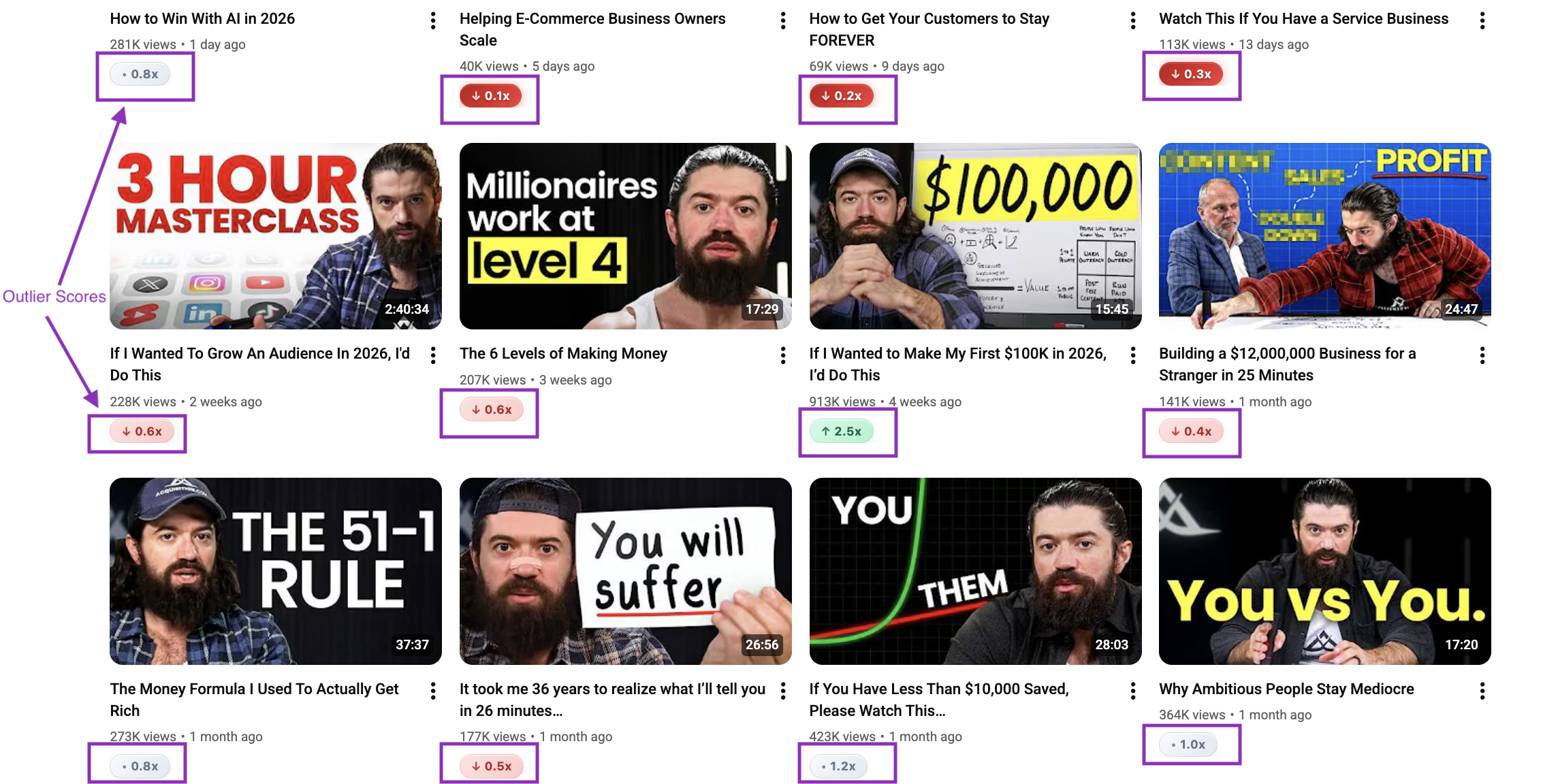
OutlierKit Chrome Extension: outlier scores overlaid on YouTube thumbnails
Pros
- ✓Completely free, no subscription or account needed
- ✓Outlier scores visible directly on YouTube thumbnails
- ✓Works on any channel's Videos tab, not just your own
- ✓Lightweight, no measurable browser slowdown
- ✓Privacy-first: no personal data collected, only activates on YouTube.com
- ✓Color-coded system makes high-potential videos unmissable at a glance
Cons
- −Deep analysis requires OutlierKit.com (paid plans)
- −No keyword research or SEO tag features
Verdict: OutlierKit ranks third because it does one job: it shows outlier scores on any channel's Videos tab, free and with no account. It has no keyword, SEO or A/B testing tools, which is why VidIQ and TubeBuddy rank above it as all-round analytics extensions. For deeper work, the paid web app adds keyword research, channel analysis, Deep Research and title writing grounded in real outlier videos.
Viewstats: Best for views-over-time graphs and title/thumbnail history
MrBeast-backed extension with outlier scores and graph overlays
217 reviews
Free / Pro $49.99/mo
Free Tier
Free tier with login
Account Required
Yes
Best For
views-over-time graphs and title/thumbnail history
What It Shows on YouTube
- ✓Views-over-time graph on video hover
- ✓Outlier score overlaid on video thumbnails
- ✓Thumbnail and title change history per video
- ✓Channel analytics panel with growth metrics
- ✓Subscriber milestones and real-time stats
Pros
- ✓MrBeast backing gives it brand credibility
- ✓Views-over-time graph is visually useful for spotting spikes
- ✓Shows thumbnail/title change history, unique insight
- ✓Outlier score visible in free tier
- ✓Channel analytics panel is informative
Cons
- −Requires account creation, no anonymous browsing
- −Login and authentication failures reported by multiple users
- −Causes noticeable lag while scrolling YouTube feeds
- −Conflicts with other extensions (VidIQ, TubeBuddy)
- −Pro plan at $49.99/mo is very expensive for a browser extension
- −Free tier limited in meaningful ways
Verdict: Viewstats has some interesting features, especially the views-over-time graph and title change history. But login failures, page lag, and extension conflicts make reliability a concern. The $49.99/mo Pro tier is hard to justify against cheaper alternatives.
1of10: Best for outlier tagging while browsing, with paid tiers for competitor tracking
Outlier flags and performance tags while browsing
Free plan; Basic $19/mo or $180/yr
Free Tier
Free plan with account
Account Required
Yes
Best For
outlier tagging while browsing, with paid tiers for competitor tracking
What It Shows on YouTube
- ✓Outlier flags on videos performing well above the channel average
- ✓View growth spikes highlighted while browsing YouTube
- ✓Performance tags (viral, trending, underperforming) on video thumbnails
- ✓Bookmark system to save interesting videos for later research
Pros
- ✓Outlier flags are clear and easy to act on while browsing
- ✓Bookmark system for saving research findings
- ✓Performance tags give a quick read on video health
- ✓Clean, minimal overlay design
Cons
- −Requires an account, even on the free plan
- −Unlimited competitor tracking and advanced filters need Basic ($29/mo)
- −Reliability bugs reported (flags occasionally not loading)
- −Steep pricing relative to what the extension alone provides
- −Less comprehensive than OutlierKit for deep competitor research
Verdict: 1of10 offers useful outlier flagging while browsing YouTube, and a free plan lets you try it. The Basic plan ($19/mo) lifts the Free plan's 5-result cap and adds 150 AI credits a month. OutlierKit shows similar outlier scores on thumbnails without an account.
NexLev: Best for faceless-channel operators who need Shorts analytics and multi-channel dashboards
28+ features including Shorts analytics and monetization status
90K+ users
$9/mo (annual) or $13/mo monthly
Free Tier
No free tier
Account Required
Yes
Best For
faceless-channel operators who need Shorts analytics and multi-channel dashboards
What It Shows on YouTube
- ✓Average views overlays on video cards
- ✓Shorts-specific analytics alongside regular videos
- ✓Monetization status indicators on channels
- ✓Outlier scores on high-performing videos
- ✓Multi-channel dashboard for managing several channels
- ✓28+ overlay data points across YouTube pages
Pros
- ✓90K+ users shows meaningful adoption
- ✓Shorts analytics alongside regular video data is useful
- ✓Multi-channel dashboard valuable for agencies and operators
- ✓Relatively affordable at $9/mo annually
- ✓Monetization status overlay saves manual checking
Cons
- −Primarily designed for faceless YouTube channels, narrower audience
- −Billing and cancellation issues reported by users
- −Chrome-only (no Firefox or other browsers)
- −Frequent breakages after YouTube UI updates
- −No free tier, paid subscription required before evaluation
- −28 features can feel like feature bloat for simple use cases
Verdict: NexLev is a solid option for faceless-channel operators who need both Shorts analytics and multi-channel management. The monetization status overlay is helpful. However, billing problems and Chrome-only support are real friction points, and the faceless-YouTube focus limits appeal for most creators.
How do the six extensions compare?
All six YouTube analytics Chrome extensions compared across the metrics that matter most. Social Blade's extension isn't ranked here: it covers subscriber stats and view history, but shows no outlier scores or keyword data on the videos you're browsing.
| Extension | Price | Rating | Free Tier | Account Needed | What It Shows | Best For |
|---|---|---|---|---|---|---|
| VidIQ#1 | Free - $49/mo | 4.5/5 | Limited | Yes | VidIQ Score, keyword tags, VPH, estimated earnings | Keyword research and SEO |
| TubeBuddy#2 | Free - $27/mo (billed annually) | 4.5/5 | Limited | Yes | SEO scores, tag competition, Videolytics panel | Video optimization and A/B testing |
| OutlierKit#3 | Free | 5.0/5 (2 ratings) | Full features free | No | Outlier scores, performance multipliers, color-coded badges | Spotting viral videos while browsing |
| Viewstats#4 | Free / $49.99/mo | 4.5/5 | Login required | Yes | Views-over-time graph, outlier score, thumbnail history | Packaging research: views graphs and title change history |
| 1of10#5 | Free to $19/mo | 4.1/5 | Limited | Yes | Outlier flags, growth spikes, performance tags | Outlier browsing with a thumbnail-first workflow |
| NexLev#6 | $9-$13/mo | 4.0/5 | None | Yes | Average views overlays, Shorts analytics, monetization status | Agencies and operators running multiple channels at once |
What should you look for in a YouTube analytics extension?
Not all Chrome extensions for YouTube analytics are built the same way. The criteria we used to evaluate each one, and what you should prioritize based on your use case.
Outlier Score Detection
Best on this test: OutlierKitThe most valuable analytics overlays show whether a video is overperforming relative to the channel average, not just raw view counts. A video with 500K views from a 10M-subscriber channel is weak; the same views from a 10K-subscriber channel is extraordinary. Look for extensions that surface this ratio automatically.
OutlierKit: OutlierKit is the only extension we tested that shows this free and with no account, as a color-coded multiplier (e.g., 2.4x) on every thumbnail.
Free Tier Quality
Best on this test: OutlierKitSeveral extensions advertise a free tier but withhold the most useful features behind paywalls. Assess whether the free tier actually surfaces actionable data or is just a lead magnet. Check if an account is required even to see basic overlays.
OutlierKit: OutlierKit requires no account and shows full outlier scoring for free.
Browser Performance Impact
Best on this test: OutlierKitHeavy extensions inject large JavaScript bundles that slow YouTube's already data-intensive pages. Test any extension by loading a channel's Videos tab with 50+ thumbnails and monitoring CPU usage. Laggy scrolling and delayed thumbnail loading are red flags.
OutlierKit: OutlierKit is specifically built to be lightweight with no measurable performance impact.
Privacy and Data Collection
Best on this test: OutlierKitExtensions run with elevated browser permissions. Check the privacy policy for what data is collected, whether browsing behavior is tracked, and what happens to that data. Prefer extensions that explicitly state no personal data collection.
OutlierKit: OutlierKit collects no personal data and only activates on YouTube.com.
Reliability After YouTube Updates
Best on this test: TubeBuddy / VidIQYouTube regularly updates its frontend. Extensions that rely on fragile CSS selectors break frequently. Check recent reviews on the Chrome Web Store for reports of 'not working after update' or 'overlays not showing'. These indicate poor maintenance practices.
TubeBuddy / VidIQ: Established extensions with large teams update faster after YouTube changes.
Depth of Overlay Data
Best on this test: VidIQSome extensions show a single score; others show views per hour, tag analysis, subscriber velocity, and earnings estimates. More data is not always better. What matters is whether the data is immediately actionable without leaving YouTube.
VidIQ: VidIQ surfaces the most diverse overlay data, including VPH and tag competition.
How does OutlierKit's outlier scoring work?
Understanding what a "2.4x" badge actually means on a YouTube thumbnail helps you act on the data more effectively.
OutlierKit calculates a performance multiplier for each video by comparing its view count to the channel's average views per video. A score of 2.4x means the video has received 2.4 times the views that are typical for that channel. This makes the score relative and meaningful. A video with 500K views on a 10M-subscriber channel might score 0.3x (underperforming), while a video with 50K views on a 5K-subscriber channel might score 8.0x (a major outlier).
Video is performing well above the channel average. Strong signal to study for content ideas.
Video is performing at or near the channel's average. Normal performance, less signal value.
Video is below the channel average. Indicates topics or formats that did not resonate with this audience.
How to use it: Open any competitor's Videos tab on YouTube with the OutlierKit extension installed. Immediately, green badges appear on their best-performing videos. Hover to see the full multiplier and view count breakdown. Click through to OutlierKit.com for a deeper analysis of why those videos outperformed. This entire workflow works for free, with no account required.
Related reading
OutlierKit vs VidIQ Chrome Extension
Head-to-head on keyword research, outlier detection, pricing, and browser performance.
OutlierKit vs TubeBuddy Chrome Extension
Compare outlier detection versus A/B testing and SEO optimization tools.
OutlierKit vs Viewstats Chrome Extension
Free vs paid, login issues, outlier scores, and which is more reliable in practice.
Best YouTube Analytics Tools (Beyond Extensions)
Full platform tools for competitor research, keyword strategy, and channel growth.
TubeBuddy Chrome Extension Guide
Install steps, free vs paid features, and known bugs.
Viewstats Chrome Extension Review
The views-over-time graph and the reported reliability issues.
Which extension should you choose?
Choose by what you want to see on YouTube while you browse.
| Tool | Best for | Choose it if | Starting price |
|---|---|---|---|
| VidIQ | Keyword scores, tags and views per hour | you want the most overlay data and search demand while you browse | Free; Boost $19/mo |
| TubeBuddy | A/B tests and bulk SEO edits | you want to test thumbnails and titles on videos you already published | Free plan available |
| OutlierKit | Outlier scores on any channel's Videos tab | you want free outlier scores with no account, and no SEO tools | Free, no account |
| Viewstats | Views-over-time graphs and title history | you study how competitors change packaging after upload | Free; Pro $49.99/mo |
| 1of10 | Thumbnail-first outlier flags | you want outlier flags plus saved research folders | Free; Basic $19/mo |
| NexLev | Shorts analytics and monetization status | you run faceless channels and need monetization checks |
Frequently Asked Questions
What It Does
What is the best YouTube analytics Chrome extension in 2026?
VidIQ is the best all-round YouTube analytics Chrome extension in 2026. It leads for keyword research and SEO tag analysis. TubeBuddy is best for video optimization and A/B testing. OutlierKit ranks third and is the best free choice for spotting outlier videos: it overlays color-coded performance multipliers (2.4x, 0.8x, etc.) on YouTube thumbnails with no account.
Is there a free YouTube analytics Chrome extension with no account required?
Yes. OutlierKit's Chrome extension is completely free and requires no account. You can install it from the Chrome Web Store and immediately see outlier scores on any channel's Videos tab without signing up or logging in. This makes it the most frictionless option for creators who want data while browsing YouTube. Other extensions like VidIQ and TubeBuddy have free tiers, but they require account creation to display any overlay data.
Does the VidIQ Chrome extension show YouTube analytics for free?
VidIQ has a free tier that shows basic analytics overlays (including a VidIQ score and limited tag data) on YouTube videos. However, the most useful features (unlimited competitor tracking, AI Daily Ideas, views per hour for all videos) are locked behind the paid Boost plan ($19/mo) or Max ($49/mo). The free tier is useful as an introduction to how the extension works, but serious creators will find it limited. VidIQ also requires account creation before any data is shown.
Features & Pricing
What does the OutlierKit Chrome extension show on YouTube?
The OutlierKit Chrome extension overlays a performance multiplier badge on every video thumbnail when you browse a channel's Videos tab on YouTube. A score like 2.4x means the video has 2.4 times the average views for that channel, an outlier. Scores are color-coded: green for 2.0x and above (strong outliers), neutral gray for 1.0x-2.0x (average), and red for below 1.0x (underperformers). Hovering over a thumbnail shows a detailed breakdown, and clicking opens a deeper analysis on OutlierKit.com.
How does the Viewstats Chrome extension compare to OutlierKit for YouTube analytics?
Both Viewstats and OutlierKit show outlier scores, but they differ in approach and cost. OutlierKit is completely free and requires no account. It shows clean performance multipliers on thumbnails. Viewstats requires account creation, has reported login failures and page lag issues, and its Pro plan costs $49.99/mo, much more expensive. Viewstats does offer a unique views-over-time graph and thumbnail change history, which OutlierKit does not. For most creators, OutlierKit delivers more reliable value at no cost. See our full comparison at the link below.
Which YouTube analytics Chrome extension is best for detecting viral videos?
For detecting viral and outlier videos while browsing YouTube, OutlierKit is the strongest option. Its free Chrome extension shows exactly how much each video outperforms the channel's average, the core signal for viral potential. A video scoring 3.0x or higher on OutlierKit indicates it's pulling three times the expected views, a clear signal worth studying. Viewstats and 1of10 also flag outliers, but both require an account, and their deeper features sit on paid plans. NexLev includes outlier scores but is designed primarily for faceless-channel operators.
Is It Worth It?
Do YouTube analytics Chrome extensions slow down the browser?
Some YouTube analytics Chrome extensions cause measurable slowdown, particularly on channel pages with many thumbnails. VidIQ and Viewstats have both received user reports of page lag during heavy scrolling. Extensions that inject large data panels on every page load are the most likely culprits. OutlierKit is specifically designed to be lightweight. It only activates on YouTube.com and processes data efficiently to avoid browser slowdown. If performance is a concern, start with OutlierKit and add heavier extensions like VidIQ only if you need their specific keyword features.
Which YouTube analytics Chrome extension should agencies and brands use?
Agencies and brand teams typically run two: OutlierKit's free extension for quick outlier scans while auditing prospect or competitor channels, plus VidIQ or TubeBuddy for per-channel SEO work inside YouTube Studio. Extensions are for fast in-context checks; client-grade niche research (mapping thousands of competitor channels, audience psychographics, sponsor intelligence) happens on the web platform, where OutlierKit's Competitor Studio is built for multi-client workflows. See our best YouTube marketing tools for agencies guide for the full stack.
Which extensions should you install?
- 1
Start with VidIQ if keyword research drives your strategy. The free tier is worth trying before upgrading to Boost ($19/mo) for AI ideas and unlimited competitor tracking.
- 2
Add TubeBuddy if you're actively A/B testing. Its thumbnail and title testing tools are the best available for optimizing published videos.
- 3
Add OutlierKit for outlier scores. It's free, needs no account, and shows outlier scores on every YouTube channel you browse. It runs next to VidIQ or TubeBuddy.
- 4
Try 1of10's free plan if you work thumbnail-first. The Basic plan ($19/mo) lifts the 5-result cap on research. If you only need outlier scores, the free OutlierKit extension covers that without an account.
- 5
Try Viewstats cautiously. The views-over-time graph is useful, but login failures and extension conflicts are real reported issues worth knowing before installing.
How to Analyze YouTube Competitor Channels
For Pro and Max users
Want this data programmatically?
The OutlierKit API is now live for Pro and Max users: pull outlier scores, channel stats, keyword research, transcripts, and comments via JSON. Calls cost 2 to 10 credits depending on the endpoint.
How this list was made
Ratings come from each extension's Chrome Web Store listing or the named review platform, and prices from each vendor's pricing page, on the update date shown. The ranking weighs what each extension shows on YouTube, its free tier and its reported reliability, from documented features and public reviews rather than a paid test.
Sources

See outlier scores on every YouTube video, for free
Install the OutlierKit Chrome extension and instantly spot viral video patterns on any channel. No account required, no slowdown.
Add OutlierKit to Chrome