How to Analyze YouTube Video Content: A Complete Step-by-Step Guide
To analyze a YouTube video, paste its URL into a video analysis tool like OutlierKit's Video Analyzer, then review the AI-generated script analysis, keyword rankings, engagement metrics, and performance benchmarks to understand why the video succeeded or failed.
Whether you want to analyze your own videos, study competitors, or reverse-engineer viral content, understanding YouTube video content analysis is essential for channel growth. This guide covers how to analyze YouTube video performance metrics, scripts, SEO, Shorts, and engagement patterns — using both AI tools and manual methods. With over 800 million videos on YouTube, systematic video analysis is the fastest way to find what works in your niche.
Key Takeaways
| Step | Analysis Area | Quick Win |
|---|---|---|
| Step 1 | Open Video Analyzer | Paste any YouTube URL to start instant analysis |
| Step 2 | Performance Metrics | Check outlier score to see if the video over/underperformed |
| Step 3 | Script & Transcript | Read hook strength score to evaluate the first 30 seconds |
| Step 4 | Video SEO | Find which keywords the video ranks for in YouTube search |
| Step 5 | Engagement Patterns | Compare like-to-view ratio against niche benchmarks |
| Step 6 | Apply Insights | Build a swipe file of winning patterns to replicate |
What Is YouTube Video Content Analysis?
YouTube video content analysis is the systematic process of examining a video's script, performance metrics, SEO optimization, and audience engagement to understand what makes it succeed or fail. It goes beyond checking view counts — proper analysis uncovers the why behind the numbers.
Content analysis covers four key areas:
Hook & Script
- •Hook strength score
- •Curiosity loop count
- •Emotional trigger density
- •Pacing score
Performance
- •Views vs. channel average
- •Engagement rate
- •Outlier score
- •Like-to-view ratio
SEO
- •Ranking keywords
- •Title optimization
- •Description keywords
- •Tag strategy
Audience
- •Comment sentiment
- •Share estimates
- •Reply engagement
- •Retention patterns
Open the Video Analyzer and Paste a YouTube Link
The fastest way to analyze any YouTube video is to paste its URL into OutlierKit's Video Analyzer. The tool accepts any YouTube video link format — standard watch URLs, shortened youtu.be links, and YouTube Shorts URLs.
How to start your analysis:
- 1.Go to OutlierKit and click "Analyze Video" in the left sidebar
- 2.Copy the YouTube video URL from your browser address bar
- 3.Paste the link into the search bar and hit Enter
- 4.Wait a few seconds for the AI to process the video content
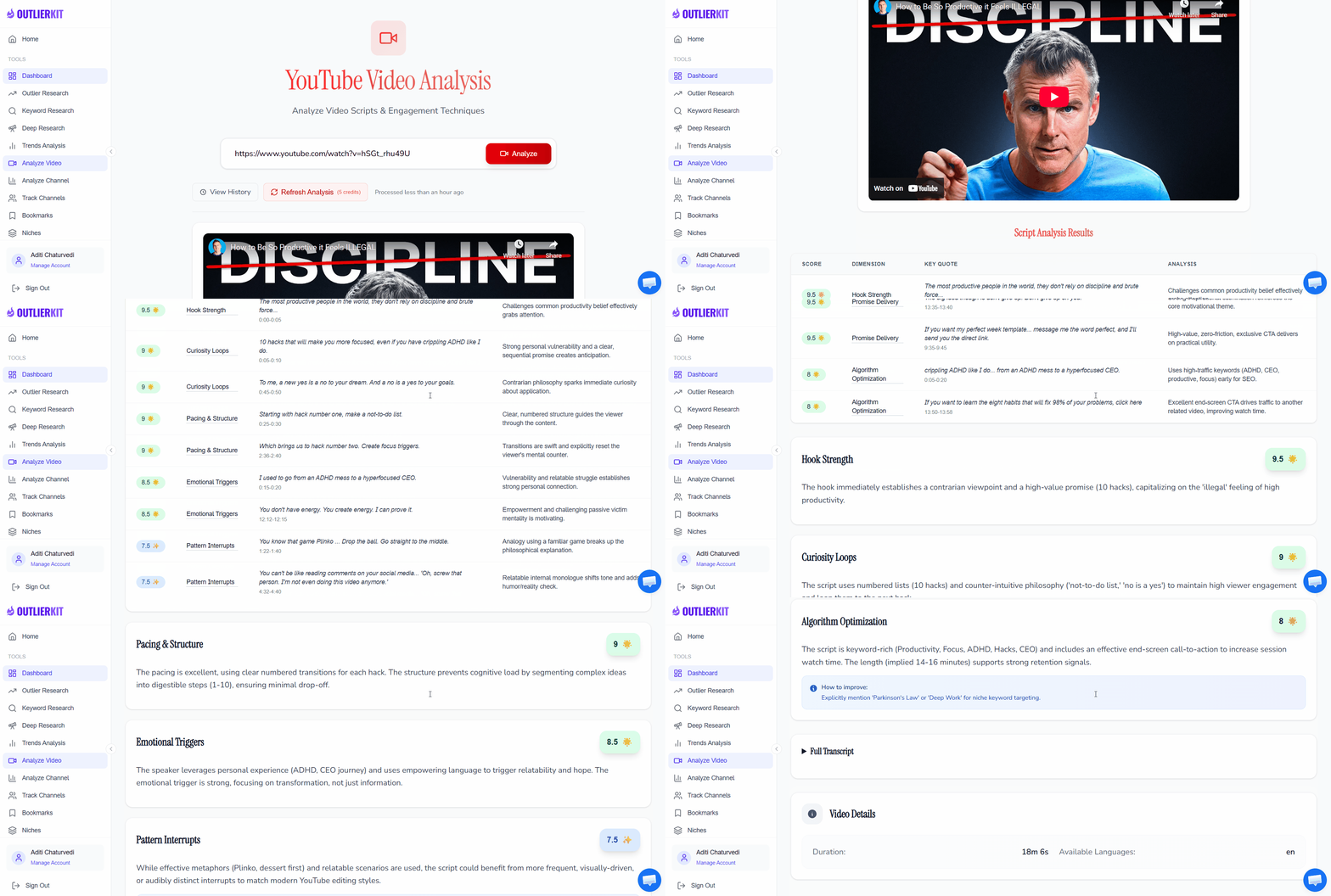
OutlierKit Video Analyzer — Paste any YouTube link to get AI-powered content analysis
Tip: You can analyze any public YouTube video — your own or competitors'. Try analyzing your top-performing video first to establish a baseline, then study 5-10 competitor videos to find patterns you can adapt.
Analyze YouTube Video Performance Metrics
Once the analysis loads, start with the performance overview. This tells you whether the video outperformed or underperformed relative to the channel's baseline — which is far more useful than raw view counts.
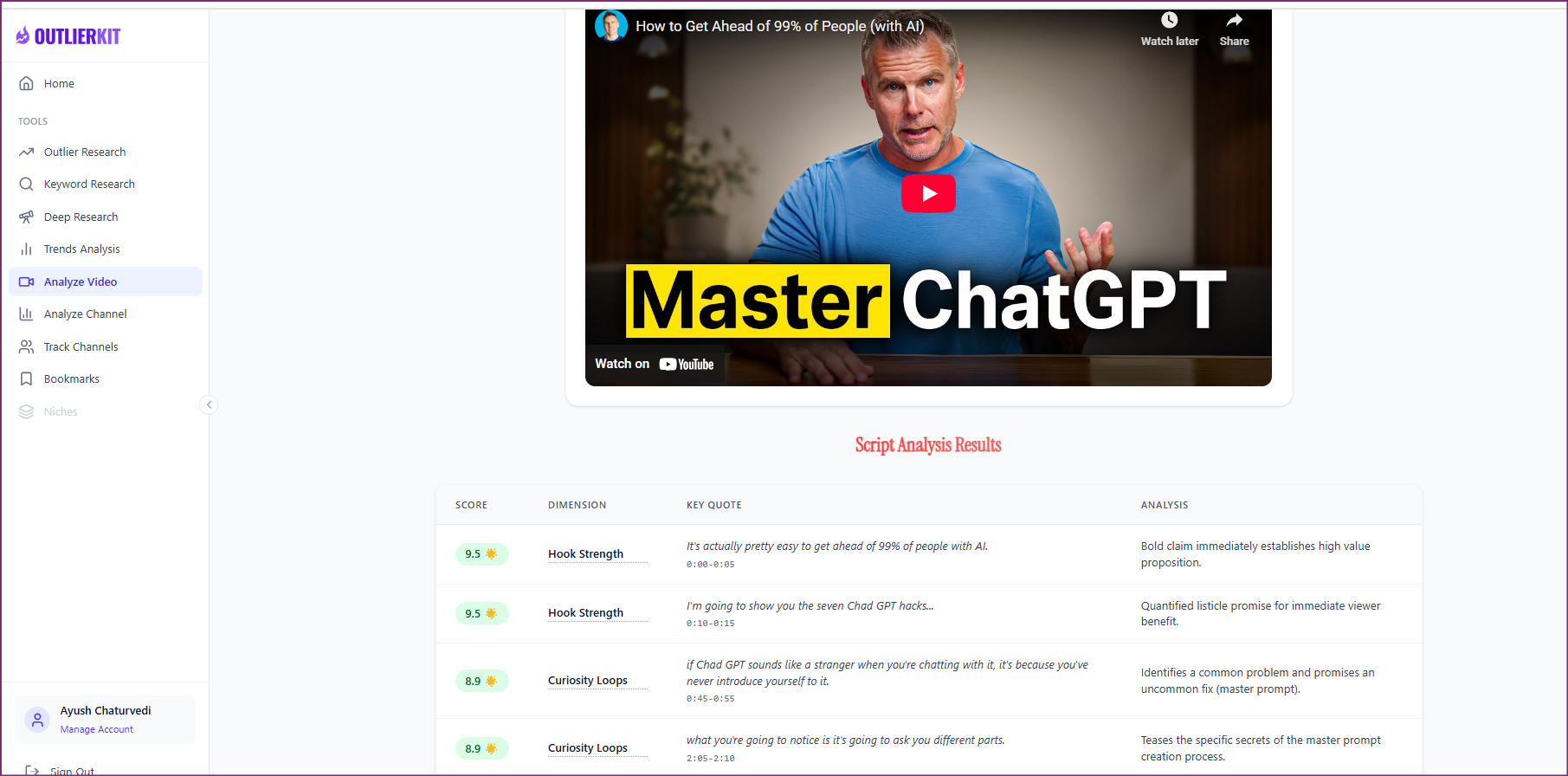
OutlierKit shows performance metrics with outlier scoring to benchmark any video against its channel average
Key metrics to check:
Outlier Score
Shows how the video performed vs. the channel average. 3x+ means it significantly outperformed. Below 1x means underperformance.
Engagement Rate
Likes + comments relative to views. Higher rates indicate the content resonated emotionally or triggered discussion.
View Velocity
How quickly the video accumulated views after upload. Fast velocity suggests strong thumbnail/title or algorithmic push.
Like-to-View Ratio
Industry benchmark is 3-5%. Videos above 5% indicate exceptional audience satisfaction with the content.
How to analyze YouTube Shorts performance: Shorts have different benchmarks than long-form videos. A Short with 50% completion rate is underperforming, while a long-form video with 50% average view duration is excellent. Always compare Shorts against other Shorts — never against long-form content.
Analyze the Video Script and Transcript
The script is the backbone of any YouTube video. OutlierKit's AI automatically extracts the video transcript and analyzes it across multiple dimensions — hook effectiveness, curiosity loops, emotional triggers, and content pacing.
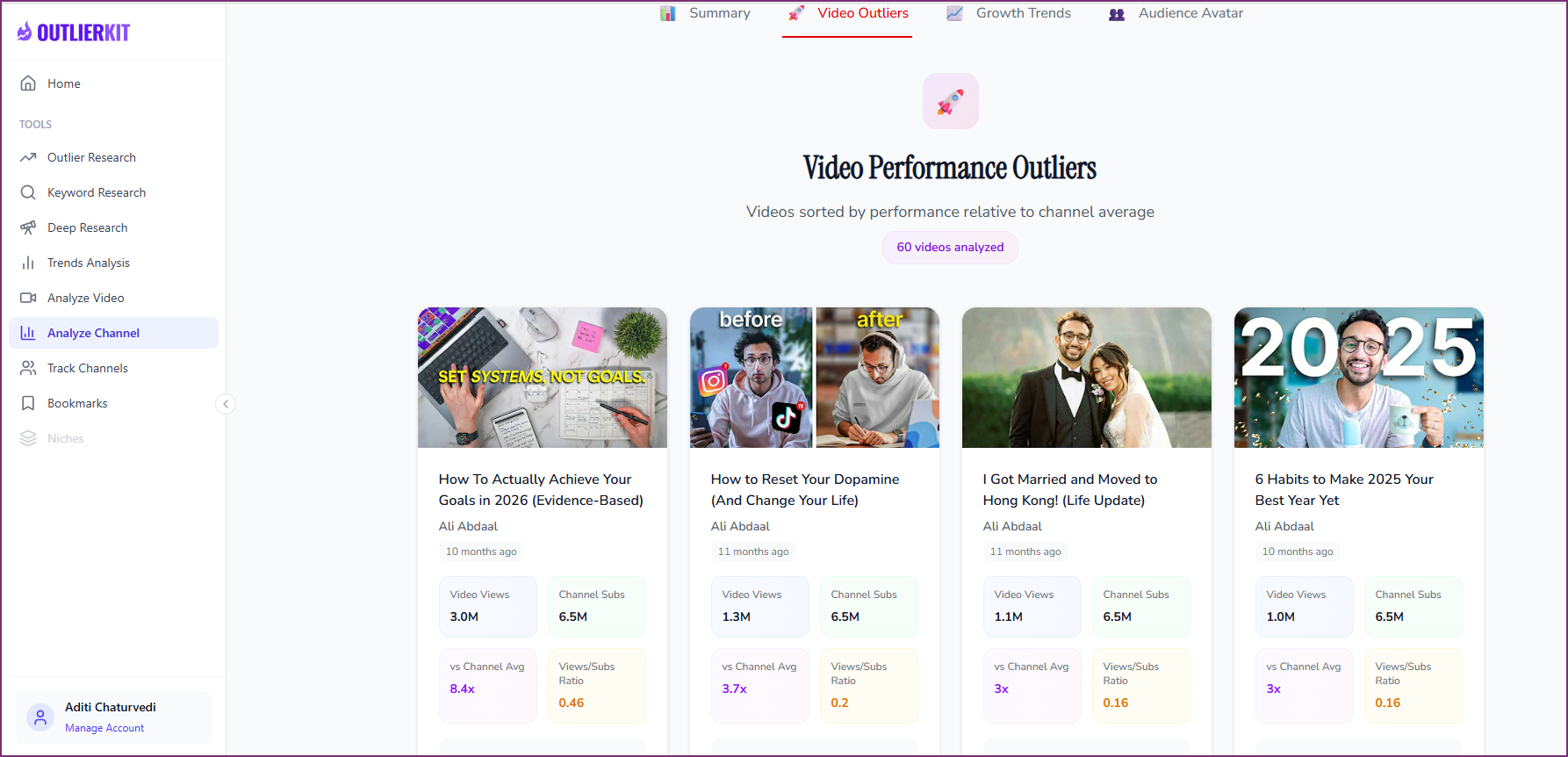
OutlierKit AI script analysis — Hook strength, curiosity loops, emotional triggers, and pacing scored automatically
What the script analysis reveals:
Hook Strength Score (First 30 Seconds)
Evaluates whether the opening uses pattern interrupts, curiosity gaps, or value promises effectively. The first 30 seconds determine whether 60%+ of viewers stay or leave.
Curiosity Loop Analysis
Identifies open loops (questions raised) and their payoff timing. Videos with well-placed curiosity loops maintain higher retention through the middle section.
Emotional Trigger Density
Maps emotional peaks throughout the script — surprise, frustration, inspiration, humor. Videos with varied emotional triggers drive higher engagement.
Pacing and Value Delivery
Scores how well the content delivers on its title promise. Videos that front-load value before the halfway mark tend to perform better in the algorithm.
Alternative: How to Use ChatGPT to Analyze a YouTube Video Script
If you prefer a manual approach, you can extract the transcript and analyze it with ChatGPT:
- 1. Open the YouTube video and click the three dots (…) below the player
- 2. Select "Show transcript" and copy the full text
- 3. Paste into ChatGPT with: "Analyze this YouTube script for hook effectiveness, content structure, emotional triggers, and key takeaways"
Note: ChatGPT provides text analysis only. It cannot access performance metrics, keyword rankings, or benchmark data that tools like OutlierKit provide automatically.
Analyze YouTube Video SEO and Keyword Rankings
YouTube SEO analysis reveals which search terms drive traffic to the video and how well it's optimized. This is critical for understanding whether a video succeeded through search, browse, suggested videos, or external traffic.
SEO elements to analyze:
Ranking Keywords
Which search terms the video appears for in YouTube search results, with estimated positions and search volumes.
Title Optimization
Whether the primary keyword appears in the title, its position, and how the title balances SEO with click appeal.
Description Analysis
Keyword usage in the first 2-3 lines (visible before "Show more"), link placement, and timestamp/chapter usage.
Tag Strategy
Tag relevance, keyword variations, and whether the video uses broad and specific tags strategically.
For deeper keyword intelligence, combine the video analysis with OutlierKit's Keyword Research Tool to find related search terms with volume data and competition scores.
SEO tip: Pay attention to keywords the video ranks for that aren't in the title. These indicate algorithmic authority — YouTube understands the video's content well enough to rank it for related terms. These are prime keyword targets for your own videos.
Analyze Engagement Patterns and Audience Response
Engagement data reveals how viewers reacted to the content — which is distinct from how they consumed it. High engagement signals that the content triggered an emotional or intellectual response worth acting on.
Engagement metrics to analyze:
Like-to-View Ratio
3-5% is average. Above 5% means viewers found exceptional value. Below 2% may indicate a clickbait mismatch between title/thumbnail and content.
Comment Volume and Sentiment
High comment volume with mixed sentiment often indicates controversial or debate-worthy content. Pure positive sentiment with lower volume suggests satisfying but less share-worthy content.
Reply Engagement
Videos where the creator replies to comments generate more algorithmic signals. Check if top comments have creator replies — this indicates an active community strategy.
Share Estimates
Content with high share rates typically provides utility (how-to, tools, resources) or entertainment value. Shares are the strongest engagement signal for algorithmic promotion.
Apply Your Analysis to Your Content Strategy
Analysis without action is wasted effort. The final step is translating your findings into a concrete content plan. Here's how to systematically apply video analysis insights.
1. Build a Swipe File
Save the best-performing videos you analyze to OutlierKit's Bookmarks feature. Create categories for different winning patterns: hooks, titles, content structures, engagement techniques. Reference this swipe file before planning new content.
2. Extract 2-3 Techniques per Video
Don't try to replicate everything at once. Pick the 2-3 most actionable techniques from each analysis — a hook style, a content structure, a keyword opportunity — and test them in your next video.
3. Track Your Results
After publishing content informed by your analysis, run the same analysis on your own video. Compare your metrics against the benchmarks you found. This feedback loop drives continuous improvement.
4. Analyze Regularly
Set a weekly habit of analyzing 3-5 videos from your niche. Trends shift, audiences evolve, and new formats emerge. Regular analysis keeps your content strategy current and data-driven.
For a deeper dive into finding content patterns across multiple videos, read our guide on how to find outlier videos on YouTube.
Common Mistakes When Analyzing YouTube Videos
Only looking at view count
Why it's a problem: A video with 500K views from a channel averaging 2M is actually underperforming. Raw views without context are misleading.
Do this instead: Always check the outlier score to see performance relative to the channel average.
Skipping the script analysis
Why it's a problem: Thumbnails get the click, but the script determines watch time. Most creators analyze packaging but ignore what actually keeps viewers watching.
Do this instead: Read the full AI script analysis to understand hook techniques, value delivery, and retention strategies.
Analyzing only one video
Why it's a problem: One video can be an anomaly. You need patterns across 5-10 videos to identify what consistently works in a niche.
Do this instead: Analyze 5-10 top-performing videos from the same channel or niche to find repeatable patterns.
Ignoring Shorts vs. long-form differences
Why it's a problem: Shorts and long-form videos have fundamentally different success metrics. Mixing them leads to wrong conclusions.
Do this instead: Analyze Shorts separately. Compare Shorts to Shorts and long-form to long-form for meaningful insights.
How to Analyze YouTube Video Content with AI: Tool Comparison
There are several ways to use AI for YouTube video content analysis. Here's how the main approaches compare:
| Method | Script Analysis | Keyword Data | Performance Metrics | Speed |
|---|---|---|---|---|
| OutlierKit | AI-scored (hook, pacing, triggers) | Full ranking data | Outlier score + benchmarks | ~10 seconds |
| ChatGPT + Transcript | Manual transcript needed | None | None | 5-10 min (manual copy) |
| YouTube Studio | None | Traffic source keywords | Full (own videos only) | Instant (your channel) |
| VidIQ / TubeBuddy | None | Tag-level data | Basic stats | Instant (browser ext.) |
For the most comprehensive analysis — especially if you want to analyze competitor videos with AI-powered script scoring and keyword intelligence — OutlierKit's Video Analyzer provides the deepest insights in the shortest time.
How to Analyze YouTube Shorts Video Content
YouTube Shorts require a different analytical framework than long-form content. The format's vertical orientation, 60-second limit, and swipe-based discovery mean different metrics matter.
Shorts-Specific Metrics
- • Completion rate (target 70%+)
- • Swipe-away rate in first 3 seconds
- • Subscriber conversion per Short
- • Loop rate (viewers rewatching)
Long-Form vs. Shorts Benchmarks
- • 50% AVD: Poor for Shorts, Excellent for long-form
- • Compare Shorts only to Shorts
- • Engagement rates are typically 2-3x higher
- • View velocity is faster but less sustained
To analyze Shorts in OutlierKit, simply paste the Shorts URL into the Video Analyzer. The tool automatically detects the format and adjusts its analysis accordingly. For channel-level Shorts analytics, use the Competitor Analysis Tool to see how Shorts contribute to overall channel growth.
Quick Summary: How to Analyze YouTube Video Content
- 1Paste the video URL into OutlierKit's Video Analyzer to start analysis from any YouTube link
- 2Check performance metrics — outlier score, engagement rate, and benchmarks tell you if the video outperformed
- 3Read the script analysis — hook strength, curiosity loops, and emotional triggers reveal the content strategy
- 4Review SEO data — ranking keywords and optimization show how the video attracts search traffic
- 5Map engagement patterns — likes, comments, and shares reveal audience emotional response
- 6Apply insights — build a swipe file, test 2-3 techniques per video, and track results
Frequently Asked Questions
Getting Started
How do I analyze a YouTube video step by step?
To analyze a YouTube video step by step: (1) Paste the video URL into OutlierKit's Video Analyzer, (2) Review performance metrics like views, engagement rate, and outlier score, (3) Read the AI script analysis for hook strength and content structure, (4) Check which keywords the video ranks for, (5) Examine engagement patterns and audience response, (6) Document patterns and apply them to your own content strategy. The entire process takes under 5 minutes with OutlierKit.
How do I analyze YouTube video performance metrics?
YouTube video performance metrics include views, watch time, average view duration, click-through rate (CTR), likes, comments, and shares. YouTube Studio provides these for your own videos. For any public video, use OutlierKit's Video Analyzer to see engagement rates, keyword rankings, and an outlier score that benchmarks the video against its channel average. Focus on relative performance (outlier score) rather than absolute numbers.
How do I analyze YouTube Shorts video performance?
YouTube Shorts have different performance benchmarks than long-form videos. Key Shorts metrics include completion rate (aim for 70%+), swipe-away rate, and subscriber conversion rate. Analyze Shorts separately from long-form content since a 50% average view duration is poor for Shorts but excellent for long-form. Use OutlierKit to compare Shorts against other Shorts on the same channel for accurate benchmarking.
AI & Tools
Can I use AI to analyze YouTube video content?
Yes. AI tools like OutlierKit analyze YouTube video content automatically by extracting the video transcript, evaluating hook effectiveness, scoring content structure, identifying ranking keywords, and mapping engagement patterns. This replaces hours of manual analysis with data-driven insights in seconds. You can also use ChatGPT to analyze a YouTube video transcript, but it requires manual transcript extraction and lacks performance data integration.
How do I analyze a YouTube video from a link or URL?
To analyze a YouTube video from a link or URL, paste the full video URL into OutlierKit's Video Analyzer. The tool accepts any YouTube video link format (youtube.com/watch?v=, youtu.be/, or YouTube Shorts URLs). Within seconds, you get a comprehensive content analysis including script breakdown, keyword rankings, engagement metrics, and performance benchmarking against the channel average.
How do I get ChatGPT to analyze a YouTube video?
To get ChatGPT to analyze a YouTube video: (1) Go to the video and click the three dots, (2) Select 'Show transcript' to copy the text, (3) Paste the transcript into ChatGPT with a prompt like 'Analyze this YouTube video script for hook effectiveness, content structure, and key takeaways.' ChatGPT can analyze script text but cannot access performance metrics, keyword rankings, or engagement data. For comprehensive analysis including metrics, use OutlierKit.
Advanced Analysis
How do I view and analyze YouTube statistics for any video?
For your own videos, use YouTube Studio to access detailed analytics including real-time views, traffic sources, audience retention graphs, and demographics. For any public video, use OutlierKit's Video Analyzer to see engagement metrics, keyword rankings, script analysis, and performance benchmarking. Social Blade provides basic public stats like view counts and estimated earnings.
How do I analyze YouTube video SEO?
To analyze YouTube video SEO, examine the title keywords, description optimization, tags, and the search terms the video ranks for. OutlierKit shows which keywords a video ranks for in YouTube search, estimated positions, and optimization techniques used. Compare against search volume data to identify high-traffic keywords. Also check whether the video uses captions, chapters, and cards effectively for additional SEO signals.
What is the best YouTube video analysis tool?
OutlierKit is the most comprehensive YouTube video analysis tool. It combines AI script analysis, keyword ranking data, engagement pattern mapping, hook scoring, and performance benchmarking in one tool. Unlike YouTube Studio (your channel only) or browser extensions (basic stats), OutlierKit provides deep AI-powered content analysis for any public video. Start with a free trial to analyze your first videos.
How do I analyze YouTube video content for free?
You can analyze YouTube video content using free methods: (1) Use YouTube Studio for your own videos' analytics, (2) Copy a video transcript and paste it into ChatGPT or Claude for basic script analysis, (3) Use OutlierKit's free trial for comprehensive AI-powered analysis including keyword rankings, engagement metrics, and script scoring. The free trial provides credits to fully analyze multiple videos.
Watch: How to Analyze Any YouTube Video with OutlierKit

Also See
Ready to grow your YouTube channel?
OutlierKit helps you find winning content strategies with competitor analysis and keyword research.
Try OutlierKit Free