Quick Verdict
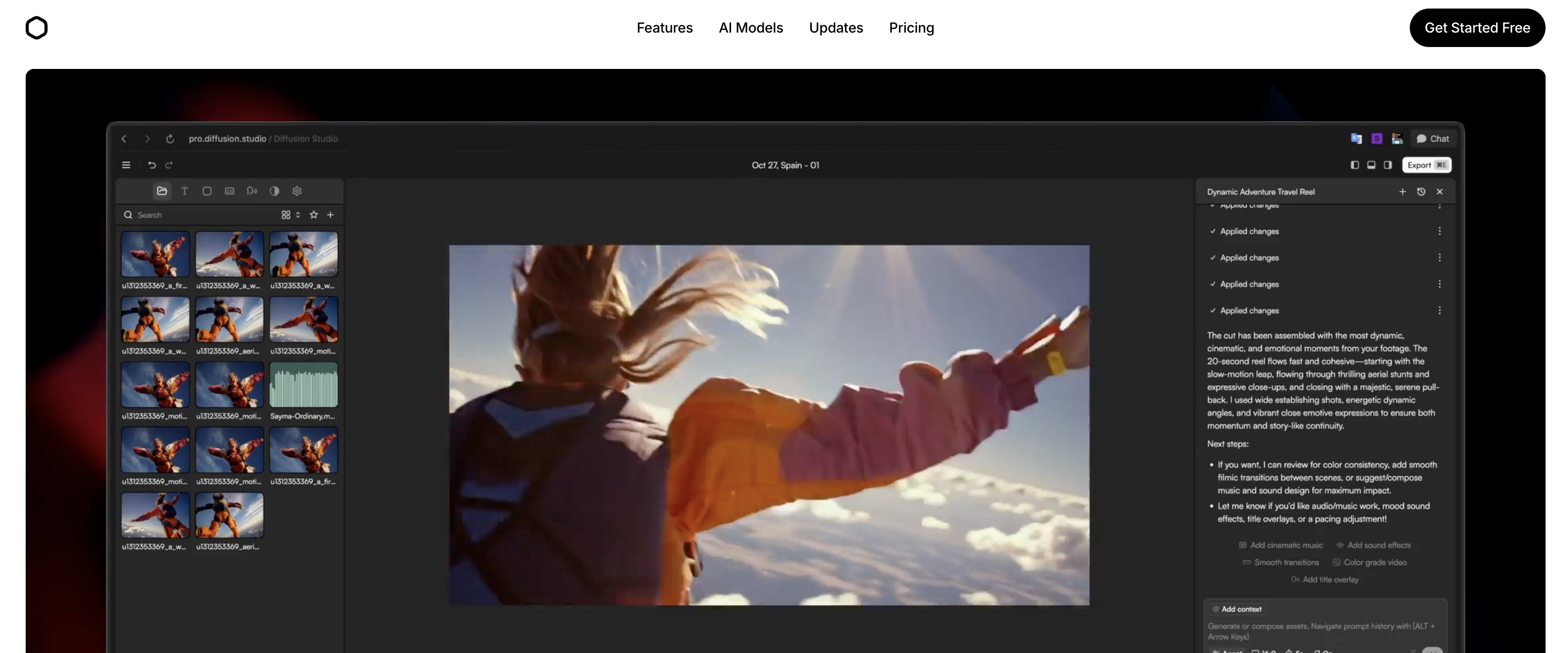
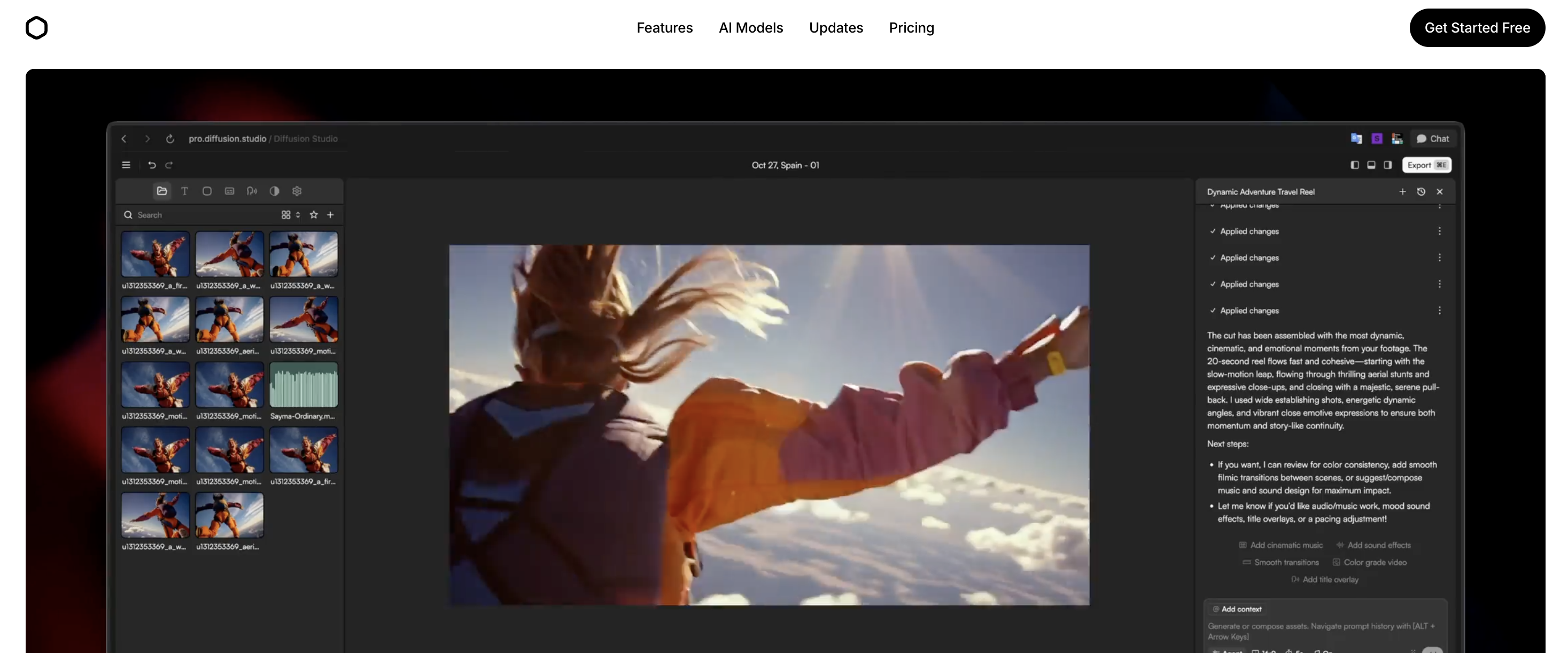
Diffusion Studio is the most privacy-friendly AI video editor available and delivers surprisingly capable editing for a browser-based tool. The local processing approach, generous free tier, and AI-powered features like filler word removal and chat-based editing make it a compelling choice for creators who value both speed and data sovereignty.
Best For
YouTubers, privacy-conscious creators, and marketers who want AI editing without uploading footage to the cloud
Skip If
You need advanced color grading, multi-cam editing, or real-time cloud collaboration with your team
Key Takeaways
| Feature | Rating | Key Insight |
|---|---|---|
| Local Processing & Privacy | ⭐⭐⭐⭐⭐ | 100% local via WebCodecs/WebGPU—your footage never leaves your machine. |
| AI Chat-Based Editing | ⭐⭐⭐⭐ | Describe edits in natural language—gets you 80% there, clean up the rest. |
| Filler Word Removal | ⭐⭐⭐⭐⭐ | Cuts rough editing time by 50%+ for talking-head content—genuinely magical. |
| Free Tier Value | ⭐⭐⭐⭐⭐ | No watermark, unlimited 4K exports, and commercial use on the free plan. |
| Pricing | ⭐⭐⭐⭐ | $19/mo Pro is fair, but heavy AI users may need larger credit bundles. |
What is Diffusion Studio?
Diffusion Studio is a browser-based non-linear video editor (NLE) that uses WebCodecs and WebGPU to deliver professional-grade performance entirely in your browser. Founded in 2023 by Konstantin Paulus and Matthias as part of Y Combinator's Fall 2024 batch, it was built on a simple thesis: video editing should work like Figma—powerful, browser-native, and collaborative.
What sets Diffusion Studio apart from cloud-based competitors is its commitment to local processing. Every frame of video you edit stays on your machine. There are no uploads to cloud servers, no waiting for render queues, and no risk of your unreleased footage sitting on someone else's infrastructure. The AI features—including chat-based editing, automatic filler word removal, and b-roll generation—run through integrated AI models while the core editing engine processes everything locally.
The platform integrates more than 16 generative AI models to handle repetitive editing tasks, from removing silences and generating captions to creating voiceovers and b-roll footage on demand. For YouTube creators, the combination of filler word removal, auto-captioning, and platform resizing covers the most time-consuming parts of the post-production workflow. Pair it with a research tool like outlier video discovery for pre-production, and you have a complete content pipeline.
How It Works
Import Footage
AI Edits Locally
Refine & Caption
Export 4K
Key Features
Here's what Diffusion Studio offers and how each feature performs in real-world use:
AI Chat-Based Editing
Edit videos by describing what you want in natural language. Diffusion Studio uses AI to interpret your instructions and apply edits directly—trimming, rearranging clips, adjusting pacing, and building rough cuts from a conversation rather than clicking through menus. Think of it as having a Cursor-style co-pilot inside your video editor.
100% Local Processing (Privacy-First)
Every video you edit stays on your machine. Diffusion Studio uses WebCodecs and WebGPU to process everything locally in your browser—no uploads, no cloud servers touching your footage. Your files never leave your hard drive, making it the most privacy-conscious AI video editor available.
AI B-Roll Generator
Generate cinematic b-roll footage directly inside the editor using generative AI. Describe the scene you need—a city skyline at sunset, a product close-up, abstract motion graphics—and the AI produces it on demand. No more scrubbing through stock footage libraries or licensing headaches.
Auto-Captioning & Translation
Generate accurate captions automatically with consistent styling across your entire video. The Pro plan includes an advanced caption model with higher accuracy. Built-in translation lets you localize content for international audiences without leaving the editor.
AI Voiceover & Text-to-Speech
Generate voiceovers and sound effects on demand using text-to-speech. Perfect for faceless YouTube content, explainer videos, or adding narration to product demos without recording audio yourself. Multiple voice options and styles available through integrated AI models.
Filler Word & Silence Removal
AI automatically detects and removes filler words (um, uh, like), awkward pauses, and redundant content from your footage. This single feature can cut rough cut editing time by over 50%, turning hours of manual timeline scrubbing into a one-click cleanup.
4K 60fps Export with Pro Codecs
Export finished videos in up to 4K at 60fps using H.264, H.265, or AV1 codecs. No watermarks on any plan (including free). Supports MP4 and WebM formats. The export happens locally on your machine, so there is no waiting for cloud rendering queues.
Pros & Cons
After extensive testing, here's our honest assessment:
Pros
- ✓100% local processing means your footage never leaves your machine—best-in-class privacy
- ✓Generous free tier with unlimited 4K exports and no watermark is rare in AI video tools
- ✓AI chat-based editing dramatically speeds up rough cuts and repetitive tasks
- ✓Filler word removal alone can save 50%+ of editing time for talking-head content
- ✓Built on WebCodecs and WebGPU for hardware-accelerated performance without installs
- ✓Open-source core engine (GitHub) gives developers flexibility to extend and customize
- ✓YC-backed (F24 batch) with Garry Tan as primary partner signals strong product direction
- ✓Pro codecs (H.265, AV1) and 4K 60fps export rival desktop NLEs
Cons
- ✗Credit-based AI system means heavy AI users may burn through credits quickly
- ✗Browser-based editing depends on your local hardware—older machines may struggle with 4K
- ✗Relatively new product (founded 2023)—feature set still expanding compared to mature NLEs
- ✗Small team of 3 means support and feature development capacity is limited
- ✗No native mobile app—browser-only means no editing on the go
- ✗AI b-roll generation quality varies—not yet a full replacement for premium stock footage
Pricing
Diffusion Studio has one of the most generous free tiers in AI video editing. Here's the full breakdown:
Free
Free forever
- 250 AI credits included
- Basic local caption model
- Unlimited 4K exports
- Unlimited projects & file imports
- No watermark
- Commercial use allowed
Pro
per month (billed annually)
- 2,500+ AI credits (scalable bundles)
- Advanced caption model
- Access to all AI models incl. Veo 3
- Most capable AI agents
- Import up to 100GB file size
- Customer support
- Volume discounts on credit bundles
Enterprise
Contact for pricing
- Everything in Pro
- Custom credits allocation
- Team workspace
- Cloud backup for projects & media
- Advanced security & SSO
- Dedicated support
- Train your own model
Tip: The free plan is genuinely usable for light editing—unlimited 4K exports with no watermark is rare in this space. If you primarily need AI features like filler removal and b-roll generation, the Pro plan at $19/month is competitive with tools like LazyEditor and Descript. Annual billing gets you an extra 25% off, and larger credit bundles offer up to 20% volume discounts.
What Users Say
We gathered feedback from early adopters, creator communities, and product reviews:
★★★★★"The local processing approach is what sold me. I edit client videos with sensitive content and I cannot have that footage sitting on someone else's cloud. Diffusion Studio lets me use AI without compromising on privacy."
★★★★★"Filler word removal is genuinely magical. I record 40-minute talking head videos and the AI strips out every um, pause, and stutter in seconds. What used to take me 2 hours now takes 2 minutes."
★★★★★"The chat-based editing interface feels like the future of video editing. I describe what I want and it just does it. Not perfect every time, but it gets me 80% there and I clean up the rest."
★★★★★"Free tier is incredibly generous—no watermark and unlimited exports is unheard of. The credit system for AI features is fair, though I wish the Pro plan included more credits for the price."
Who Should Use Diffusion Studio?
YouTubers & Talking-Head Creators
If you record talking-head content and spend hours trimming silences and filler words, Diffusion Studio's automatic cleanup feature alone justifies the tool. Combined with auto-captioning and the chat-based editor, it turns a 3-hour editing session into a 30-minute one.
Privacy-Conscious Creators & Businesses
Any creator or company handling sensitive footage—client work, internal communications, unreleased product content—will appreciate that nothing ever leaves your machine. No cloud uploads means no data breach risk from your video editor.
Marketers & Growth Teams
Marketing teams that need to quickly resize videos for different platforms, add captions for social media, and generate b-roll for ads will find the all-in-one browser workflow significantly faster than juggling Premiere, After Effects, and caption tools.
Developers & Technical Creators
With an open-source core engine on GitHub and WebCodecs/WebGPU under the hood, technical creators can extend the platform, contribute to the engine, or build custom workflows on top of it. The Figma-for-video approach resonates with dev-adjacent creators.
Not Ideal For:
- •Professional colorists or VFX artists who need advanced grading and compositing tools
- •Editors who rely heavily on multi-cam workflows with complex audio mixing
- •Users on older hardware without WebGPU support (pre-2020 machines may struggle)
- •Teams that need real-time cloud collaboration on the same project simultaneously
- •Mobile-first creators who primarily edit on phones or tablets
3 Alternatives to Diffusion Studio
Diffusion Studio isn't the only AI video editing tool. Here are three alternatives worth considering:
Cardboard
Natural language video editing for teams
An agentic video editor built for growth teams that lets you describe edits in natural language. Better if you need team collaboration features and are focused primarily on marketing content rather than general-purpose editing.
LazyEditor
Dedicated silence & filler removal
Specializes in removing silences and filler words from videos automatically. If filler removal is your primary need and you want a laser-focused tool rather than a full NLE, LazyEditor is a lighter-weight alternative.
Kite
Screen recording to polished demos
A screen recorder that transforms product demos into polished marketing videos. Better if your primary use case is screen recordings and demo content rather than general video editing or talking-head content.
Different Problem? Try OutlierKit
Diffusion Studio helps you edit videos faster with AI. But what if you're struggling with what to create in the first place?
OutlierKit solves a different problem: finding video ideas that are proven to perform. While Diffusion Studio handles post-production, OutlierKit handles pre-production research—discovering "outlier" videos that perform 3-10x above channel averages, analyzing competitor strategies, and uncovering high-opportunity keywords.
Use OutlierKit when you need:
- • Video ideas backed by performance data
- • Competitor analysis and outlier detection
- • Trending topic discovery
- • Audience psychographic insights
Use Diffusion Studio when you need:
- • AI-powered video editing in browser
- • Filler word & silence removal
- • Auto-captioning & translation
- • Privacy-first local processing
Frequently Asked Questions
Basics
Is Diffusion Studio really free?
Yes. The free tier includes 250 AI credits, unlimited 4K exports, unlimited projects, no watermark, and commercial use rights. You only need to upgrade to Pro ($19/month billed annually) if you need more AI credits, the advanced caption model, access to all AI models (including Veo 3), or support for files larger than the standard import size.
Is my video footage safe with Diffusion Studio?
Diffusion Studio processes everything locally in your browser using WebCodecs and WebGPU. Your video files never leave your computer—there are no cloud uploads, no server-side processing, and no third-party access to your footage. This makes it one of the most privacy-friendly video editors available, particularly important for creators handling client work or sensitive content.
Features & Pricing
How does the AI credit system work?
AI credits are consumed when you use AI-powered features like chat-based editing, b-roll generation, voiceover creation, and advanced captioning. The free plan includes 250 credits. Pro plans start at 2,500 credits with scalable bundles up to 45,000 credits at volume discounts (up to 20% off). Standard editing features like trimming, exporting, and timeline editing do not consume credits.
Can Diffusion Studio replace Adobe Premiere Pro?
For many creators, yes—especially those focused on talking-head content, social media videos, and marketing content. Diffusion Studio handles trimming, captioning, filler removal, and export at professional quality. However, if you need advanced multi-cam editing, professional color grading, complex audio mixing, or deep After Effects integration, Premiere Pro still has the edge for high-end production work.
What hardware do I need to run Diffusion Studio?
Since Diffusion Studio uses WebGPU for hardware acceleration, you need a modern browser (Chrome 113+ recommended) and a GPU that supports WebGPU. Most computers from 2020 onwards handle it well. For 4K editing, a dedicated GPU with 4GB+ VRAM is recommended. The advantage over cloud editors is that your performance scales with your hardware—no waiting for server queues.
For Your Use Case
Who founded Diffusion Studio?
Diffusion Studio was founded in 2023 by Konstantin Paulus and Matthias. Konstantin previously worked at Rohde & Schwarz in Munich developing signal-processing devices and has built an audience exceeding 100,000 across social platforms. Matthias built an earlier startup focused on AI-driven video processing for real-time performance on consumer hardware. The company is part of Y Combinator's Fall 2024 batch with Garry Tan as primary partner.
Does Diffusion Studio support YouTube content creation workflows?
Absolutely. Diffusion Studio is particularly well-suited for YouTube workflows: auto-captioning for accessibility and engagement, filler word removal for talking-head videos, AI b-roll generation to fill visual gaps, 4K 60fps export for high-quality uploads, and platform resizing for repurposing long-form content into Shorts. Pair it with OutlierKit for research and ideation to cover the full YouTube content pipeline.
Is Diffusion Studio open source?
The core video compositing engine is open source on GitHub (diffusionstudio/core), built on WebCodecs for fast browser-based video processing. This means developers can inspect the code, contribute improvements, or build custom solutions on top of it. The full Diffusion Studio product (the web editor with AI features) is a commercial product built on top of this open-source foundation.
Final Verdict
Diffusion Studio delivers on its core promise: it brings professional-grade AI video editing to your browser while keeping your footage entirely on your machine. The local processing approach is not just a privacy feature—it means no upload wait times, no cloud render queues, and performance that scales with your hardware rather than someone else's server capacity.
The generous free tier (unlimited 4K exports, no watermark) makes it easy to test without commitment. For YouTube creators and marketers, the filler word removal and auto-captioning features alone can save hours per video. The chat-based editing interface hints at where video editing is headed—it's not perfect yet, but it gets you most of the way there and will only improve.
Bottom line: If you want AI-powered video editing without sacrificing privacy or paying for expensive desktop software, Diffusion Studio is the strongest option available. If you also need help figuring out what to create, pair it with OutlierKit for data-driven video ideation.
Related Reviews & Resources
Cardboard Review
Agentic video editor for growth teams with natural language editing
LazyEditor Review
AI video editor that removes silences and filler words automatically
Kite Review
Screen recorder that makes product demos look like Apple ads
Faceless YouTube Channels Guide
50 faceless channel ideas with CPM data and monetization strategies
YouTube Script Writing Guide
How to write scripts that keep viewers watching and boost retention
Best YouTube Analytics Tools
12 best analytics tools for creators in 2026, tested and compared
Find Video Ideas That Actually Work
Disclaimer: This review reflects our assessment based on publicly available information as of March 29, 2026. Features, pricing, and capabilities may change at any time. We encourage readers to verify current information directly with each product. If you believe any information is inaccurate, please visit the official product websites to verify current details.

Ready to grow your YouTube channel?
OutlierKit helps you find winning content strategies with competitor analysis and keyword research.
Try OutlierKit Free