Analyze Any YouTube Competitor's Entire Niche — From One Channel
The most complete YouTube competitor analysis tool. Enter one channel and Competitor Studio scans thousands of competitors to reveal who's winning, why they're winning, and where your opportunity lies — audience psychology, outlier videos, sponsor intelligence, monetization strategies, and comment signals, all from a single query.
- Scans thousands of competitors automatically
- Audience psychographics with psychology profiles
- Sponsor intelligence & monetization mapping
- 1,000–5,000+ outlier videos per analysis





Loved by 5,000+ YouTubers
1000s
Channels Analyzed Per Query
TL;DR
Competitor Studio is OutlierKit's YouTube competitor analysis tool that scans thousands of channels from a single seed — delivering audience psychographics, sponsor intelligence, monetization mapping, outlier videos, and comment intelligence in one report.
8 Intelligence Modules. One Query.
Enter any YouTube channel. Competitor Studio uses it as a seed to scan thousands of channels in that niche, delivering a complete competitive intelligence report.
Niche Mapping & Positioning
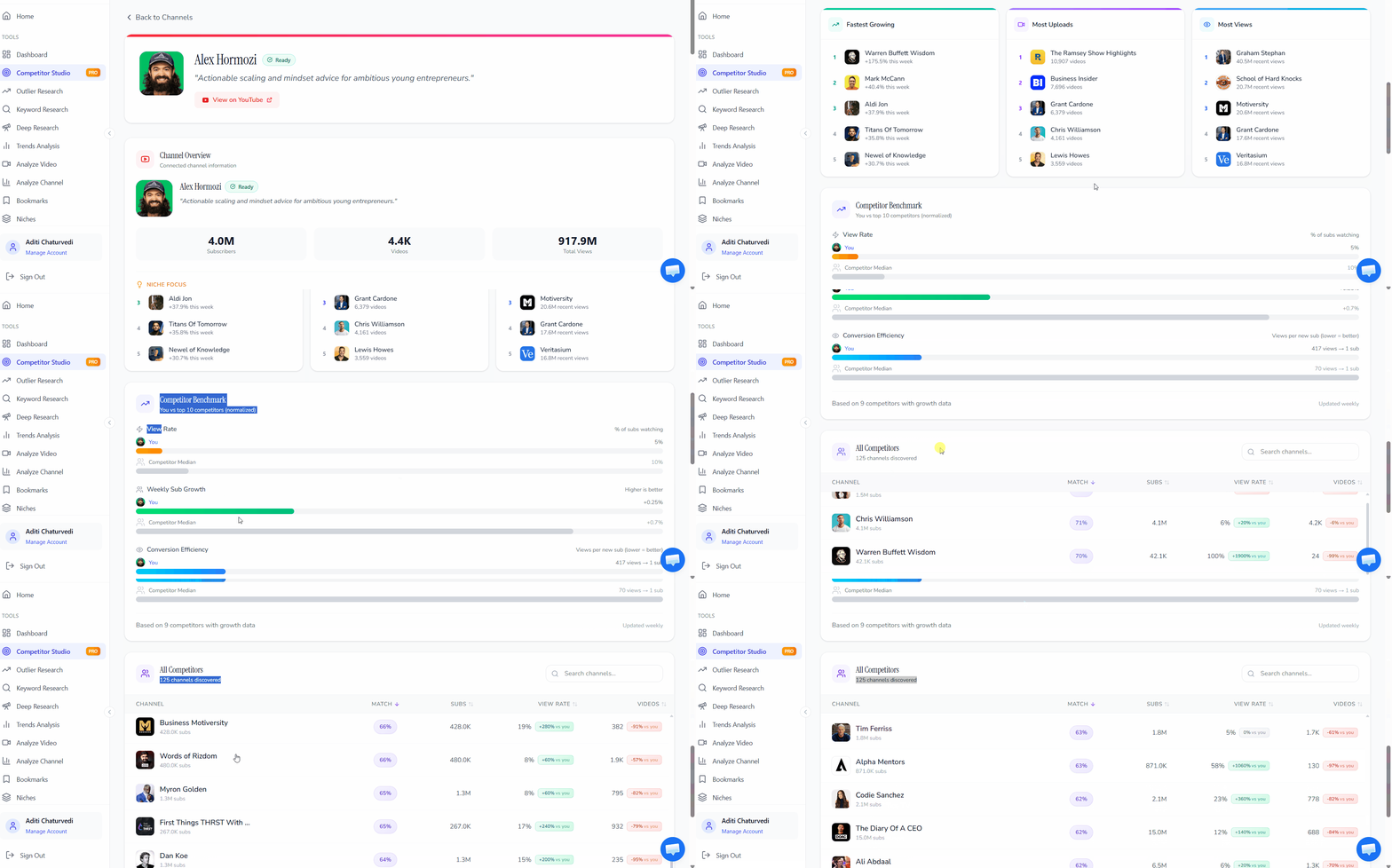
Enter any channel — Competitor Studio identifies its precise niche, maps where it outperforms the field, and surfaces the topic affinities that define the space. Know exactly where a channel stands before creating a single video.
Competitor Discovery at Scale
Not just the top 5. We surface competitors across multiple dimensions: fastest-growing, most uploads, most views, and emerging channels just getting started. See who actually matters in the niche, not just who's obvious.
Performance Benchmarking
Compare any channel against the niche median — view rate (percentage of subscribers actually watching), weekly subscriber growth relative to the space, and conversion efficiency (views-to-subscriber ratio). Know exactly where you stand.
Audience Psychographics
Go beyond demographics. Competitor Studio identifies specific viewer segments (e.g., "hustleface founders," "corporate escapers," "scale-stock operators") with detailed psychology profiles — drivers, motivations, pain points, and content preferences for each segment.
Unique to OutlierKit — no competitor offers audience psychographics at this depth.
Outliers & Opportunities
Surface 1,000–5,000+ outlier videos across the entire niche with channel attribution, relevance scoring, views, outlier score, and recency. See what's breaking through right now — with full niche context that standalone outlier tools can't provide.
Sponsor Intelligence
Map the sponsorship landscape — established sponsors, emerging sponsors, vertical integration patterns (creators promoting their own platforms), and which sponsor categories dominate the space. Know what content attracts sponsor money before you create it.
No other YouTube tool offers sponsor intelligence.
Funnels & Monetization
See how channels in any niche actually make money — percentage breakdown of lead magnets, newsletter signups, service sales, book sales, with specific channel examples for each monetization type.
Industry First — No other tool provides this.
Comment Intelligence
Analyze comments across the entire niche to surface audience requests, recommendations, pain points, and praise — with exact comments, attribution, and actionable guidance on whether to act on each signal.
Niche-wide comment analysis. VidIQ and TubeBuddy offer comment management for your own channel only.
What Used to Take 5 Tools Now Takes One Query
Competitor Studio combines the capabilities of standalone channel analysis, outlier detection, audience research, niche research, and deep content research — all from entering a single YouTube channel.
Channel Analysis Tool
What you'd normally need: Analyze a single competitor's videos, growth, and strategy
Competitor Studio delivers: Analyzes thousands of channels simultaneously, benchmarks against niche medians, discovers competitors you didn't know existed
Single-channel deep dives →Outlier Finder Tool
What you'd normally need: Search for outlier videos by keyword or channel
Competitor Studio delivers: Surfaces 1,000–5,000+ outlier videos across the entire niche with relevance scoring, channel attribution, and full context
Quick outlier searches →Video Analyzer Tool
What you'd normally need: Analyze a single video's hooks, script, and performance
Competitor Studio delivers: Reveals which video formats, engagement triggers, and content styles resonate with specific audience segments across the whole niche
Analyze individual videos →Deep Research Tool
What you'd normally need: AI-powered content ideas from a research prompt
Competitor Studio delivers: Provides the data layer that powers smarter research — audience psychology, content gaps, and proven topic opportunities
AI-powered content ideas →Niche Research Tool
What you'd normally need: Discover profitable niches to enter
Competitor Studio delivers: Maps a niche you've already identified — competitive density, audience segments, monetization strategies, and where the gaps are
Discover new niches →Each of these tools works great on its own. But Competitor Studio is where they converge — delivering the complete competitive picture that individual tools can only show pieces of.
From One Channel to Complete Niche Intelligence
Enter any YouTube channel URL
Paste any channel URL or search by name. Competitor Studio uses it as a seed to identify the niche.
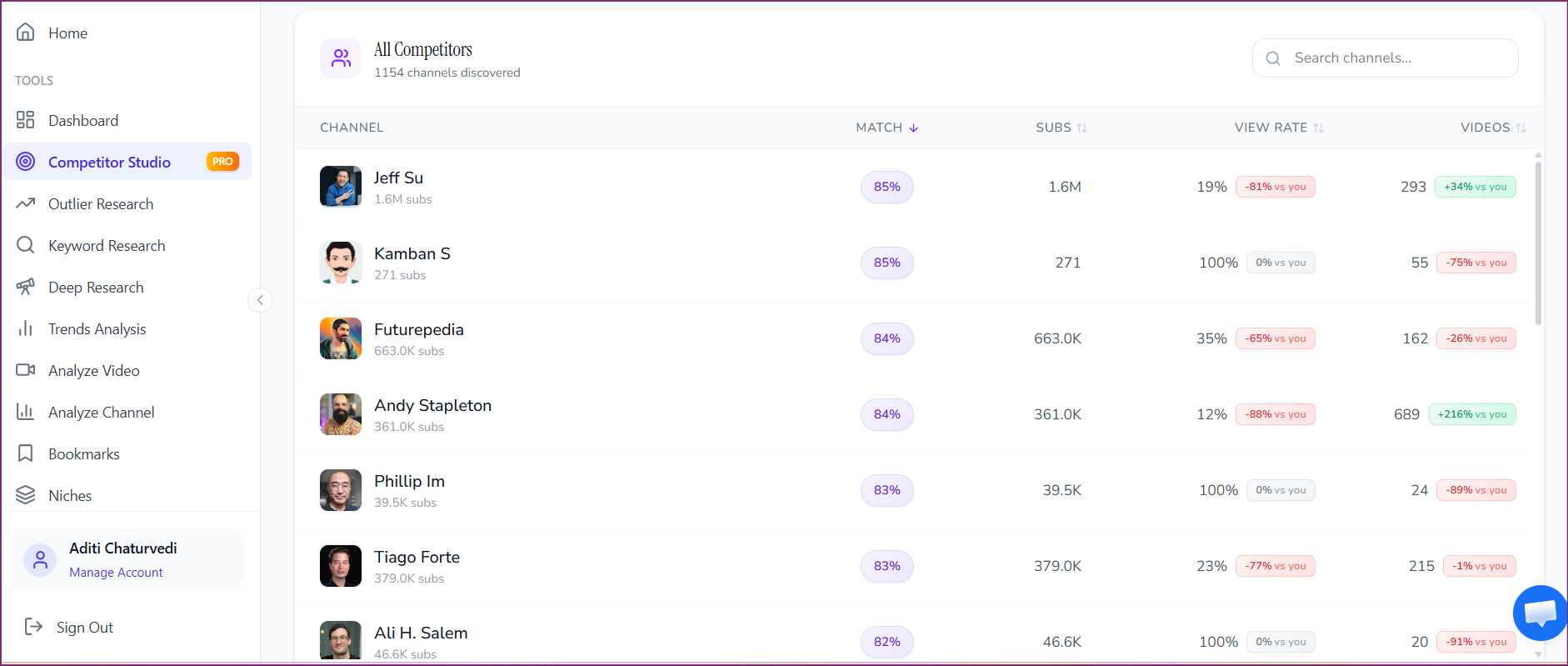
We scan thousands of channels in that niche
Our engine analyzes competitors, audience patterns, content performance, sponsors, monetization strategies, and comments across the entire space.
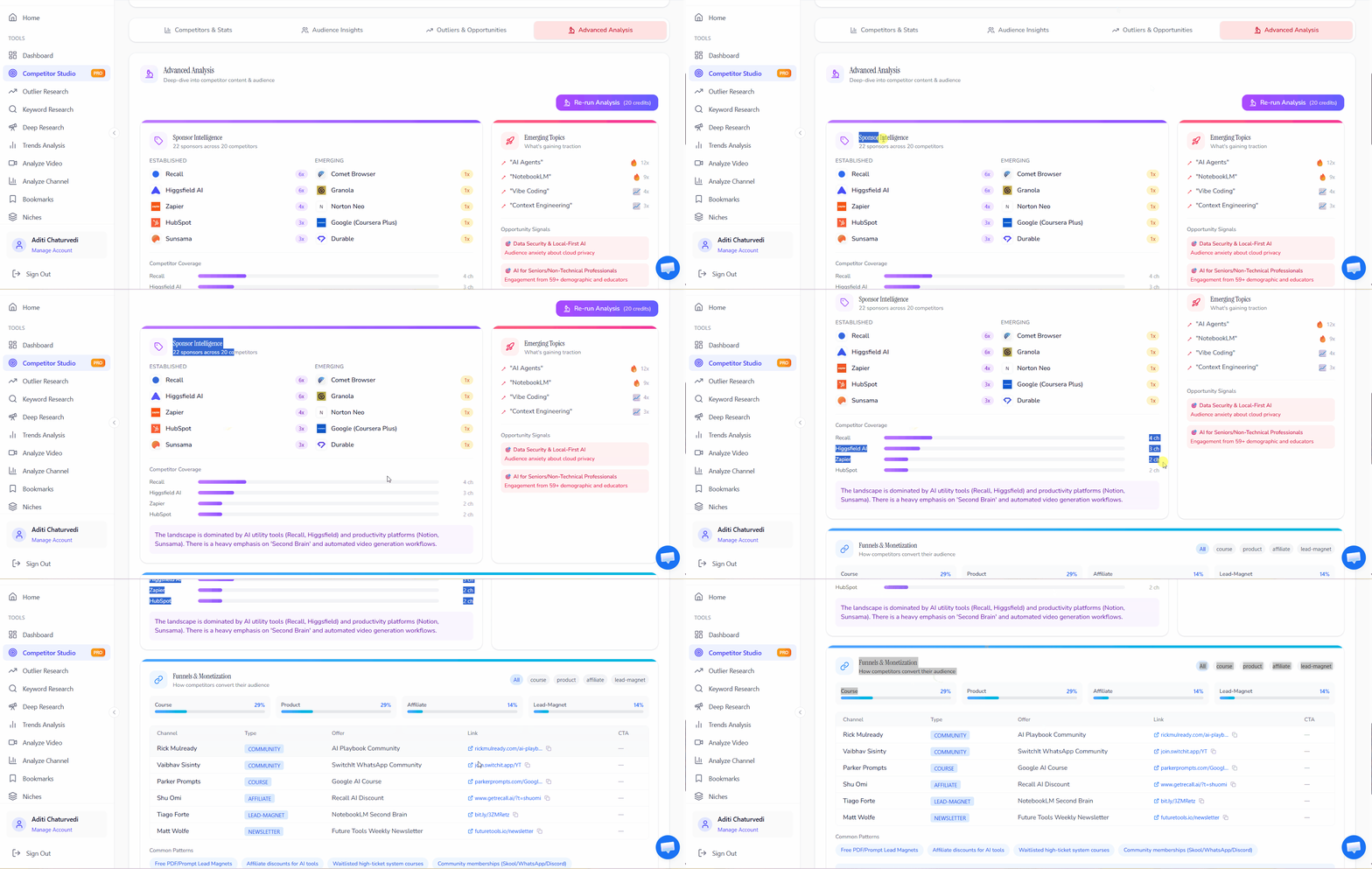
Get your complete niche intelligence report
Actionable insights across 8 intelligence modules — audience psychology, outlier videos, sponsor data, monetization funnels, and more. Ready to act on immediately.
Not Another Competitor Tracker. A Niche Intelligence Engine.
Most YouTube tools let you track a handful of competitors manually. Competitor Studio maps the entire competitive landscape automatically — and layers intelligence no other tool provides.
| Typical Competitor Analysis | Competitor Studio | |
|---|---|---|
| Scope | Analyze one channel at a time | Scans thousands of channels per query |
| Competitors | You manually pick 3-20 to track | We auto-discover them — fastest-growing, emerging, most active |
| Audience | Basic demographics (age, gender) | Psychographic segments with psychology profiles |
| Insights | What happened (metrics and stats) | Why it works + what to do next |
| Monetization | Not covered | Full funnel and monetization breakdown with channel examples |
| Sponsors | Not covered | Sponsor landscape mapping with categories and trends |
| Comments | Moderation on your own channel | Niche-wide comment intelligence with actionable signals |
| Outliers | Top 10-20 videos from tracked channels | 1,000-5,000+ outlier videos across the entire niche with scoring |
How Competitor Studio Compares
Most YouTube tools offer some form of competitor tracking or outlier detection. Competitor Studio goes further — it maps the entire niche ecosystem from a single channel, layering intelligence no other tool provides.
| Feature | OutlierKit Competitor StudioBest Value | VidIQ | TubeBuddy | 1of10 | Social Blade |
|---|---|---|---|---|---|
| Niche-wide auto-scanning (thousands of channels from one seed) | Core feature | Manual add (up to 20) | Limited niche view | Keyword search only | |
| Auto competitor discovery (fastest-growing, emerging, most active) | Multi-dimensional | Manual add | Manual add | Basic via Niche Explorer | |
| Outlier video detection | 1,000–5,000+ with niche context | Robust with filters | Content Standouts | Core feature (millions tracked) | |
| Audience psychographics (viewer segments, psychology profiles) | Segment-level profiles | Basic demographics only | |||
| Content preferences & engagement triggers | |||||
| Sponsor intelligence (landscape mapping, categories, trends) | |||||
| Funnels & monetization mapping (with channel examples) | Industry first | ||||
| Comment intelligence (niche-wide requests, pain points, praise) | Niche-wide with attribution | Own channel only | Own channel only | ||
| Performance benchmarking vs niche median | View rate, growth, conversion | Limited | Niche Leaderboard | Basic stats |
Every Tool Finds Outliers. Only Competitor Studio Tells You Why They Worked.
VidIQ, TubeBuddy, and 1of10 all offer outlier detection — and they do it well. Where Competitor Studio diverges is context. We don't just surface outlier videos. We surface them within a complete niche intelligence layer: who the audience segments are and what psychologically drives them to click, what sponsors are paying for in this space, how channels in the niche actually monetize, and what the comment signals say about unmet audience needs. Other tools show you the outlier. Competitor Studio shows you the ecosystem that made it an outlier.
Unlock Competitor Studio
Competitor Studio is available on Pro and Max plans. Each analysis costs 50 credits and delivers a complete niche intelligence report across all 8 modules. Start with a free trial — no credit card required.
Hobby
or $16.6/mo ($199 billed annually)
For content creators getting started
- 100 credits/month
- Outlier video detection (5 credits)
- Keyword research (1 credit)
- Video script analysis (10 credits)
- Competitor analysis (20 credits)
- Competitor Studio not included — upgrade to Pro to unlock
Pro
or $24.9/mo ($299 billed annually)
For professionals — includes Competitor Studio
- 500 credits/month
- Competitor Studio (50 credits per analysis — run up to 10/month)
- Outlier video detection (5 credits)
- Keyword research (1 credit)
- Video script analysis (5 credits)
- Competitor analysis (10 credits)
- Deep Research (20 credits)
Max
or $83/mo ($999 billed annually)
For serious creators & teams
- 2,000 monthly research credits
- Competitor Studio (50 credits per analysis — run up to 40/month)
- Integrate up to 50+ YouTube channels
- All Pro features included
- Advanced Competitor Identification and Research
- Update Data on Demand
- API Access (coming)
Managing multiple client niches? The Max Plan's 2,000 credits/month supports 40 full Competitor Studio analyses — enough for an entire agency portfolio. Additional credits available at $10 per 100.
What Creators Say About OutlierKit
Join thousands of YouTubers who have transformed their content strategy with data-driven competitive intelligence.
“Been creating for years, running multiple YouTube channels. OutlierKit is the first tool that actually improved our view counts almost instantly. The competition analysis revealed gaps we never knew existed. We now rank for multiple keywords in our industry that generate substantial monthly revenue.”
“OutlierKit has been a recent addition to my toolkit. It has drastically reduced my time to plan out content for my SaaS's YouTube channel. The deep research feature has revealed insights that I overlooked earlier. A must have tool in your arsenal if you are serious about YouTube as an acquisition channel.”
“I find it very helpful in identifying trends for DevOps / Cloud topics, comparing video performance and insights on what worked and what didn't. Highly recommend it.”
“The YouTube Channel Analysis feature makes it super easy to dive deep into performance and audience insights without getting lost in endless raw data. The interface is super clean and user friendly. Highly recommend!!”
Verified Ratings Across Platforms
Frequently Asked Questions About Competitor Studio
Everything you need to know about OutlierKit's niche-wide YouTube competitor analysis tool.
Basics
What is Competitor Studio?
How is Competitor Studio different from regular competitor analysis?
How many channels does Competitor Studio analyze per query?
Features
What are audience psychographics?
How does Sponsor Intelligence work?
What does the Funnels & Monetization module show?
What is Comment Intelligence?
Pricing & Usage
How many credits does a Competitor Studio analysis cost?
Is Competitor Studio available on all plans?
Can I run multiple niche analyses?
Comparisons
How is Competitor Studio different from VidIQ's YouTube competitor analysis features?
How do you analyze a YouTube competitor?
What are the best free YouTube competitor analysis tools?
How to analyze competitor tags on YouTube?
Does any other tool offer sponsor and monetization intelligence?
Do VidIQ, TubeBuddy, and 1of10 have outlier detection?
How to find competitor ads on YouTube?
Competitor Studio Connects Your Entire YouTube Toolkit
Competitor Studio is the intelligence layer that makes every other OutlierKit tool more powerful. Explore the tools it connects to.
Competitor Analysis Tool
Deep-dive into any single YouTube channel's strategy, top videos, and growth patterns. Perfect for when you've identified a specific competitor to study.
Outlier Finder
Quick outlier video searches by keyword or channel. Find content performing 5-10x above average in any niche.
Video Analyzer
Break down any individual video's hooks, pacing, script structure, and performance. Understand why specific videos succeed.
Deep Research
AI-powered content ideas, titles, and strategies personalized to your channel and niche data.
Niche Research
Discover profitable, underserved content niches before committing. Validate opportunity before you invest.
Ready to analyze your competitors' entire niche?
Join 10,000+ YouTubers using OutlierKit's YouTube competitor analysis tool to understand their competitive landscape and grow their channels faster.
Start Free — No Credit Card