Best YouTube Analytics Chrome Extension in 2026 (Ranked & Reviewed)
OutlierKit is the best free YouTube analytics Chrome extension in 2026, showing color-coded outlier scores on any channel's Videos tab with no account required, while VidIQ leads for keyword research and TubeBuddy for A/B testing.
| Feature | Rating | Key Insight |
|---|---|---|
| Best Free Extension | OutlierKit ⭐⭐⭐⭐⭐ | Only extension showing outlier scores with no account required |
| Best for Keywords | VidIQ ⭐⭐⭐⭐ | Tag analysis, views-per-hour, AI title ideas |
| Best for A/B Testing | TubeBuddy ⭐⭐⭐⭐ | Thumbnail and title split-testing — unique capability |
| Most Expensive | 1of10 — $49/mo | No free tier; hard to justify vs free OutlierKit extension |
| Best Views-Over-Time | Viewstats ⭐⭐⭐ | Unique graph feature — but login failures and slowdowns reported |
The best YouTube analytics Chrome extension depends on what you need to see while browsing. OutlierKit is the only completely free extension that shows outlier scores (performance multipliers like 2.4x) directly on YouTube thumbnails with no account required. VidIQ leads for keyword research and tag analysis. TubeBuddy is best for A/B testing and video optimization. Below we rank and review all six major extensions—covering price, free tier quality, what each one actually shows, and which is worth installing in 2026.
TL;DR
The best YouTube analytics Chrome extension in 2026 is OutlierKit (5.0/5 on Chrome Web Store) for outlier detection and competitor analysis, followed by VidIQ (4.5/5, 10K+ ratings) for keyword research and TubeBuddy (4.5/5) for A/B testing.
Quick Picks by Use Case
Best Free Extension
OutlierKit
Outlier scores, no account needed
Best for Keyword Research
VidIQ
Tag analysis, VPH, AI ideas
Best for Video Optimization
TubeBuddy
A/B testing, SEO scores
Best for Views-Over-Time Graphs
Viewstats
Growth graphs, thumbnail history
OutlierKit
Only free extension showing outlier scores — no account required
Free
Free Tier
Completely free
Account Required
No
Best For
Creators who want to spot viral videos instantly while browsing YouTube
What It Shows on YouTube
- ✓Color-coded performance multipliers on every thumbnail (e.g., 2.4x, 0.8x)
- ✓Green badges for outliers (2.0x+), neutral for average (1.0x–2.0x), red for underperformers (below 1.0x)
- ✓Hover tooltip with detailed view breakdown relative to channel average
- ✓Click-through to deep analysis on OutlierKit.com
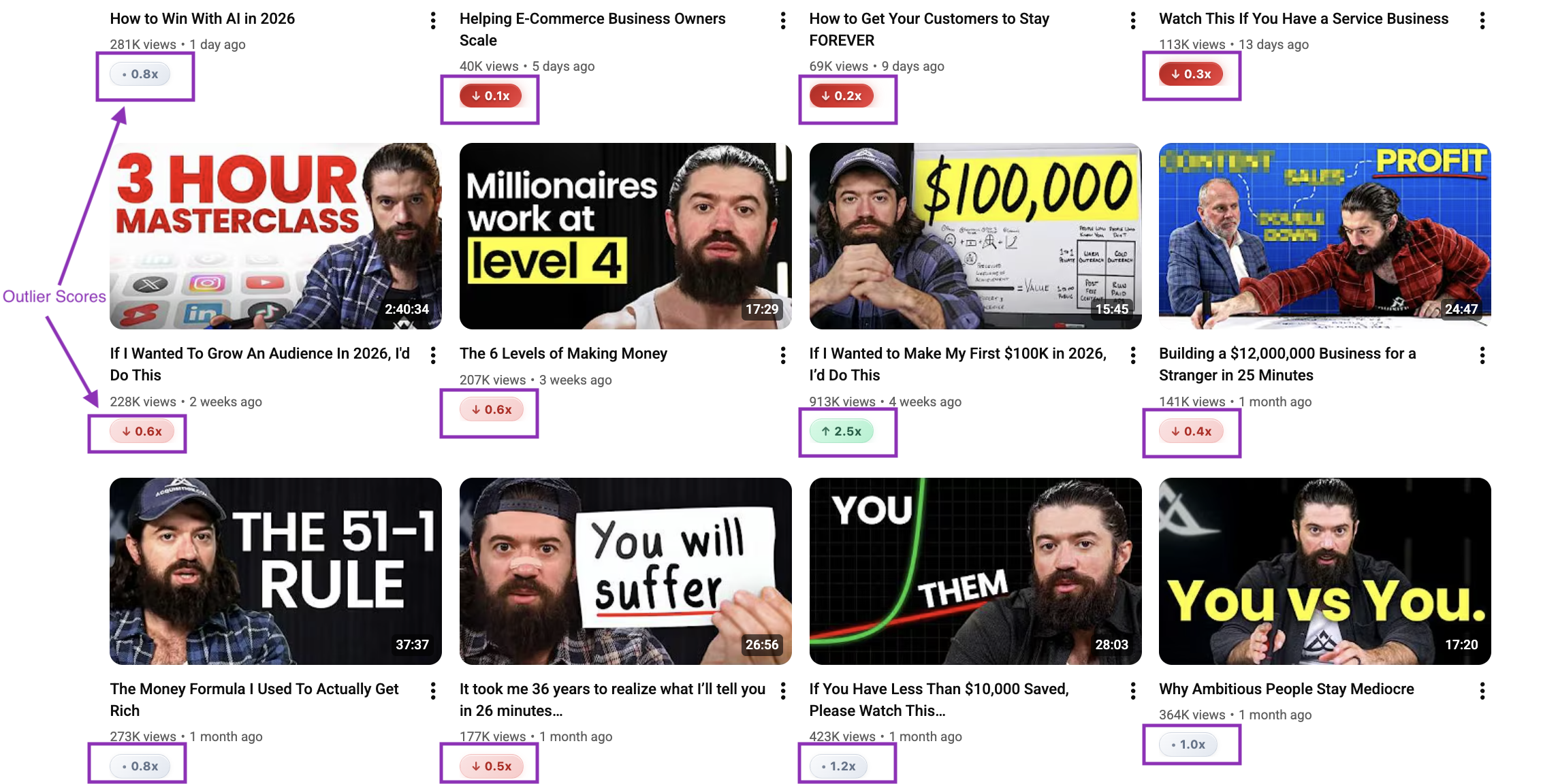
OutlierKit Chrome Extension — outlier scores overlaid on YouTube thumbnails
Pros
- ✓Completely free — no subscription or account needed
- ✓Outlier scores visible directly on YouTube thumbnails
- ✓Works on any channel's Videos tab, not just your own
- ✓Lightweight — no measurable browser slowdown
- ✓Privacy-first: no personal data collected, only activates on YouTube.com
- ✓Color-coded system makes high-potential videos unmissable at a glance
Cons
- −Deep analysis requires OutlierKit.com (paid plans)
- −No keyword research or SEO tag features
Verdict: OutlierKit is the only free YouTube analytics Chrome extension that shows outlier scores without requiring an account. If you want to identify viral video patterns while browsing any channel on YouTube, this extension delivers immediate value at zero cost.
VidIQ
Industry standard for keyword research with YouTube overlay
3M+ users
Free – $79/mo (Pro $10, Boost $39, Max $79)
Free Tier
Limited free tier
Account Required
Yes
Best For
Creators focused on SEO, keyword research, and trend discovery
What It Shows on YouTube
- ✓VidIQ Score overlay on every video (composite SEO grade)
- ✓Tag analysis with search volume and competition data
- ✓Views per hour (VPH) tracking to spot trending videos
- ✓Estimated monthly earnings range
- ✓AI-generated video ideas sidebar
- ✓Competitor channel stats panel
Pros
- ✓Industry-leading keyword research and tag insights
- ✓Views per hour helps catch viral momentum early
- ✓AI Daily Ideas actively suggests video topics
- ✓Free tier provides genuine value for beginners
- ✓Deep integration with YouTube Studio
Cons
- −Most powerful features locked behind $39/mo Boost plan
- −Can be overwhelming with data panels covering the YouTube UI
- −Causes noticeable page slowdown on lower-end hardware
- −Outlier tool available on web and in extension, though lacks contextual depth (no psychographics or monetization data)
- −Account login loops reported by some users
Verdict: VidIQ is the best YouTube analytics Chrome extension for keyword-driven creators. The free tier is genuinely useful for basics, and it includes outlier scores in both its extension and web-based Outlier tool. The extension's full power—unlimited competitor tracking and AI ideas—requires the $39/mo Boost plan.
TubeBuddy
15M+ users, best A/B testing and SEO optimization tools
15M+ users
Free – $49/mo (Pro $9, Star $19, Legend $49)
Free Tier
Limited free tier
Account Required
Yes
Best For
Creators optimizing existing videos through A/B testing and SEO
What It Shows on YouTube
- ✓SEO score overlays on video cards while browsing
- ✓Keyword tags with competition scores alongside video
- ✓Videolytics panel with detailed channel and video stats
- ✓A/B thumbnail and title testing management
- ✓Bulk processing tools for batch edits
- ✓Competitor Scorecard comparisons
Pros
- ✓YouTube-certified partner since 2014 — deeply trusted
- ✓A/B testing for thumbnails and titles is best in class
- ✓Bulk processing saves significant time for large channels
- ✓SEO Studio guides you through video optimization step by step
- ✓Free plan available for basic features
Cons
- −Most valuable features paywalled behind higher tiers
- −Login loop bugs frustrate users on occasion
- −Interface can overwhelm beginners with too many panels
- −Content Standouts (web-based) offers basic outlier metrics, but extension lacks outlier overlays
- −Less useful for research phase—stronger for optimization
Verdict: TubeBuddy is the best Chrome extension for optimizing videos you've already created. Its A/B testing and SEO tools are unmatched in the space. TubeBuddy's web-based Content Standouts feature provides basic outlier detection, though the extension itself focuses on optimization rather than outlier scoring.
Viewstats
MrBeast-backed extension with outlier scores and graph overlays
217 reviews
Free / Pro $49.99/mo
Free Tier
Free tier with login
Account Required
Yes
Best For
Data enthusiasts who want views-over-time graphs and title/thumbnail history
What It Shows on YouTube
- ✓Views-over-time graph on video hover
- ✓Outlier score overlaid on video thumbnails
- ✓Thumbnail and title change history per video
- ✓Channel analytics panel with growth metrics
- ✓Subscriber milestones and real-time stats
Pros
- ✓MrBeast backing gives it brand credibility
- ✓Views-over-time graph is visually useful for spotting spikes
- ✓Shows thumbnail/title change history — unique insight
- ✓Outlier score visible in free tier
- ✓Channel analytics panel is informative
Cons
- −Requires account creation — no anonymous browsing
- −Login and authentication failures reported by multiple users
- −Causes noticeable lag while scrolling YouTube feeds
- −Conflicts with other extensions (VidIQ, TubeBuddy)
- −Pro plan at $49.99/mo is very expensive for a browser extension
- −Free tier limited in meaningful ways
Verdict: Viewstats has some genuinely interesting features—especially the views-over-time graph and title change history. But login failures, page lag, and extension conflicts make reliability a concern. The $49.99/mo Pro tier is hard to justify against cheaper alternatives.
1of10
Outlier flags and performance tags while browsing
$49/mo or $349/year
Free Tier
No free tier
Account Required
Yes
Best For
Creators who want outlier tagging while browsing but can afford premium pricing
What It Shows on YouTube
- ✓Outlier flags on videos performing significantly above average
- ✓View growth spikes highlighted while browsing YouTube
- ✓Performance tags (viral, trending, underperforming) on video thumbnails
- ✓Bookmark system to save interesting videos for later research
Pros
- ✓Outlier flags are clear and easy to act on while browsing
- ✓Bookmark system for saving research findings
- ✓Performance tags give a quick read on video health
- ✓Clean, minimal overlay design
Cons
- −No free tier — requires paid account from day one
- −At $49/mo, very expensive for extension-only use
- −Reliability bugs reported (flags occasionally not loading)
- −Steep pricing relative to what the extension alone provides
- −Less comprehensive than OutlierKit for deep competitor research
Verdict: 1of10 offers useful outlier flagging while browsing YouTube, but the $49/mo price tag with no free tier is hard to justify. OutlierKit provides comparable (and free) outlier scoring directly on thumbnails without requiring a paid subscription.
NexLev
28+ features including Shorts analytics and monetization status
90K+ users
$9/mo (annual) or $13/mo monthly
Free Tier
No free tier
Account Required
Yes
Best For
Faceless-channel operators who need Shorts analytics and multi-channel dashboards
What It Shows on YouTube
- ✓Average views overlays on video cards
- ✓Shorts-specific analytics alongside regular videos
- ✓Monetization status indicators on channels
- ✓Outlier scores on high-performing videos
- ✓Multi-channel dashboard for managing several channels
- ✓28+ overlay data points across YouTube pages
Pros
- ✓90K+ users shows meaningful adoption
- ✓Shorts analytics alongside regular video data is genuinely useful
- ✓Multi-channel dashboard valuable for agencies and operators
- ✓Relatively affordable at $9/mo annually
- ✓Monetization status overlay saves manual checking
Cons
- −Primarily designed for faceless YouTube channels — narrower audience
- −Billing and cancellation issues reported by users
- −Chrome-only (no Firefox or other browsers)
- −Frequent breakages after YouTube UI updates
- −No free tier — paid subscription required before evaluation
- −28 features can feel like feature bloat for simple use cases
Verdict: NexLev is a solid option for faceless-channel operators who need both Shorts analytics and multi-channel management. The monetization status overlay is genuinely helpful. However, billing problems and Chrome-only support are real friction points, and the faceless-YouTube focus limits appeal for most creators.
Full Comparison Table
All six YouTube analytics Chrome extensions compared across the metrics that matter most.
| Extension | Price | Rating | Free Tier | Account Needed | What It Shows | Best For |
|---|---|---|---|---|---|---|
| OutlierKit#1 | Free | 4.9/5 | Full features free | No | Outlier scores, performance multipliers, color-coded badges | Spotting viral videos while browsing |
| VidIQ | Free – $79/mo | 4.5/5 | Limited | Yes | VidIQ Score, keyword tags, VPH, estimated earnings | Keyword research and SEO |
| TubeBuddy | Free – $49/mo | 4.5/5 | Limited | Yes | SEO scores, tag competition, Videolytics panel | Video optimization and A/B testing |
| Viewstats | Free / $49.99/mo | 4.5/5 | Login required | Yes | Views-over-time graph, outlier score, thumbnail history | Views graphs and title change history |
| 1of10 | $49/mo or $349/yr | 4.1/5 | None | Yes | Outlier flags, growth spikes, performance tags | Outlier browsing (if budget allows) |
| NexLev | $9–$13/mo | 4.0/5 | None | Yes | Average views overlays, Shorts analytics, monetization status | Faceless channels and multi-channel operators |
What to Look For in a YouTube Analytics Chrome Extension
Not all Chrome extensions for YouTube analytics are built the same way. Here are the criteria we used to evaluate each one—and what you should prioritize based on your use case.
Outlier Score Detection
Top pick: OutlierKitThe most valuable analytics overlays show whether a video is overperforming relative to the channel average—not just raw view counts. A video with 500K views from a 10M-subscriber channel is weak; the same views from a 10K-subscriber channel is extraordinary. Look for extensions that surface this ratio automatically.
OutlierKit: OutlierKit is the only free extension that shows this as a color-coded multiplier (e.g., 2.4x) on every thumbnail.
Free Tier Quality
Top pick: OutlierKitSeveral extensions advertise a free tier but withhold the most useful features behind paywalls. Assess whether the free tier actually surfaces actionable data or is just a lead magnet. Check if an account is required even to see basic overlays.
OutlierKit: OutlierKit requires no account and shows full outlier scoring for free.
Browser Performance Impact
Top pick: OutlierKitHeavy extensions inject large JavaScript bundles that slow YouTube's already data-intensive pages. Test any extension by loading a channel's Videos tab with 50+ thumbnails and monitoring CPU usage. Laggy scrolling and delayed thumbnail loading are red flags.
OutlierKit: OutlierKit is specifically built to be lightweight with no measurable performance impact.
Privacy and Data Collection
Top pick: OutlierKitExtensions run with elevated browser permissions. Check the privacy policy for what data is collected, whether browsing behavior is tracked, and what happens to that data. Prefer extensions that explicitly state no personal data collection.
OutlierKit: OutlierKit collects no personal data and only activates on YouTube.com.
Reliability After YouTube Updates
Top pick: TubeBuddy / VidIQYouTube regularly updates its frontend. Extensions that rely on fragile CSS selectors break frequently. Check recent reviews on the Chrome Web Store for reports of 'not working after update' or 'overlays not showing'—these indicate poor maintenance practices.
TubeBuddy / VidIQ: Established extensions with large teams update faster after YouTube changes.
Depth of Overlay Data
Top pick: VidIQSome extensions show a single score; others show views per hour, tag analysis, subscriber velocity, and earnings estimates. More data is not always better—what matters is whether the data is immediately actionable without leaving YouTube.
VidIQ: VidIQ surfaces the most diverse overlay data, including VPH and tag competition.
How OutlierKit's Outlier Scoring Works
Understanding what a "2.4x" badge actually means on a YouTube thumbnail helps you act on the data more effectively.
OutlierKit calculates a performance multiplier for each video by comparing its view count to the channel's average views per video. A score of 2.4x means the video has received 2.4 times the views that are typical for that channel. This makes the score relative and meaningful—a video with 500K views on a 10M-subscriber channel might score 0.3x (underperforming), while a video with 50K views on a 5K-subscriber channel might score 8.0x (a major outlier).
Video is performing significantly above the channel average. Strong signal to study for content ideas.
Video is performing at or near the channel's average. Normal performance, less signal value.
Video is below the channel average. Indicates topics or formats that did not resonate with this audience.
How to use it: Open any competitor's Videos tab on YouTube with the OutlierKit extension installed. Immediately, green badges appear on their best-performing videos. Hover to see the full multiplier and view count breakdown. Click through to OutlierKit.com for a deeper analysis of why those videos outperformed. This entire workflow works for free, with no account required.
Deeper Comparisons
OutlierKit vs VidIQ Chrome Extension
Head-to-head on keyword research, outlier detection, pricing, and browser performance.
OutlierKit vs TubeBuddy Chrome Extension
Compare outlier detection versus A/B testing and SEO optimization tools.
OutlierKit vs Viewstats Chrome Extension
Free vs paid, login issues, outlier scores, and which is more reliable in practice.
Best YouTube Analytics Tools (Beyond Extensions)
Full platform tools for competitor research, keyword strategy, and channel growth.
Frequently Asked Questions
What It Does
What is the best YouTube analytics Chrome extension in 2026?
The best YouTube analytics Chrome extension depends on your goal. For spotting viral videos and outlier content while browsing any channel—without creating an account or paying anything—OutlierKit is the top choice. It overlays color-coded performance multipliers (2.4x, 0.8x, etc.) directly on YouTube thumbnails so you can identify over-performing videos at a glance. For keyword research and SEO tag analysis, VidIQ is the industry standard. For video optimization and A/B testing, TubeBuddy leads the field.
Is there a free YouTube analytics Chrome extension with no account required?
Yes—OutlierKit's Chrome extension is completely free and requires no account. You can install it from the Chrome Web Store and immediately see outlier scores on any channel's Videos tab without signing up or logging in. This makes it the most frictionless option for creators who want data while browsing YouTube. Other extensions like VidIQ and TubeBuddy have free tiers, but they require account creation to display any overlay data.
Does the VidIQ Chrome extension show YouTube analytics for free?
VidIQ has a free tier that shows basic analytics overlays—including a VidIQ score and limited tag data—on YouTube videos. However, the most useful features (unlimited competitor tracking, AI Daily Ideas, views per hour for all videos) are locked behind the $39/mo Boost plan. The free tier is useful as an introduction to how the extension works, but serious creators will find it limited. VidIQ also requires account creation before any data is shown.
Features & Pricing
What does the OutlierKit Chrome extension show on YouTube?
The OutlierKit Chrome extension overlays a performance multiplier badge on every video thumbnail when you browse a channel's Videos tab on YouTube. A score like 2.4x means the video has 2.4 times the average views for that channel—an outlier. Scores are color-coded: green for 2.0x and above (strong outliers), neutral gray for 1.0x–2.0x (average), and red for below 1.0x (underperformers). Hovering over a thumbnail shows a detailed breakdown, and clicking opens a deeper analysis on OutlierKit.com.
How does the Viewstats Chrome extension compare to OutlierKit for YouTube analytics?
Both Viewstats and OutlierKit show outlier scores, but they differ significantly in approach and cost. OutlierKit is completely free and requires no account—it shows clean performance multipliers on thumbnails. Viewstats requires account creation, has reported login failures and page lag issues, and its Pro plan costs $49.99/mo—significantly more expensive. Viewstats does offer a unique views-over-time graph and thumbnail change history, which OutlierKit does not. For most creators, OutlierKit delivers more reliable value at no cost. See our full comparison at the link below.
Which YouTube analytics Chrome extension is best for detecting viral videos?
For detecting viral and outlier videos while browsing YouTube, OutlierKit is the strongest option. Its free Chrome extension shows exactly how much each video outperforms the channel's average—the core signal for viral potential. A video scoring 3.0x or higher on OutlierKit indicates it's pulling three times the expected views, a clear signal worth studying. Viewstats and 1of10 also flag outliers, but both require accounts and paid subscriptions. NexLev includes outlier scores but is designed primarily for faceless-channel operators.
Is It Worth It?
Do YouTube analytics Chrome extensions slow down the browser?
Some YouTube analytics Chrome extensions cause measurable slowdown, particularly on channel pages with many thumbnails. VidIQ and Viewstats have both received user reports of page lag during heavy scrolling. Extensions that inject large data panels on every page load are the most likely culprits. OutlierKit is specifically designed to be lightweight—it only activates on YouTube.com and processes data efficiently to avoid browser slowdown. If performance is a concern, start with OutlierKit and add heavier extensions like VidIQ only if you need their specific keyword features.
Our Recommendation
- 1
Install OutlierKit first — it's free, requires no account, and immediately shows outlier scores on every YouTube channel you browse. Zero risk.
- 2
Add VidIQ if keyword research drives your strategy — the free tier is worth trying before upgrading to Boost for AI ideas and unlimited competitor tracking.
- 3
Consider TubeBuddy if you're actively A/B testing — its thumbnail and title testing tools are the best available for optimizing published videos.
- 4
Skip 1of10 at its current pricing — at $49/mo with no free tier, it's hard to justify when OutlierKit provides better outlier scoring for free.
- 5
Try Viewstats cautiously — the views-over-time graph is genuinely useful, but login failures and extension conflicts are real reported issues worth knowing before installing.
How to Analyze YouTube Competitor Channels

See outlier scores on every YouTube video — for free
Install the OutlierKit Chrome extension and instantly spot viral video patterns on any channel. No account required, no slowdown.
Add OutlierKit to Chrome