 OutlierKit
 UTubeKit
Free YouTube SEO Workflow
Complete YouTube SEO optimization using only free tools — no VidIQ or TubeBuddy subscription needed. Combine OutlierKit (4.9/5 on Product Hunt)'s keyword research and competitor analysis with UTubeKit's free title, hashtag, and description generators.
TL;DR
Rank higher on YouTube with a complete SEO workflow — from keyword research in OutlierKit to metadata optimization in UTubeKit. Covers every step from topic selection to publishing.
100% Free
No paid subscriptions needed
15 min
Per video optimization time
+85% CTR
Average click-through improvement
The Problem
YouTube SEO matters. Videos with optimized titles, descriptions, and tags get 2-5x more search traffic. But the tools most people recommend — VidIQ and TubeBuddy — cost $49-199/month for their useful features.
The free tiers of those tools are extremely limited:
- VidIQ (4.5/5 on G2 (33 reviews)) free: Only 3 keyword searches per day, no competitor tracking
- TubeBuddy (4.6/5 on Capterra (113 reviews)) free: Basic suggestions only, no A/B testing, no keyword explorer
- Both: Core SEO features locked behind $49/month Pro plans
The result? Most small creators skip YouTube SEO entirely — or do it poorly with guesswork. They leave views on the table because they can't afford the tools.
The Solution
OutlierKit handles the research — deep keyword analysis, competitor intelligence, and content gap discovery. UTubeKit handles the optimization — AI-powered title generation, scoring, hashtags, and descriptions. Together, they give you a complete SEO workflow that matches (and often beats) what you'd get from VidIQ or TubeBuddy.
Both tools have generous free tiers. UTubeKit is entirely free with no signup required.
Before vs. After: The Impact
VidIQ / TubeBuddy
- Cost$49-199/mo
- Free tier3 searches/day
- Keyword researchBasic (limited data)
- Competitor analysis$199/mo plan only
- Title optimizationManual + suggestions
- Description writingManual (15-30 min)
$588-2,388 / year
- Cost$0/mo (free plans)
- Free tierUnlimited searches
- Keyword researchDeep data + outlier detection
- Competitor analysisIncluded in free plan
- Title optimizationAI-generated + scored
- Description writingAI-generated (30 sec)
$0 / year — Save $588-2,388
The Complete Workflow at a Glance
Step-by-Step Workflow
Follow these 6 steps for every video. Total time: ~15 minutes once you get the hang of it.
OutlierKit Keyword ResearchFind High-Opportunity Keywords
Search your niche topic in OutlierKit's Keyword Research tool. Look for keywords with high search volume but low competition — specifically keywords where the top-ranking videos have relatively low view counts. These represent untapped demand: lots of people searching, but nobody making great content yet.
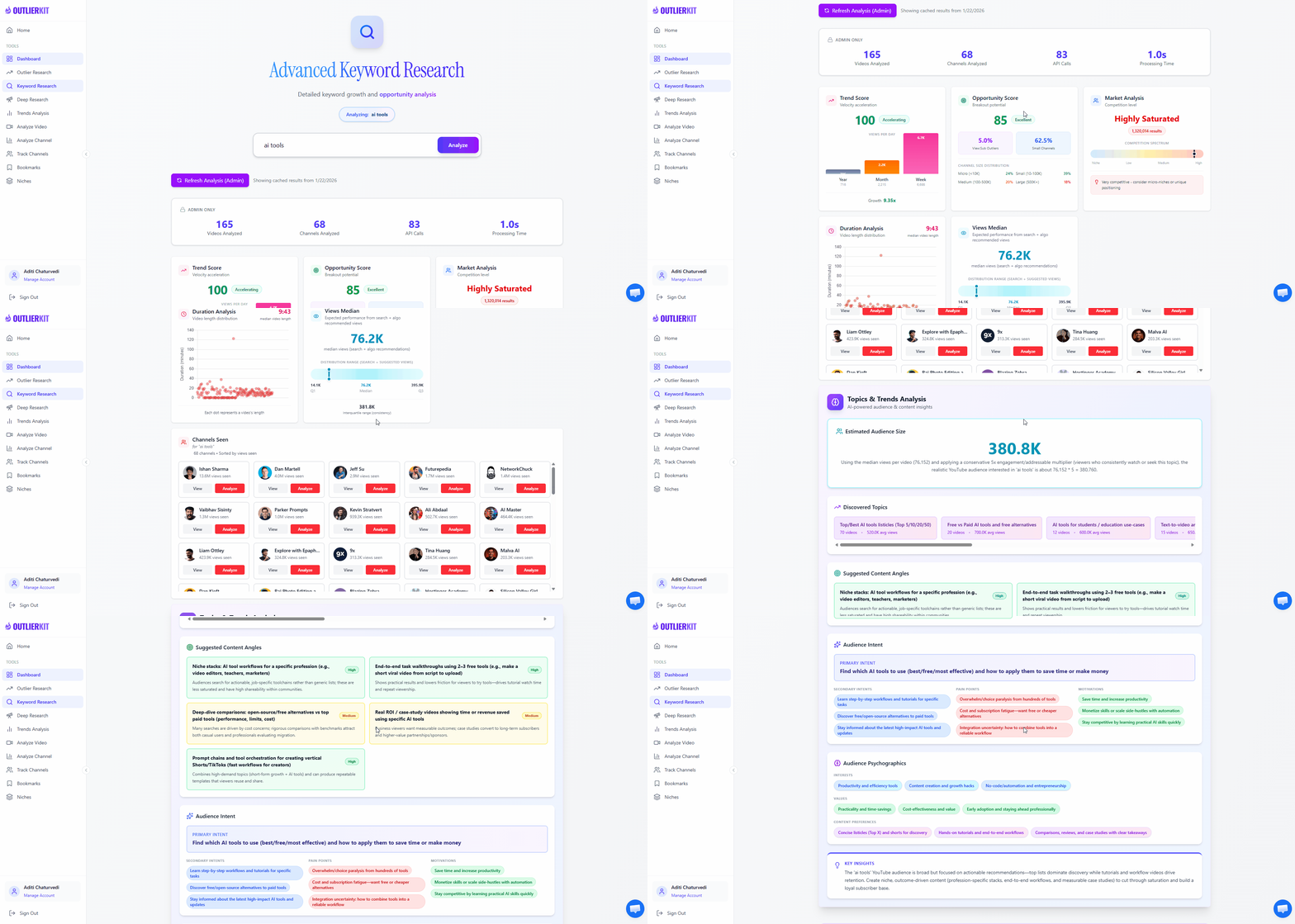
- Enter your niche topic (e.g., 'home workout')
- Sort by volume-to-competition ratio
- Flag keywords where top videos have under 50K views
- Save your top 10-15 keyword opportunities
Pro Tip: Focus on "how to" and "best" prefixed keywords — these have learner/buyer intent and YouTube prioritizes them in search results.
OutlierKit Competitor AnalysisAnalyze Competitor SEO Strategy
Enter 3-5 competitor channel URLs into OutlierKit's Competitor Analysis tool. See exactly what keywords they rank for, which titles get the most clicks, and most importantly — where the gaps are. Gaps are keywords they should be targeting but aren't.
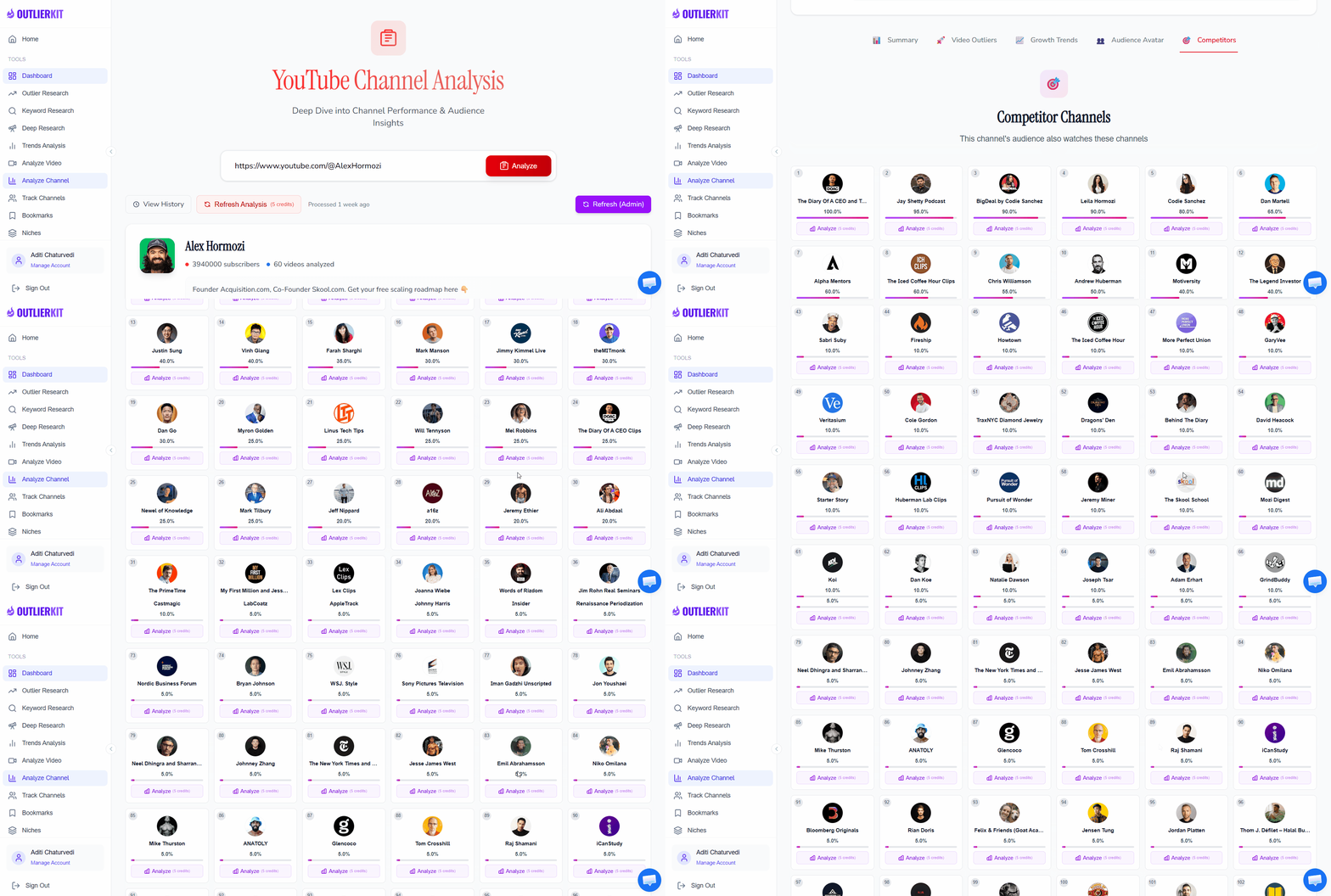
- Add 3-5 competitor channels in your niche
- Review their top-performing keywords
- Find keywords they rank for with older or weaker videos
- Identify keyword gaps (topics they haven't covered)
Pro Tip: Look for keywords competitors rank for with videos that are 1-2 years old. You can outrank them with fresh, higher-quality content on the same topic.
UTubeKit Title GeneratorGenerate Click-Worthy Titles
Take your top keywords from Step 1 and paste them into UTubeKit's free Title Generator. It creates 10+ title variations optimized for both CTR (click-through rate) and YouTube search. No signup needed — just enter your topic and get instant results.
- Enter your target keyword
- Generate 10+ title variations
- Try different angles: listicle, question, how-to, comparison
- Shortlist your top 3-5 favorites
Pro Tip: Generate titles for the same topic using different angles — a listicle ("5 Best..."), a question ("Is X Worth It?"), a how-to ("How to X in 2026"), and a comparison ("X vs Y"). Then pick the most compelling one.
UTubeKit Title ScorerScore & Refine Your Title
Run your top 3 title options through UTubeKit's free Title Scorer. It rates each title for searchability, CTR potential, and clarity — giving you an objective score rather than relying on gut feeling. Pick the highest scorer.
- Paste each title candidate into the scorer
- Compare scores across your options
- Refine low-scoring titles based on feedback
- Select your winning title
Pro Tip: Aim for a score above 80. If all titles score below 70, try shorter titles with stronger power words ("ultimate", "proven", "exactly how").
UTubeKit Hashtag GeneratorGet Strategic Hashtags
UTubeKit's Hashtag Generator doesn't just spit out random tags — it organizes hashtags by competition level: High Volume (broad reach), Medium Volume (niche targeting), and Niche-Specific (highly targeted). This strategic mix maximizes discoverability.
- Enter your video topic and target keyword
- Review the categorized hashtag sets
- Select 1-2 high-volume + 2 medium + 1-2 niche-specific
- Add hashtags to your video
Pro Tip: Use 3-5 hashtags per video maximum. Mix 1 high-volume tag for broad reach + 2 medium-competition tags for niche targeting + 1-2 niche-specific tags. More than 5 looks spammy.
UTubeKit Description GeneratorWrite SEO-Optimized Description
Instead of spending 15 minutes writing descriptions manually, UTubeKit's Description Generator creates comprehensive, SEO-optimized descriptions in 30 seconds. It includes proper keyword placement, suggested timestamps, and effective CTAs.
- Enter your video topic and key points
- Generate the SEO-optimized description
- Add your target keyword to the first 2 lines
- Include timestamps and relevant links
Pro Tip: Add your target keyword in the first 2 lines of the description — this is what appears in search results before the "Show more" button. It's prime SEO real estate.
Bonus: Complete Your Optimization
UTubeKit offers additional free tools that round out your workflow:
Thumbnail Text Generator
Generate punchy overlay text optimized for mobile screens and quick scanning.
Video Script Writer
Generate keyword-rich scripts with hooks, CTAs, and timestamps built in.
Keyword Generator
Discover additional keyword and tag ideas to add to your video's metadata.
Free Stack vs. Paid Tools
Here's what you get with the free OutlierKit + UTubeKit stack compared to VidIQ/TubeBuddy paid plans:
| What You Need | VidIQ / TubeBuddy | OutlierKit + UTubeKit |
|---|---|---|
| Keyword Research | $49/mo Pro plan | OutlierKit (free plan) |
| Title Optimization | $49/mo Pro plan | UTubeKit Title Generator + Scorer (free) |
| Tag/Hashtag Research | $49/mo Pro plan | UTubeKit Hashtag Generator (free) |
| Description Writing | Manual (15-30 min) | UTubeKit Description Generator (free) |
| Competitor Analysis | $199/mo Boost plan | OutlierKit Competitor Analysis (free plan) |
| Monthly Cost | $49-199/month | $0/month |
Who This Workflow Is For
New YouTubers on a Budget
You're just starting out and can't justify $49-199/month for SEO tools. This workflow gives you professional-grade optimization for free.
Creators Cancelling VidIQ/TubeBuddy
You've been paying for premium SEO tools but want a free alternative that covers the same ground. This stack does it.
Side-Project Channel Owners
Your channel is a side project — not your full-time income. Paying $49/month for SEO tools doesn't make sense. Free tools do.
Data-Driven Creators
You want real keyword data and competitor insights — not guesswork. OutlierKit's research depth exceeds what most paid tools offer.
Frequently Asked Questions
Basics
Is this workflow really 100% free?
Yes. OutlierKit has a free plan that includes keyword research and competitor analysis. All UTubeKit tools (Title Generator, Title Scorer, Hashtag Generator, Description Generator) are completely free with no signup required and no usage limits. You get professional-grade YouTube SEO without paying a cent.
How does this compare to VidIQ or TubeBuddy?
You get equivalent keyword research (OutlierKit), title optimization (UTubeKit Title Generator + Scorer), hashtag generation (UTubeKit Hashtag Generator), and description writing (UTubeKit Description Generator) — all for free. The main thing you miss is VidIQ/TubeBuddy's browser extension that shows data inside YouTube, but the actual SEO optimization is the same quality.
Tools & Workflow
Do I need to use both OutlierKit and UTubeKit?
They complement each other perfectly. OutlierKit provides the deep research layer — finding keywords, analyzing competitors, spotting content gaps. UTubeKit provides the optimization layer — generating titles, hashtags, descriptions, and scoring your choices. Together they cover the full SEO workflow that VidIQ or TubeBuddy would handle alone.
How long does this workflow take per video?
About 15 minutes once you're familiar with the steps. The first time may take 30-45 minutes as you learn the tools. After that, it becomes a quick routine: find keywords (5 min) → generate title (3 min) → score it (1 min) → get hashtags (2 min) → generate description (2 min) → review and publish (2 min).
Integration
Can I use this alongside VidIQ or TubeBuddy?
Absolutely. Many creators use OutlierKit for deeper research and competitor intelligence while keeping VidIQ or TubeBuddy for their browser extension features (real-time YouTube dashboard data, A/B testing). The workflows are complementary, not exclusive.
Related Workflows
AI Video Making for Finance Niche
Build a faceless finance YouTube channel from scratch using AI.
Niche PlaybookAI Video Making for Affiliate Marketing
Build an AI-powered affiliate review channel that earns commissions.
AI Script Writing for YouTube
Write scripts matched to search intent using AI.
Official Resources

Ready to optimize your YouTube SEO for free?
Start with OutlierKit's free plan for keyword research and competitor analysis. Pair it with UTubeKit's free SEO tools for a complete optimization workflow.
Try OutlierKit Free