#1 Rated YouTube Keyword Tool

Find Low Competition, High Volume YouTube Keywords

Discover untapped keywords with high search volume and low difficulty. Get the exact data you need to rank your videos and grow your channel.

  • Search volume & difficulty scores
  • Low competition keyword finder
  • Competitor keyword analysis
  • Trending topics detection
Reviewer 1Reviewer 2Reviewer 3Reviewer 4Reviewer 5

Loved by 5,000+ YouTubers

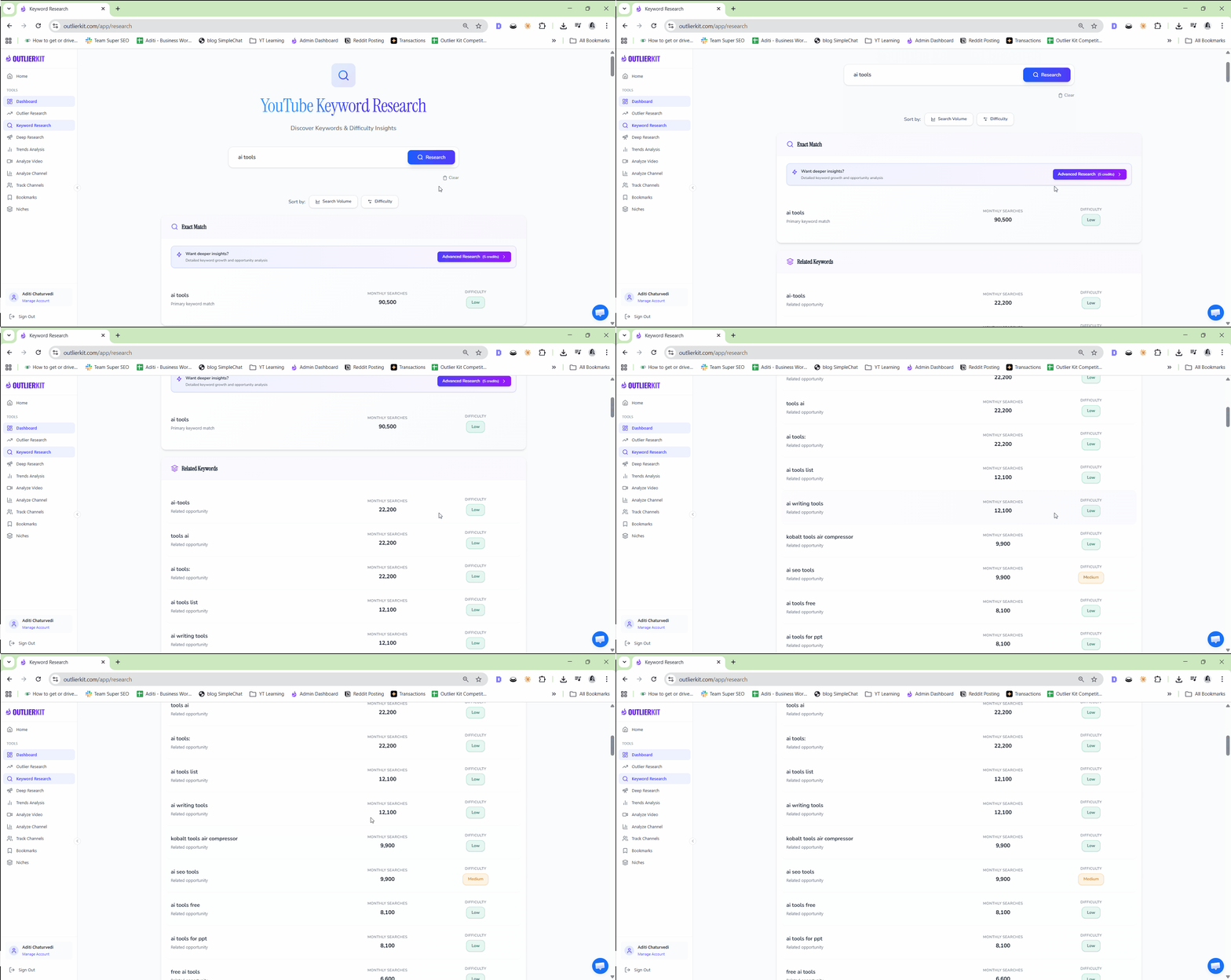
OutlierKit Keyword Research Tool Screenshot

10M+

Videos Processed

Everything You Need for YouTube Keywords

Powerful features to help you grow your channel

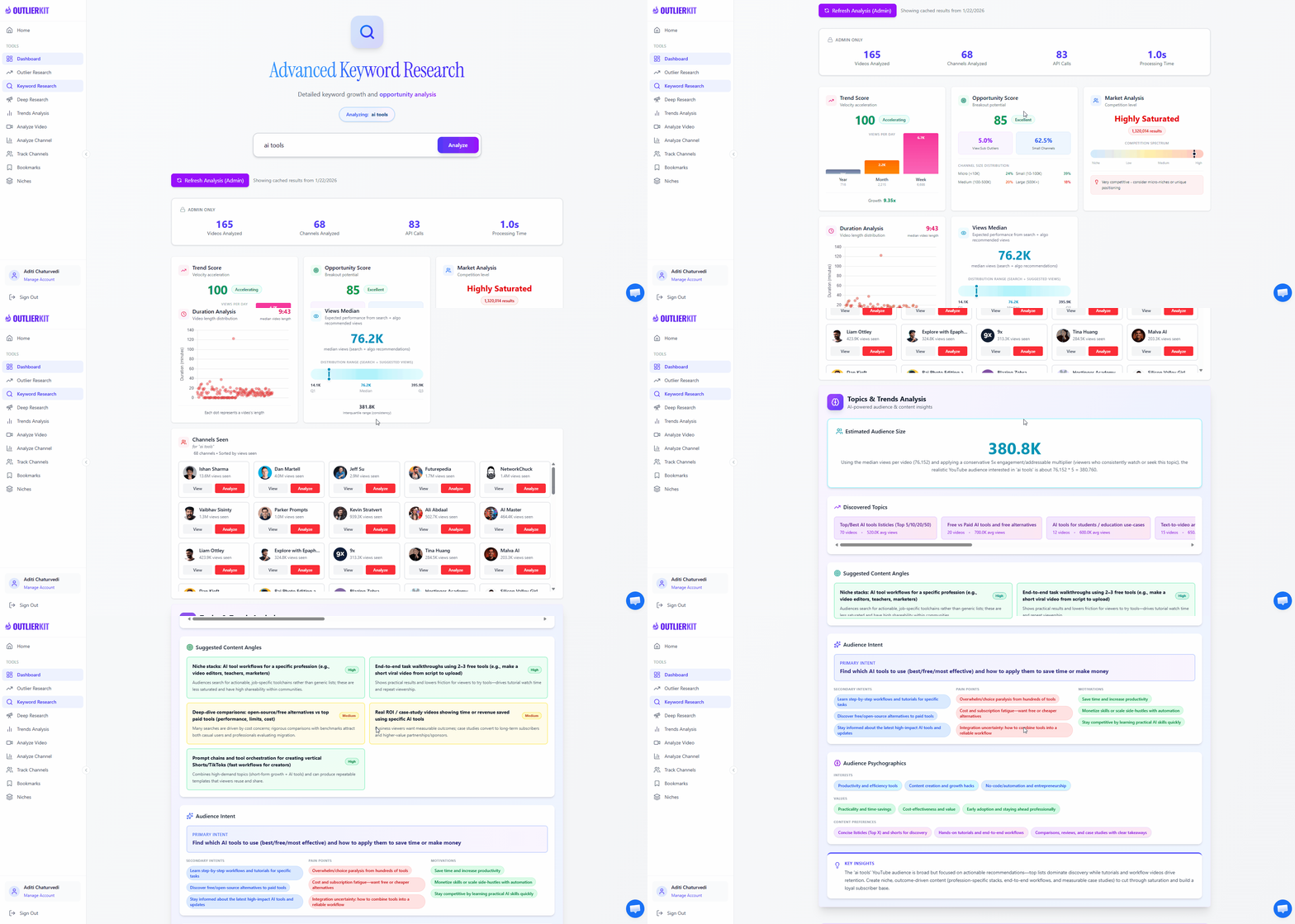
Search Volume & Difficulty

Get accurate keyword volume data and difficulty scores instantly. Our advanced algorithms analyze millions of data points to show you exactly how many people search for each keyword monthly and calculate a precise difficulty score based on the current top-ranking videos. This data helps you make informed decisions about which keywords are worth targeting for your channel size and goals.

Low Competition Gems

Discover the golden opportunities that most creators miss—keywords with high search volume but low competition. Our proprietary algorithm identifies these hidden gems by analyzing the gap between search demand and content supply, helping you find topics where you can realistically rank even as a smaller channel. These low-competition keywords are your fastest path to organic growth.

Keyword Suggestions

Get hundreds of related keyword ideas based on what real users are actually searching for on YouTube. Our suggestion engine analyzes autocomplete data, related searches, and semantic relationships to surface long-tail opportunities that your competitors are missing. Each suggestion comes with volume and difficulty data so you can quickly identify winners.

Trend Detection

Spot rising keywords before they peak and capitalize on emerging trends in your niche. Our trend analysis monitors search pattern changes over time, alerting you to keywords gaining momentum so you can create content while competition is still low. Being early to trending topics can mean the difference between thousands and millions of views.

Competitor Keywords

See exactly which keywords are driving traffic to your competitors' most successful videos. Enter any channel URL and instantly discover their keyword strategy, find content gaps they're missing, and identify opportunities to create better content for the same search terms. Understanding competitor keywords is essential for strategic content planning.

Video Ideas Generator

Transform raw keywords into compelling video ideas that audiences actually want to watch. Our AI-powered suggestion engine analyzes top-performing content patterns in your niche and generates specific video concepts complete with angle suggestions and title ideas. Stop staring at a blank page and start creating content you know will perform.

See Keyword Research in Action

Watch how easy it is to find winning keywords for your next video. Enter any topic, and instantly get search volume, competition scores, and related keywords.

1

Enter your topic

Type any keyword or topic you want to create content about.

2

Analyze the results

See search volume, competition, and trend data instantly.

3

Pick your winners

Choose high-volume, low-competition keywords to target.
Try It Free
OutlierKit Keyword Research Demo

How OutlierKit Compares to Other YouTube Keyword Tools

Not all keyword research tools are created equal. While several options exist for YouTube creators, OutlierKit offers a unique combination of features specifically designed for video content optimization. We've compared the most popular tools across the features that matter most for YouTube growth, including search volume accuracy, competition analysis, trend detection, and outlier video identification. See how OutlierKit stacks up against VidIQ, TubeBuddy, and Ahrefs to make an informed decision for your channel.

FeatureOutlierKitBest ValueVidIQTubeBuddyAhrefs
Search Volume Data
Competition Score
Keyword Suggestions
Trend Analysis
Competitor Keywords
Video Ideas
Outlier Detection
Pricing
$29/mo
Hobby plan
$19/mo
Boost plan
$49/mo
Legend plan
$129/mo
Lite plan

Simple, Transparent Pricing for Every Creator

Whether you're just starting your YouTube journey or managing multiple channels, we have a plan that fits your needs. Start with a free trial to experience the full power of OutlierKit's keyword research capabilities. No credit card required, no hidden fees, and you can cancel anytime. Our credit-based system ensures you only pay for what you use, and annual plans offer significant savings for committed creators.

Hobby

$29/month

or $16.6/mo ($199 billed annually)

For content creators

  • 100 credits/month
  • 1 credit per keyword research
  • 1 credit per Outlier Research
  • 5 credits for video script analysis
  • 5 credits for competitor analysis
  • 20 credits for Deep Research
Start Free Trial
Most Popular

Pro

$49/month

or $24.9/mo ($299 billed annually)

For professionals

  • 500 credits/month
  • 1 credit per keyword research
  • 1 credit per Outlier Research
  • 5 credits for video script analysis
  • 5 credits for competitor analysis
  • 20 credits for Deep Research
  • 50 credits per connected channel
Start Free Trial

Max

$199/month

or $83/mo ($999 billed annually)

For serious creators & teams

  • 2,000 monthly research credits
  • Integrate up to 50+ YouTube channels
  • Outlier video detection
  • Competitor channel analysis
  • AI script & hook analysis
  • Deep Research
  • Advanced Competitor Identification
  • Update Data on Demand
  • API Access (coming)
Start Free Trial

What Creators Say About OutlierKit

Join thousands of YouTubers who have transformed their content strategy with data-driven keyword research. Here's what they have to say about their experience using OutlierKit to grow their channels.

OutlierKit completely changed how I approach content planning. Before, I was guessing what topics might work—now I know exactly what my audience is searching for. The keyword research tool helped me find untapped topics in the tech review space that my competitors completely overlooked. My last three videos all got 10x more views than my channel average because I targeted the right low-competition keywords. The ROI on this tool is insane.

AM
Alex Martinez
Tech Reviewer · 245K subscribers

I was paying for both VidIQ and TubeBuddy, but OutlierKit gives me competitor keyword data that neither of them provide. Being able to see exactly which keywords are driving traffic to my competitors' best videos has been a complete game changer. I've found so many content gaps in my niche that I now have a six-month content calendar filled with validated video ideas. Best investment I've made in my channel.

SK
Sarah Kim
Lifestyle Creator · 890K subscribers

The trend detection feature alone is worth the subscription. Last month, OutlierKit flagged a rising keyword in the finance space before anyone else was talking about it. I created a video on that topic while competition was still low, and it exploded to 500K views—my best performing video ever. That single video brought in more ad revenue than I spend on the tool in two years. Absolute no-brainer for any serious creator.

MJ
Marcus Johnson
Finance YouTuber · 1.2M subscribers

Frequently Asked Questions About YouTube Keyword Research

New to keyword research or looking to level up your strategy? We've compiled answers to the most common questions YouTube creators ask about finding and using keywords effectively. Whether you're curious about search volume, competition scores, or how to implement keywords in your videos, you'll find detailed guidance below to help you make data-driven content decisions.

What is YouTube keyword research?
YouTube keyword research is the systematic process of discovering, analyzing, and selecting the search terms that people type into YouTube's search bar when looking for video content. Unlike simply guessing what topics might be popular, proper keyword research uses data to reveal exactly what your potential audience is searching for, how many people search for each term monthly, and how difficult it would be to rank for those terms. This research forms the foundation of any successful YouTube content strategy, helping creators make informed decisions about what videos to produce. Effective keyword research goes beyond just finding popular terms—it involves understanding search intent, analyzing competition, identifying trending topics, and finding the sweet spot between search demand and ranking opportunity.
Why is keyword research important for YouTube success?
Keyword research is arguably the most critical factor in determining whether your YouTube videos get discovered organically. Without targeting the right keywords, even exceptionally produced content can remain invisible in YouTube's vast library of over 800 million videos. Here's why it matters so much: First, it ensures you're creating content that people actually want to watch—not just content you assume they want. Second, it helps you rank higher in YouTube search results, which is one of the primary ways new viewers discover channels. Third, it reveals gaps in the market where demand exists but quality content is lacking. Research shows that channels who consistently perform keyword research before creating content typically see 3-5x more organic views compared to those who don't. Additionally, keyword-optimized videos continue to generate views months and years after publication, creating a compounding effect on channel growth.
How do successful YouTubers use keyword research?
Top-performing YouTubers integrate keyword research into every stage of their content creation process. During the planning phase, they identify high-volume, low-competition keywords to validate that sufficient demand exists for their video ideas—this prevents wasting time on content nobody is searching for. They analyze what keywords their competitors are ranking for to find content gaps and opportunities to create superior content on proven topics. They continuously monitor trending keywords in their niche to capitalize on emerging topics while competition is still low—being early to a trend can mean the difference between 10,000 and 1,000,000 views. When scripting, they naturally incorporate target keywords and related terms to help YouTube understand the video's topic. For metadata, they craft keyword-optimized titles, descriptions, and tags that align with search intent. Many successful creators report spending 20-30% of their content planning time on keyword research because they understand that great content without discoverability is essentially invisible content.
What's the difference between YouTube keywords and Google keywords?
While YouTube is owned by Google, the keywords people search for on each platform serve fundamentally different purposes and reflect different user intents. YouTube keywords are video-centric and typically reflect entertainment, tutorial, or visual learning intent—people searching on YouTube generally want to watch something. Google keywords are broader and often target informational, navigational, or transactional queries where users might prefer reading an article, visiting a website, or making a purchase. For example, someone searching 'how to tie a tie' on YouTube specifically wants a video demonstration, while the same search on Google might be satisfied by a step-by-step article with images. This intent difference means that keyword volume and competition data from traditional SEO tools often doesn't accurately represent YouTube search behavior. Additionally, YouTube's ranking algorithm considers factors unique to video content—like watch time, audience retention, click-through rate, and engagement metrics—that don't apply to traditional web search. This is why YouTube-specific keyword tools like OutlierKit provide more accurate data for video creators than repurposing Google SEO tools.
How does OutlierKit find keyword search volume?
OutlierKit employs a sophisticated multi-source approach to estimate YouTube keyword search volume with high accuracy. Our system combines official YouTube API data with proprietary algorithms that analyze autocomplete suggestions, related search patterns, and the performance metrics of videos currently ranking for each keyword. We continuously crawl and analyze millions of data points across YouTube to understand search demand patterns. Unlike some tools that simply repurpose Google search data (which doesn't accurately reflect YouTube-specific searches), OutlierKit's estimates are built specifically for the YouTube ecosystem. Our difficulty scores factor in the subscriber counts, view counts, engagement rates, and video age of the top-ranking results to give you a realistic picture of what it takes to compete. We update our data regularly to ensure you're working with current information, not outdated snapshots.
What is a good keyword competition score?
The ideal keyword competition score depends heavily on your channel's current size and authority on YouTube. For new channels with fewer than 1,000 subscribers, we strongly recommend targeting keywords with competition scores under 30 (low competition). These keywords give you a realistic chance of ranking on the first page of results and building momentum. Growing channels with 1,000-100,000 subscribers can start competing for medium competition keywords (scores between 30-60), especially in sub-niches where they've established some authority. Established channels with over 100,000 subscribers and strong engagement can realistically target high-competition keywords (scores above 60) because YouTube's algorithm tends to favor channels with proven track records. OutlierKit's competition score is calculated by analyzing multiple factors: the average subscriber count of channels ranking in the top 10, the view counts and engagement rates of those videos, how recently they were published, and how well-optimized they are. A low score indicates that smaller or newer channels are successfully ranking, suggesting the keyword is accessible to creators at various levels.
How many keywords should I target per video?
The optimal keyword strategy focuses on one primary keyword and two to three secondary keywords per video. Your primary keyword should be the main topic you want to rank for—this should appear in your title, the first 100 words of your description, and be mentioned naturally within your video content (YouTube can transcribe and understand spoken words). Secondary keywords should be semantically related variations, synonyms, or long-tail versions of your primary keyword that help YouTube understand the full scope of your video's topic. For example, if your primary keyword is 'beginner guitar lessons,' secondary keywords might include 'learn guitar for beginners,' 'how to play guitar,' and 'guitar basics.' Avoid the temptation to stuff your content with dozens of keywords—this can actually hurt your performance. YouTube's algorithm has become sophisticated enough to understand context, synonyms, and topical relationships without explicit keyword repetition. Focus on creating comprehensive content that naturally addresses user intent, and the algorithm will reward you.
How often should I do keyword research?
We recommend a two-tiered approach to keyword research frequency. First, you should perform targeted keyword research before creating every single video—this takes just 10-15 minutes with the right tools and ensures each piece of content has verified search demand. Second, conduct a comprehensive monthly deep-dive into trends in your niche to identify emerging opportunities and shifting viewer interests. Keywords are not static—new topics emerge as technology and culture evolve, seasonal trends create periodic demand spikes, and the competitive landscape constantly shifts as other creators publish content. Channels that research keywords only once and then create a static content plan often find their strategies become outdated within months. Regular research also helps you spot declining keywords early so you can pivot to growing topics. Many successful creators set a recurring calendar reminder for monthly trend analysis and make it a non-negotiable part of their content strategy.
What are long-tail keywords and why do they matter?
Long-tail keywords are longer, more specific search phrases that typically have lower search volume but also significantly lower competition—and often higher conversion rates because they capture users with very specific intent. For example, 'photography' is a head keyword with massive volume but extreme competition, while 'portrait photography tips for beginners with iPhone' is a long-tail keyword that fewer people search for but where you have a much better chance of ranking. Long-tail keywords matter enormously for YouTube growth because they allow newer and smaller channels to gain traction in competitive niches. A channel might never rank for 'cooking recipes' but could easily dominate 'easy 15-minute vegetarian dinner recipes for students.' These specific keywords also tend to have higher viewer satisfaction because the content more precisely matches what the searcher wanted. Our research shows that channels focusing on long-tail keywords in their first year grow subscribers 40% faster than those chasing only high-volume terms.
Can keyword research help me get more subscribers?
Absolutely—keyword research is one of the most effective strategies for sustainable subscriber growth on YouTube. When you target the right keywords, you attract viewers who are actively searching for the exact type of content you create, making them far more likely to subscribe than random viewers from the browse or suggested features. Here's how it works: Videos that rank well for relevant keywords receive consistent, ongoing traffic from search—unlike viral content that spikes and fades, search traffic compounds over time. Each video becomes a permanent asset that continuously introduces new viewers to your channel. When viewers find your video because it perfectly answers their search query, they perceive you as an authority on that topic and are more likely to subscribe for future content. Additionally, having multiple videos ranking for related keywords creates a network effect where viewers discover one video, watch others, and eventually subscribe to access your full library. The data backs this up: channels with strong search presence convert viewers to subscribers at 2-3x the rate of channels relying primarily on suggested traffic.
How do I use keywords in my video title and description?
Optimizing your title and description with keywords requires balancing search optimization with human appeal—both YouTube's algorithm and potential viewers need to find your content compelling. For titles, place your primary keyword as close to the beginning as possible while ensuring the title remains natural and clickable. A title like 'Beginner Guitar Lessons: Learn Your First Song in 30 Minutes' is superior to 'How to Learn Something New on the Guitar for People Who Are Beginning.' Keep titles under 60 characters to prevent truncation in search results. For descriptions, include your primary keyword in the first 100-150 characters (this is what shows in search results), then expand with a comprehensive description of 200-300 words that naturally incorporates secondary keywords and related terms. Write for humans first—describe what viewers will learn, include timestamps for key sections, and add relevant links. Avoid keyword stuffing or listing keywords unnaturally; YouTube's algorithm is sophisticated enough to penalize obvious manipulation while rewarding genuinely helpful, well-written descriptions.

More OutlierKit Features

Keyword research is just the beginning. Explore all the tools to grow your channel.

Ready to find winning keywords?

Join 10,000+ YouTubers using OutlierKit to discover high-impact keywords and grow their channels faster.

Start Free — No Credit Card