Getting Started with OutlierKit: Complete Dashboard Guide (2026)
Master the OutlierKit dashboard in minutes. Learn the 3-step workflow for finding viral YouTube video ideas, navigating tools, and maximizing your content research.
Welcome to OutlierKit, the YouTube research platform that helps creators find viral video ideas backed by real data. Whether you're a new YouTuber looking for your first hit video or an experienced creator seeking to optimize your content strategy, this guide will walk you through everything you need to know about the OutlierKit dashboard. Our proven 3-step workflow—Keyword Research, Find Outliers, and Deep Research—has helped thousands of creators discover content ideas that actually get views.
Step-by-Step Instructions
- 1
Log in to your OutlierKit account at outlierkit.com/app
- 2
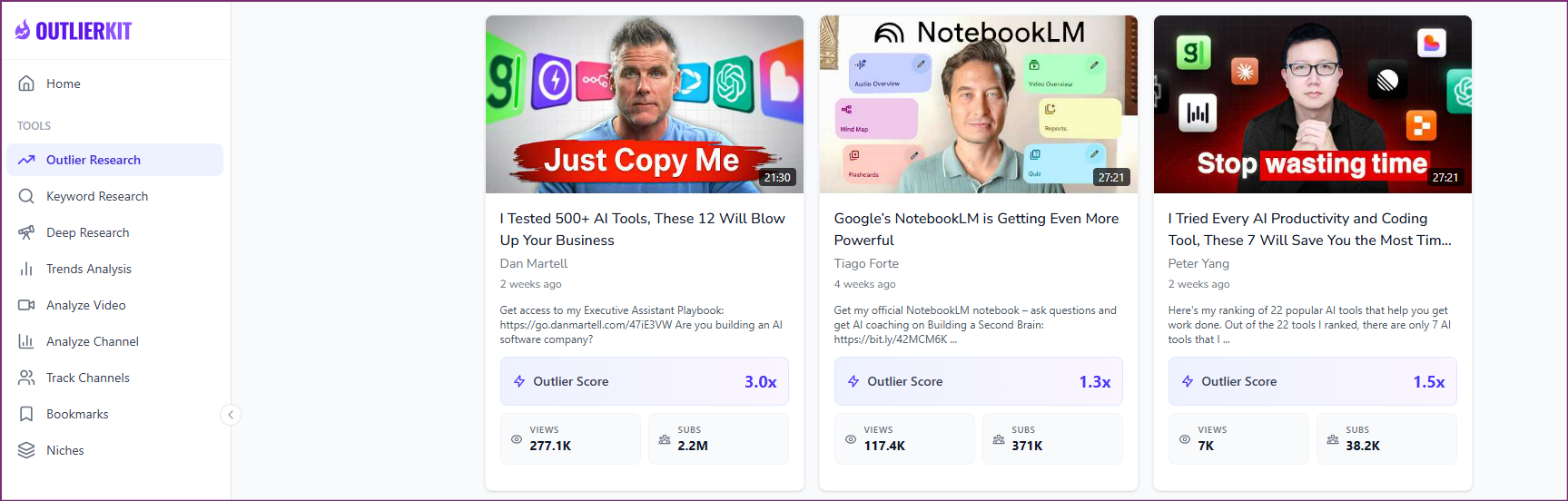
View your dashboard showing the recommended 3-step workflow: Keyword Research → Find Outliers → Deep Research
- 3
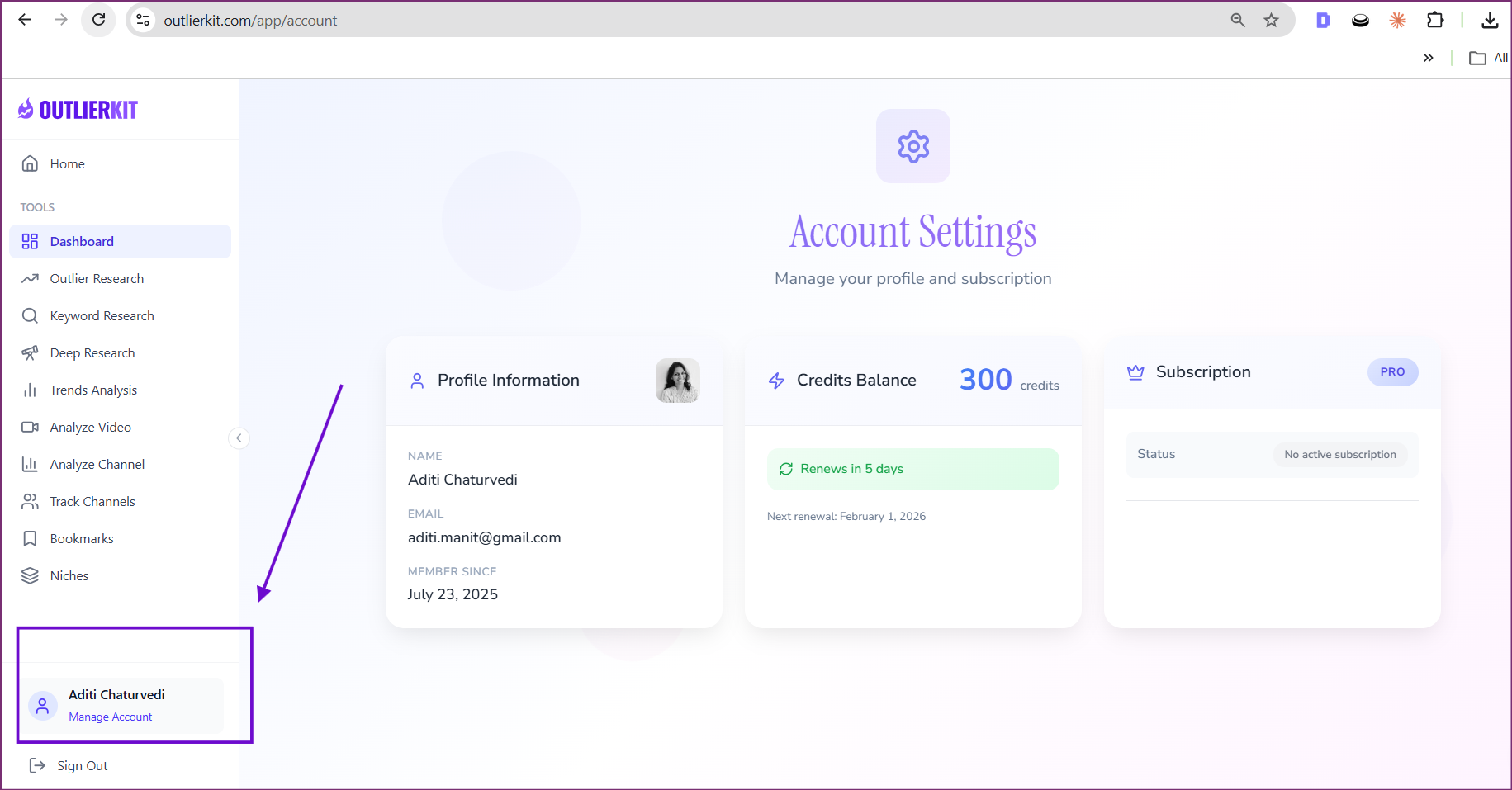
Check your current plan status in the top right area
- 4
Access Account Settings by clicking "Account Settings" or your profile at the bottom left
- 5
Use the left sidebar to navigate between different tools like Outlier Research, Keyword Research, Deep Research, and more
Pro Tips
- Start with Keyword Research to validate your niche before diving into outlier analysis
- Use the 3-step workflow in order for best results: Keywords → Outliers → Deep Research
- Bookmark interesting videos as you research so you don't lose track of good ideas
- Check the Trends section weekly to stay on top of emerging content opportunities
What is OutlierKit?
OutlierKit is an all-in-one YouTube research platform designed to help content creators find viral video ideas backed by real data.
- 1Focuses on what will work next, not just what's already happened—helping you stay ahead of trends
- 2Combines outlier detection, keyword research, AI deep research, and competitor analysis in one dashboard
- 3Uses real performance data to validate content ideas before you invest time creating them
- 4Works for creators at any level—from finding your first viral video to optimizing an established channel's strategy
The Hard Way vs The Easy Way
Without OutlierKit (The Hard Way)
- Manual Video ResearchSpend hours scrolling through YouTube, watching competitors, and trying to guess which videos are actually performing well relative to the channel's average.
- Spreadsheet TrackingCreate complex spreadsheets to track video performance, keywords, and ideas—constantly updating and maintaining them manually.
- Disconnected ToolsJump between 5-6 different tools for keyword research, analytics, trend monitoring, and competitor tracking—each with its own learning curve and subscription cost.
- Guesswork Content PlanningPlan your content based on intuition and hope, without data to validate which topics actually have demand in your niche.
With OutlierKit (The Easy Way)
- Instant Outlier DetectionFind videos that outperform channel averages in seconds. See exactly which content formats and topics are working right now.
- All Research in One PlaceKeywords, outliers, trends, competitor analysis, and AI insights—all accessible from a single dashboard with no switching between tools.
- AI-Powered PlanningLet Deep Research analyze your niche and generate comprehensive content strategies, complete with keyword opportunities and audience psychology insights.
- Data-Backed DecisionsEvery content decision is backed by real performance data, search volumes, and trend signals—no more guessing.
How Pro YouTubers Do It
Weekly Research Blocks
Top creators schedule 2-3 hours weekly specifically for research. They don't mix research with content creation—dedicated focus yields better insights.
The 3-Step Workflow
Pros follow Keyword Research → Outlier Analysis → Deep Research in order. This builds context and ensures ideas are validated at each stage.
Bookmark Everything Interesting
Successful creators save every promising video they find, even if they're not sure why it works yet. Patterns emerge when reviewing later.
Track Competitors Strategically
Rather than tracking the biggest channels, pros track channels 2-3x their size—close enough to learn from, realistic enough to compete with.
Real-World Examples
New channel in the fitness niche
Used Keyword Research to find 'resistance band exercises' had high volume but low difficulty, then found outliers in that sub-niche
First video ranked on page 1 within 2 weeks, generating 15K views in the first month
Established tech reviewer hitting a plateau
Deep Research revealed audience was interested in 'budget tech' angle that competitors weren't covering well
Pivoted 30% of content to budget reviews, saw 40% increase in subscriber growth rate
Common Mistakes to Avoid
Why it hurts: You waste hours creating content for topics with no search demand or too much competition.
Do this instead: Spend 30 minutes validating every video idea with keyword research and outlier analysis before scripting.
Why it hurts: Their strategies often rely on existing audience size and don't apply to smaller channels.
Do this instead: Focus on outliers from channels 1-3x your subscriber count for actionable, realistic insights.
Why it hurts: Trends change, competitors evolve, and new opportunities emerge constantly.
Do this instead: Make research a weekly habit, not a one-time setup task.
Frequently Asked Questions
How many credits do I get with my plan?
Credit allocation depends on your subscription tier. Free users get limited credits, while Pro users receive more credits that refresh monthly. Check your Account Settings to see your current balance and renewal date.
Can I use OutlierKit on mobile?
Yes! OutlierKit is fully responsive and works on mobile browsers. However, for the best research experience, we recommend using a desktop or laptop computer.
How often is the data updated?
Our YouTube data is refreshed regularly to ensure you're working with current information. Trending topics and outlier scores are updated multiple times daily.

Ready to grow your YouTube channel?
OutlierKit helps you find winning content strategies with competitor analysis and keyword research.
Try OutlierKit Free