OutlierKit Account Settings: Credits, Billing & Profile Guide
Manage your OutlierKit account, track credit usage, view renewal dates, and update subscription settings. Complete guide to account management and billing.
Your OutlierKit account is your central hub for managing your subscription, tracking credit usage, and customizing your research experience. Understanding how credits work and keeping track of your usage ensures you always have access to the tools you need for content research. This guide covers everything you need to know about managing your OutlierKit account, from checking your credit balance to updating your subscription.
Step-by-Step Instructions
- 1
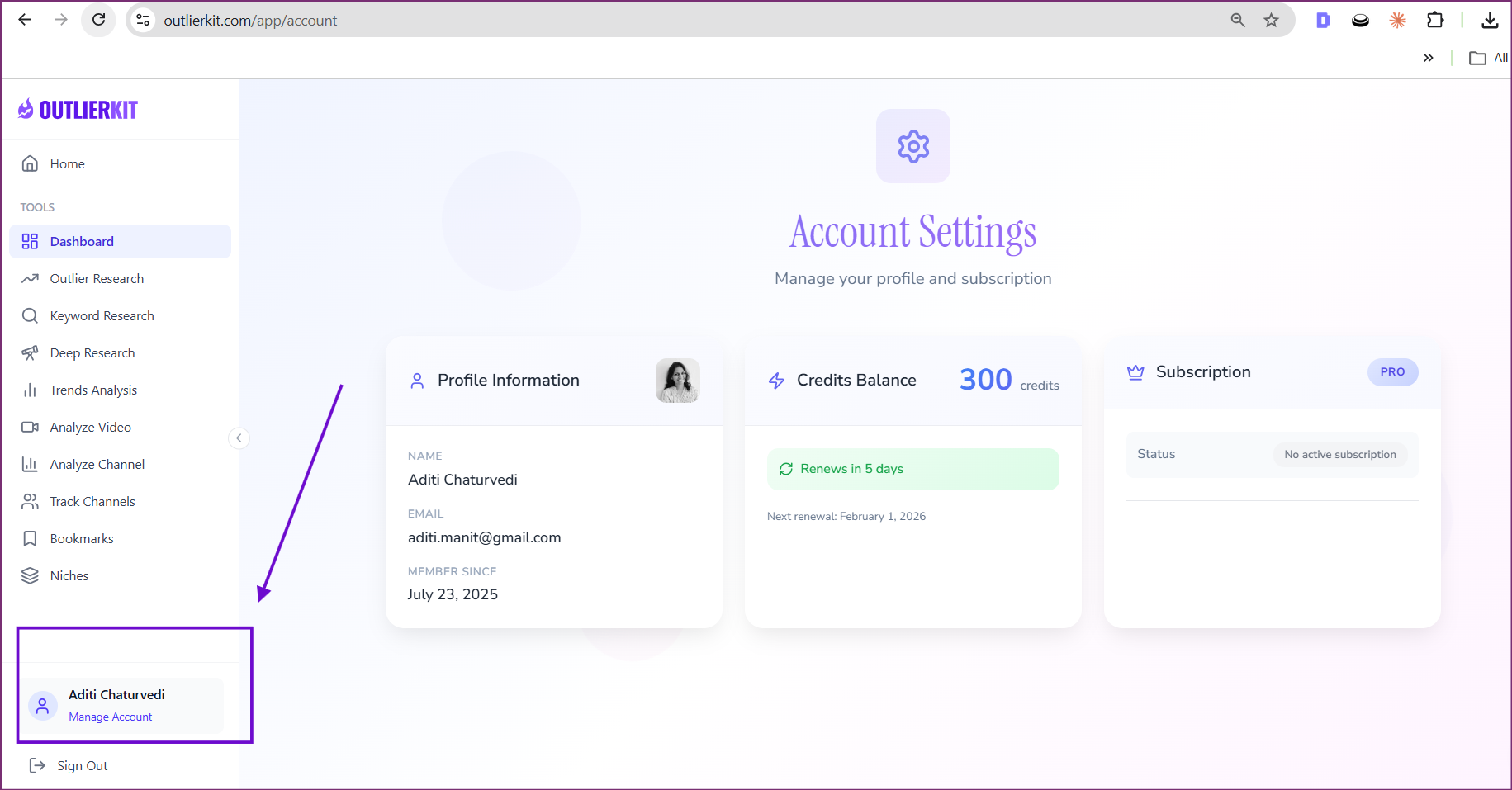
Click "Manage Account" at the bottom left of the sidebar
- 2
View your Account Settings page with all your information
- 3
View your Profile Information (Name, Email, Member Since date)
- 4
Check your Credits Balance
- 5
View credit renewal date and countdown
- 6
Review your Subscription status and plan type (e.g., PRO)
- 7
Manage subscription settings as needed
Pro Tips
- Check your credit balance before starting intensive research sessions
- Set a reminder a few days before renewal to plan your credit usage
- Upgrade your plan if you consistently run out of credits before renewal
- Use credits strategically—save expensive features like Deep Research for important projects
What are OutlierKit Credits?
Credits power advanced features in OutlierKit—basic features are free, while AI-driven features consume credits when used.
- 1Different features cost different amounts: keyword search (1 credit) vs Deep Research (20 credits)
- 2Allows OutlierKit to offer powerful AI features while keeping subscription costs reasonable
- 3Credits refresh monthly on your billing cycle date
- 4Track your current balance and renewal date anytime in Account Settings
The Hard Way vs The Easy Way
Without OutlierKit (The Hard Way)
- Pay Per Feature SeparatelySubscribe to multiple tools separately—one for keyword research, one for analytics, one for AI insights—each with its own subscription and billing cycle.
- Unlimited But LimitedUse "unlimited" tools that actually throttle usage, provide poor data quality, or lock essential features behind higher tiers anyway.
- No Usage VisibilityHave no clear understanding of how much you're using each tool or whether you're getting value from your subscriptions.
- Overpay for Light UsagePay full price even in months when you don't use the tools much, because flat-rate subscriptions charge regardless of actual usage.
With OutlierKit (The Easy Way)
- Transparent Credit SystemKnow exactly how many credits each feature costs upfront, so you can budget your research activities strategically.
- All Features IncludedEvery feature is available to every user—credits just determine how much you can use, not what you can access.
- Real-Time Balance TrackingAlways see your current credit balance and renewal date, so you're never surprised by running out of research capacity.
- Monthly RefreshCredits refresh every billing cycle, giving you a predictable research budget that resets regularly.
How Pro YouTubers Do It
Budget Credits Around Content Calendar
Pros align research with their content planning cycle. If you plan monthly, do most research in the first week when credits are fresh.
Save Deep Research for Important Decisions
At 20 credits, Deep Research is for significant questions—entering new niches, major pivots, quarterly planning. Don't use it for quick checks.
Track What Generates ROI
Note which research activities lead to your best-performing videos. Double down on high-ROI research patterns.
Plan for Renewal
Know your renewal date and front-load research activities when you have full credits. Don't scramble at month-end.
Real-World Examples
Creator running low on credits mid-month
Reviewed which research activities had led to best videos—found outlier research provided most value, Deep Research least
Adjusted strategy to prioritize outlier searches, stretching credits further while maintaining research quality
New subscriber unsure how to use credits effectively
Started tracking credit usage vs video performance in a simple spreadsheet for one month
Discovered keyword research had highest ROI for their channel, optimized future credit allocation accordingly
Common Mistakes to Avoid
Why it hurts: Running out mid-month means no research when you might need it most—like when a trend emerges.
Do this instead: Estimate your monthly research needs and pace credit usage accordingly.
Why it hurts: Credits don't roll over. Unused credits at renewal are wasted value.
Do this instead: Use all your credits each month. Research insights compound—more research means more opportunity.
Why it hurts: Deep Research (20 credits) for a question that keyword search (1 credit) could answer wastes resources.
Do this instead: Match the research tool to the question complexity. Start simple, escalate if needed.
Frequently Asked Questions
How do credits work?
Credits are used to access various OutlierKit features. Different features cost different amounts—basic searches may be free or low-cost, while advanced features like Deep Research cost more credits. Credits refresh on your renewal date.
What happens if I run out of credits?
When you run out of credits, you'll need to wait until your renewal date for more credits, or upgrade to a higher plan for immediate additional credits.
Can I upgrade or downgrade my plan?
Yes, you can change your subscription plan at any time from the Account Settings page. Upgrades take effect immediately, while downgrades typically apply at your next billing cycle.

Ready to grow your YouTube channel?
OutlierKit helps you find winning content strategies with competitor analysis and keyword research.
Try OutlierKit Free