
TL;DR: A YouTube strategy is a written plan for what you publish and why. Research what your audience searches for, study the outlier videos in your niche, fix the script and SEO before you publish, then measure each video against your channel average and make more of what wins. Start with the free template below and one researched video.
Last updated: October 13, 2026
The median YouTube video has 39 views (UMass Amherst random sample). The channels that beat those odds pick topics from data before they film. They check viewer demand, study competitors and copy proven patterns, not guesses or trends that already peaked.
This guide covers the framework: seven steps, a free template, a pre-publish checklist and the mistakes to avoid. To see what "normal" growth looks like for a channel like yours, compare your numbers with our YouTube subscriber benchmarks by niche. For the full weekly research system behind the framework, read our data-driven YouTube growth strategy playbook.
Strategy Pillar | Key Number | Why It Matters |
Demand research | 1 in 20 videos hit 1,000 views | Check audience demand before you film |
Outlier analysis | 10x+ above channel average | Shows proven content patterns you can adapt |
Hook and script | First 15 seconds | Decides whether viewers watch or click away |
Posting cadence | 1 to 3 videos a week | A pace you can keep beats random daily uploads |
First results | 4 to 8 videos | Data-driven creators see lift within a handful of uploads |
Related: YouTube Growth · YouTube Channel Audit · YouTube Monetization Strategies
How hard is it to get views on YouTube?
Hard, because most uploads never find an audience. Two numbers frame the problem:
500+ hours of video are uploaded to YouTube every minute (Global Media Insight, 2026).
The median YouTube video has 39 views, and only about 4% of videos pass 10,000 views, according to a random sample of YouTube by Ethan Zuckerman's team at UMass Amherst.
What is a YouTube channel strategy?
A YouTube channel strategy is a plan for what to make based on what your audience searches for, watches and engages with, instead of what you think they want. It covers five jobs:
Analyze viewer demand before you create content
Find topics with high demand and low competition
Learn which content formats work in your niche
Optimize every element, from title to thumbnail to script
Measure results and make more of what works
Random creators make videos and hope for views. Strategic creators research what will get views, then make those videos.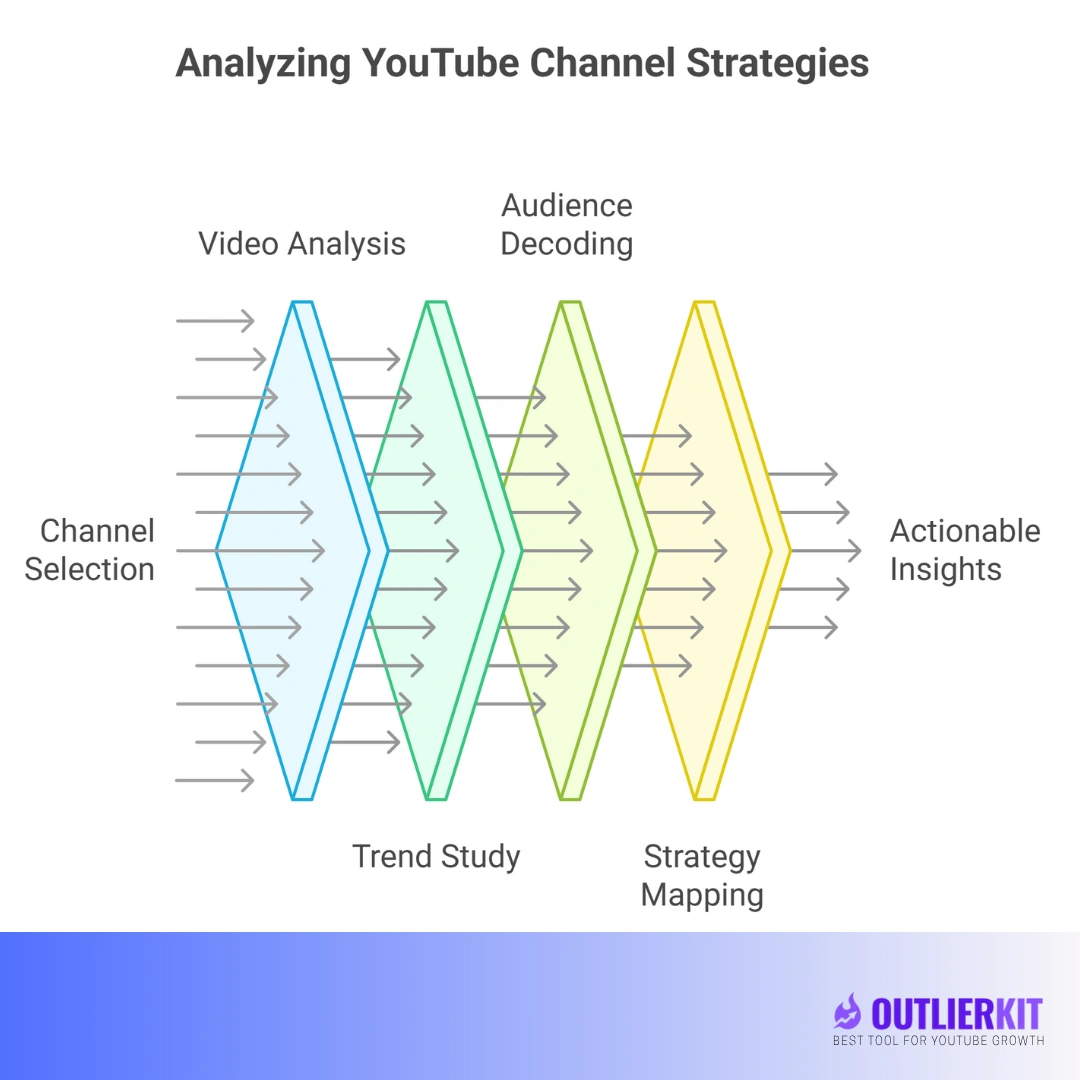
Want the full data-driven system? This guide gives you the framework, template and checklist. For the weekly loop behind it (competitor study, outlier modeling, keyword validation and a 30-minute weekly workflow, with a diagram), see the YouTube Growth Strategy playbook.
Free template: Turn this guide into a working document with the free YouTube content strategy template. It has a one-page channel strategy, content pillars, a 90-day calendar and a KPI tracker in Excel, Word or PDF. Direct download, no signup.
Why do most YouTube strategies fail?
Most strategies fail because creators skip research. The usual advice to "post consistently" and "be authentic" is fine, but it leaves out the four problems below.
1. They Focus on Creation, Not Research
Creators spend 10 hours filming and editing and 10 minutes checking whether anyone wants to watch. The result is a well-made video nobody sees.
2. They Chase Already-Saturated Trends
By the time a trend reaches you, thousands of creators have covered it. You end up competing with established channels for the leftovers.
3. They Ignore What Data Shows
YouTube Analytics shows what works and what does not. Most creators check their numbers once a month and decide on feel instead of data.
4. They Copy Surface-Level Tactics
Copying a successful channel's thumbnail style will not help if you do not know why its content lands with its audience.
How do you build a data-driven YouTube growth strategy?
You run the same loop for every video: Research → Analyze → Create → Optimize → Repeat. The seven steps below fill in that loop.
Step 1: Identify What Your Audience Is Actually Searching For
Find out what people want to watch before you make anything. Look at search demand and viewer behavior instead of guessing.
How OutlierKit helps: OutlierKit analyzes millions of YouTube videos to find high-demand, low-competition keywords in your niche. You skip topics owned by MrBeast and find ones where smaller channels can rank and get views.
Example (hypothetical):
A generic "How to start a podcast" video competes with 150,000 others. OutlierKit might show that "Best microphones for podcasting under $50" has high search volume and only 2,000 competing videos, a topic a small channel can win.
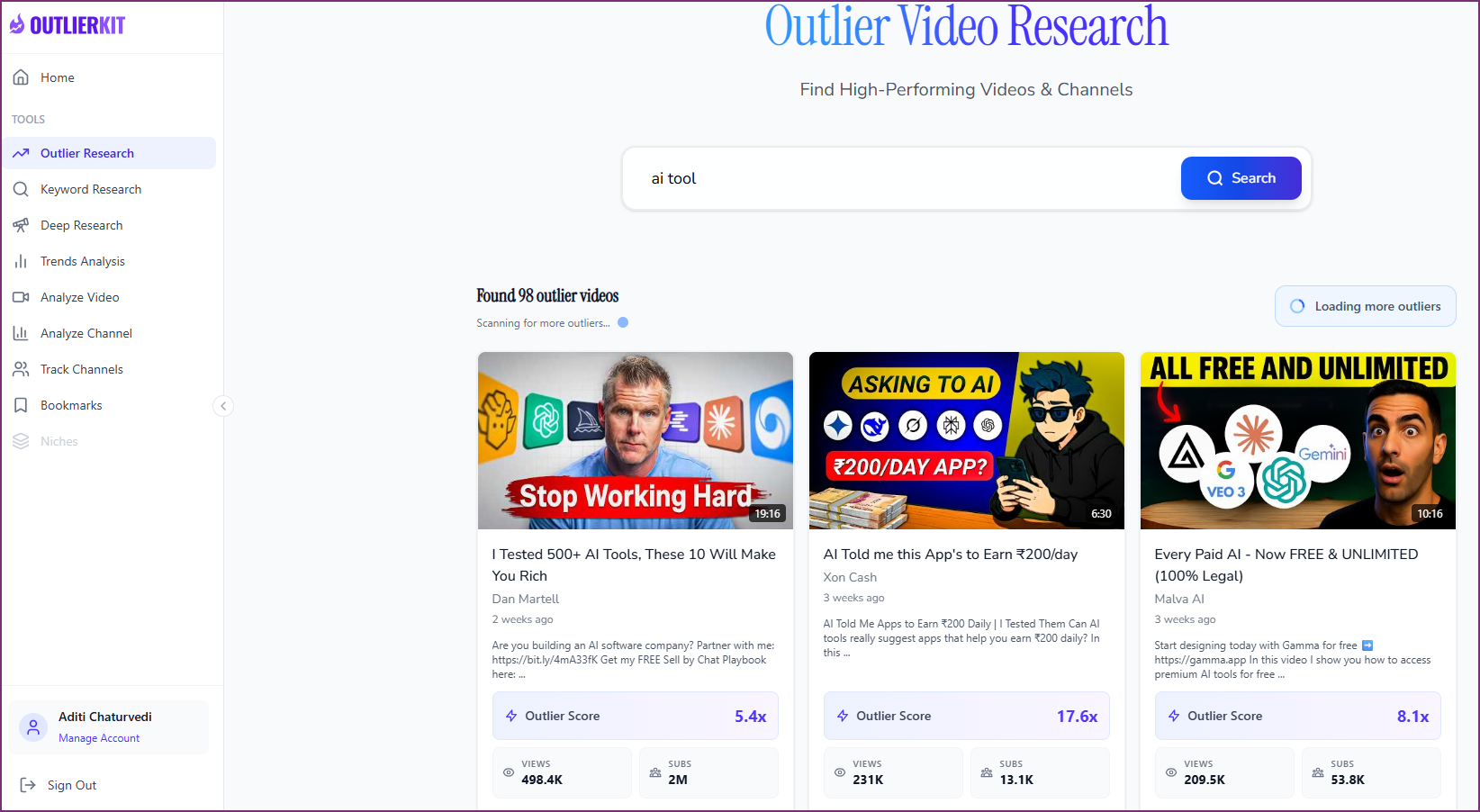
Step 2: Analyze Outlier Videos in Your Niche
Outlier videos beat their own channel's average by a wide margin, so they show what works in your space right now. Look for videos that:
Get 10x+ more views than the channel's average
Come from channels close to your size
Went up in the last 3 to 6 months
Cover topics in your niche
How OutlierKit helps: Outlier search is OutlierKit's core feature. It finds the videos breaking out in any niche and shows why they work, so you get a pattern to adapt without copying anyone.
Step 3: Understand Channel Strategy Through Psychographic Analysis
Every successful channel follows a strategy, even if its owner never wrote it down. Study its content patterns to see what makes it work. Check these five things:
Audience psychographics: what motivates the viewers, and what problems they have
Content length: 8-minute videos or 20-minute explainers
Tone and style: educational or entertaining, fast or detailed
Formats that work: listicles, tutorials or commentary
Publishing frequency: how often they post, and when
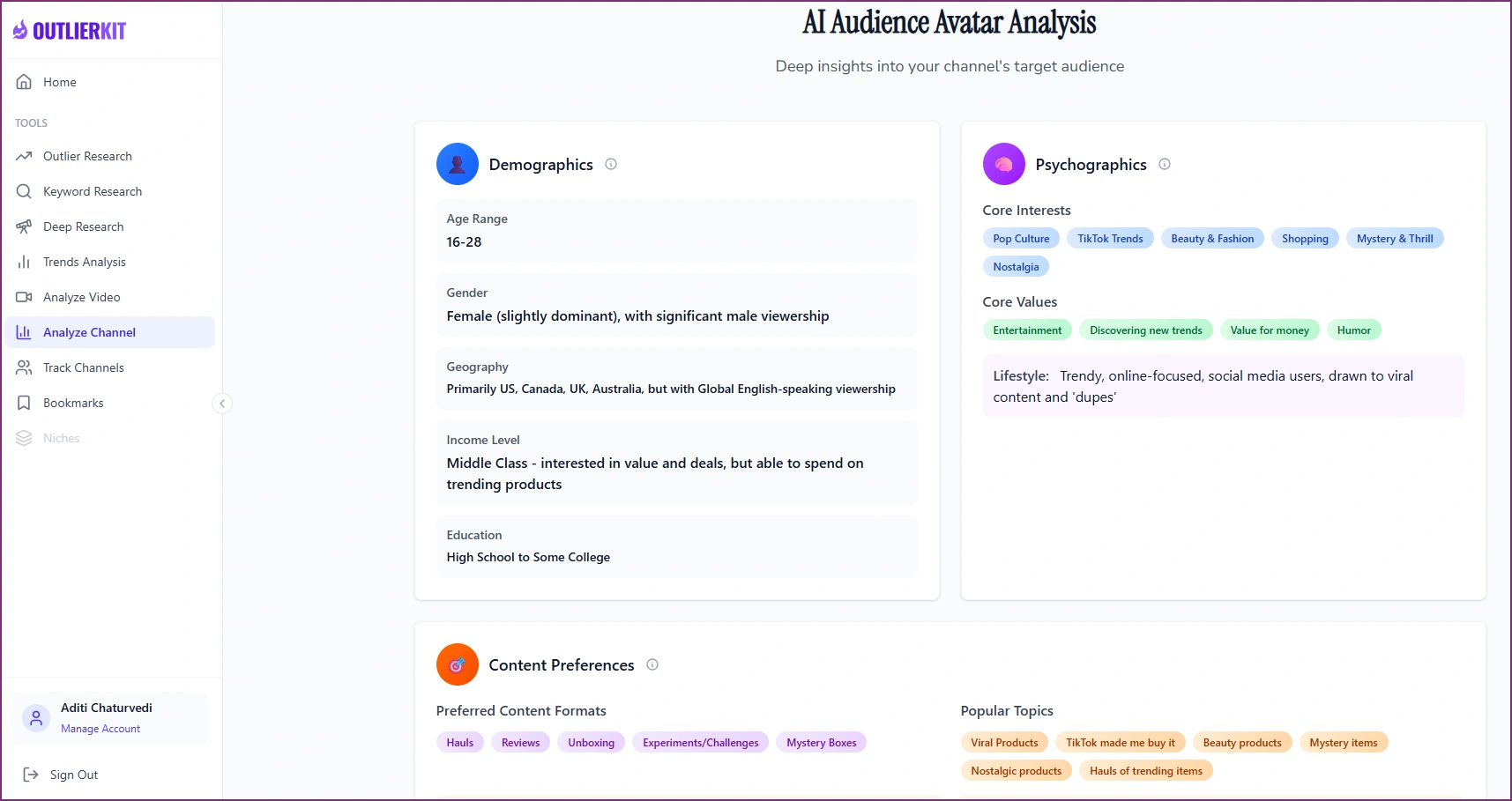
How OutlierKit helps: Enter any YouTube channel URL and OutlierKit breaks down its content strategy. It shows:
Outlier videos that drove growth
Recent performance trends
What is working right now and why
Detailed audience psychographics
Demographics and preferences
Preferred tone, style and video length
Content format patterns
Example (hypothetical):
An analysis of a successful tech review channel might show an audience of 25 to 34 year-old professionals who prefer 12 to 15 minute videos in a calm, non-hyped tone. Videos that compare products get 3x more views than single reviews. The channel posts Tuesday and Thursday at 9 AM EST.
Step 4: Optimize Your Script Before Filming
Fix the script before you film, because the script decides whether viewers stay. The first 15 seconds decide whether people watch or click away, and the rest decides whether they keep watching. Strong scripts have:
A hook that sparks curiosity right away
A clear structure that gets to the value fast
Pattern interrupts that hold attention
A payoff that delivers on the opening promise
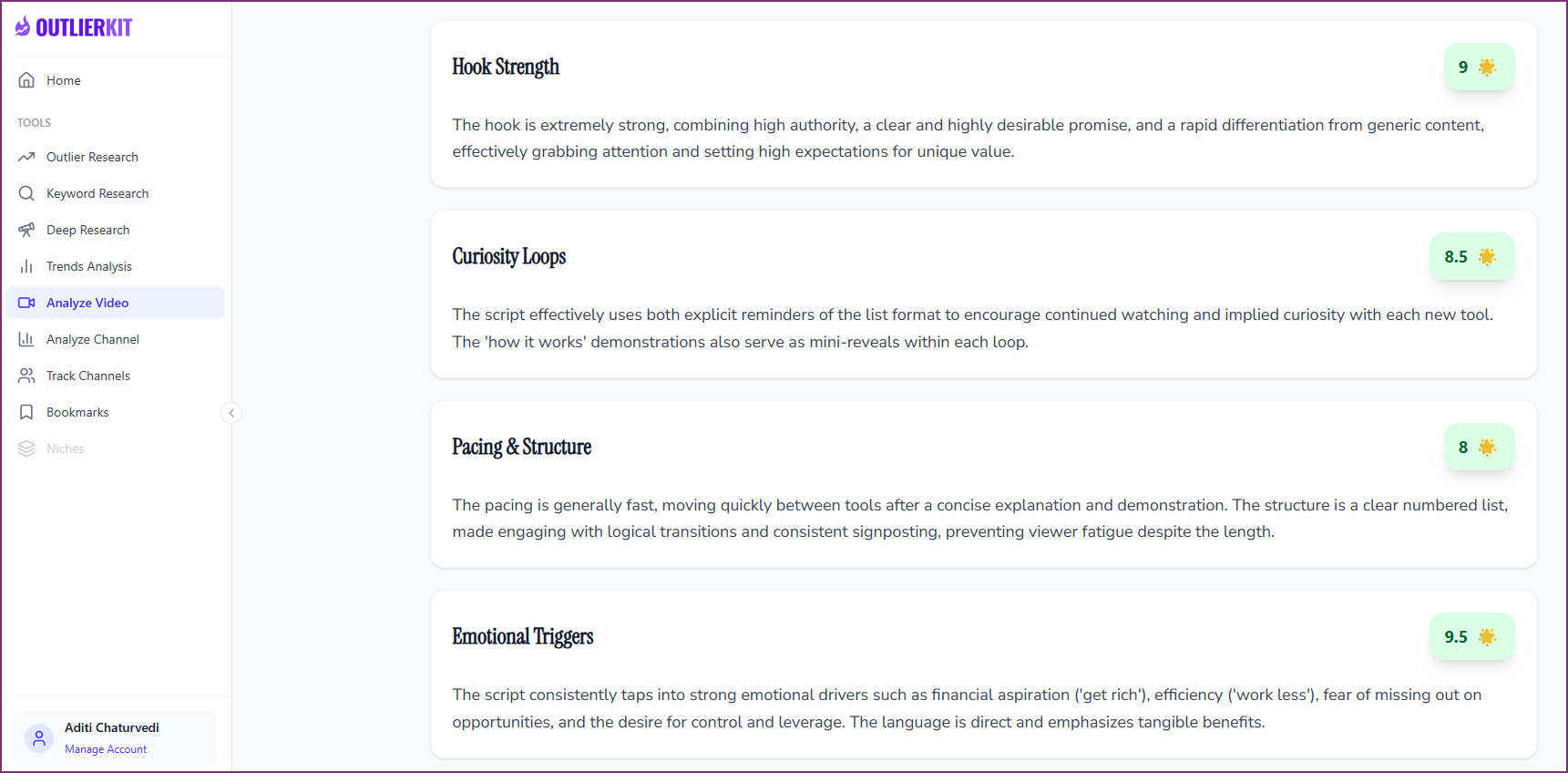
How OutlierKit helps: Video Script Analysis breaks down a video that already worked, including its hook strength, pacing and curiosity loops. Script review then scores the script you wrote and shows where to improve it before you film.
Step 5: Implement a YouTube SEO Strategy
Your SEO decides whether people find your videos in search or scroll past them, because YouTube works as the world's second-largest search engine. Cover these five elements on every upload (our YouTube SEO strategy guide goes deeper):
Title: front-load the keyword, add curiosity, stay under 60 characters
Description: hook viewers in the first 2 lines, then add keywords and links
Tags: mix broad and specific tags that match search intent
Thumbnail: high contrast, readable text and a clear emotion
First 48 hours: promote the video to boost early engagement
How OutlierKit helps: OutlierKit writes titles (16 candidates ranked against real breakout videos), the description with hashtags, and chapters, and its Script review scores your script before you record.
Pro tip: Good YouTube SEO answers what people search for, then labels the video clearly so YouTube knows what it is about. Gaming the algorithm does not last.
Step 6: Develop a Consistent YouTube Posting Strategy
Post on a schedule your audience can count on, even if it is not daily. Your posting plan should set:
A frequency you can sustain (1 to 3 videos a week suits most channels)
The days and times your audience is most active
A mix of trending topics and evergreen content
A batching workflow so you stay ahead of the schedule
Step 7: Measure What Matters and Double Down
Track the metrics that predict growth, not vanity metrics.
Vanity Metric | Growth Metric |
Total views | Click-through rate (CTR) |
Subscriber count | Average view duration |
Likes | Views from search/browse |
Comments | Subscriber conversion rate |
Upload frequency | Video performance vs. channel average |
Review these metrics weekly, spot the patterns and make more of what works.
Where can I get a free YouTube content strategy template?
Download the free template below and use it to plan your YouTube content strategy step by step.
Template Includes:
Niche research worksheet
Keyword opportunity tracker
Competitor analysis framework
Content ideation system
Video optimization checklist
Performance tracking dashboard
30/60/90 day content calendar
It is a spreadsheet you can use in Excel, Google Sheets or any other spreadsheet app.
How do you analyze a YouTube channel's content strategy?
Pick 5 to 10 channels in your niche, study their best and latest videos, read their comments, then map their patterns. The five steps:
Step 1: Identify 5 to 10 Channels in Your Niche
Pick channels with 10k to 500k subscribers that target your audience. Skip mega-channels, because their strategies will not work for you.
Step 2: Analyze Their Top-Performing Videos
Sort by "Most Popular" and look for patterns in topic, format and length. Flag outliers that got 5x+ their average views.
Step 3: Study Recent Performance Trends
Sort by "Date Added (Newest)" and review the last 20 videos. Check whether views are rising or falling, and what changed.
Step 4: Decode Audience Preferences
Read the comments on their best videos. Note what viewers praise, what they ask for and what problems they want solved.
Step 5: Map Their Content Strategy
Write down their posting frequency, video lengths, title formulas, thumbnail style and content mix. Then decide what you can adapt without copying.
The OutlierKit shortcut: Enter a channel URL in OutlierKit instead of spending hours on manual analysis. It finds the outlier videos, shows performance trends and audience psychographics, and tells you what is working now, in minutes.
See This Analysis Applied to Real Channels
We ran this process on the most-searched channels on YouTube. Each teardown decodes the growth strategy with live channel data:
- MrBeast’s growth strategy: the escalation engine behind 500M+ subscribers
- MKBHD’s growth strategy: how quality compounded into 21M subscribers
- Alex Hormozi’s growth strategy: the volume plus value machine (91% Shorts views)
- Paddy Galloway’s growth strategy: the strategist’s own playbook (1M avg views per video)
- Fox News’ YouTube strategy: inside the 26-billion-view clip machine
- DecodingYT’s growth strategy: 1M subscribers from just 60 videos
Which YouTube strategy tool should you use: OutlierKit, vidIQ or TubeBuddy?
Use OutlierKit for the research and strategy step, vidIQ for data-heavy channel analysis, and TubeBuddy for managing uploads in bulk. Each tool takes a different approach:
Tool | Starting Price | Best for | Choose it if |
$49/month (free trial, no card) | Experts, consultants and coaches, and their agencies | You want to know what to make next: outlier videos, channel breakdowns and a script check before you film | |
VidIQ | $19/month | Data-heavy analysis | You want channel and keyword data in a browser extension |
TubeBuddy | $4.50/month | Bulk video management | You manage many uploads and want a browser extension for bulk edits |
OutlierKit is built for experts, consultants and coaches who use YouTube to share what they know, whether they run the channel themselves or an agency runs it. It centers on one question: what should your next video be, and why will it work? VidIQ and TubeBuddy put more weight on tracking data and managing the channel you already have. On Pro and Max, an MCP connector lets Claude use OutlierKit's research tools, which suits agencies that plan for several client channels.
Frequently Asked Questions
Start with its outlier videos, the ones that beat the channel's average, and study their topics, formats, titles and thumbnails. Then check posting frequency, video length and engagement for patterns. In OutlierKit, you enter the channel URL and get the outliers, recent trends and audience psychographics in one view.
Posting is reactive: you make what you feel like and hope it works. A strategy is proactive: you research what your audience wants, find gaps competitors miss, fix the video before you film and make more of what works.
Post 1 to 3 videos a week on a schedule you can keep. One well-researched video a week beats seven random daily uploads, and your audience learns when to expect you.
Target low-competition, long-tail keywords (3 to 5 words) that still have search demand, and skip topics large channels own. For example, target "home workout routine for beginners over 40" instead of "fitness tips". OutlierKit finds keywords with high demand and low competition.
Watch click-through rate, average view duration and traffic from search and browse, and compare each video with your channel average. Videos that do 2x+ better than average show what to make more of.
No. Adapt their principles instead: study their topics, format, pacing and audience focus, then apply them in your own voice. Copying titles or thumbnails makes you look unoriginal.
Most creators see improvement within 4 to 8 videos with a data-driven approach, and significant channel growth within 3 to 6 months. A single video can perform well right away if it targets the right keyword.
Making the video before checking demand. Most creators spend 10 hours filming and 10 minutes researching, and no amount of production saves a topic nobody searches or one competitors have saturated.
No. You need a tool that tells you what to make next. OutlierKit starts at $49/month with a 30-credit free trial and no card.
What do creators say about using OutlierKit for strategy?
"I use Outlier Kit for supplemental channel audits and to help clients brainstorm video ideas and/or explore pivot strategies. It's a fantastic competitive intelligence tool to have in your arsenal." (Diane, professional YouTube coach, Product Hunt review)
"I was consistent with uploading videos, but at a certain point, I wasn't able to understand how things were working. With OutlierKit, I was really able to understand the competitor landscape and identify the kinds of opportunities I could bet on." (Sai Teja Challapalli, creator, Product Hunt review)
"It's really simple and gives really useful data and insights for choosing WHAT to make and how to structure it better. Will recommend to anyone seriously committing to YouTube." (Ashutosh Upadhyay, podcast host, Product Hunt review)
"After implementing the recommendations from the first report last week, my latest video has nearly tripled in views (2000) compared to my previous best one (700), so the recommendations do work." (Harjit Lakhan, creator, Product Hunt review) One creator on a small channel. Not a typical or promised result.
How is a YouTube business strategy different?
A business channel measures leads and revenue, not fame, so it sets different priorities. For a B2B version of this framework, read our YouTube content strategy for B2B startups.
Focus on Leads Over Views
Make content that attracts your ideal customers instead of random viewers. Target the keywords your prospects search, and add clear CTAs that move viewers into your funnel.
Optimize for Conversion, Not Virality
A video with 5,000 views and 50 qualified leads beats a viral video with 500,000 views and 5 leads. Build content that educates and pre-qualifies prospects.
Build Authority Through Consistency
B2B buyers watch 3 to 5 videos before they contact you. Build a library that shows expertise, earns trust and answers common objections.
Measure Business Metrics
Track leads, demo requests and revenue. Connect YouTube Analytics to your CRM to see which videos drive revenue.
Where OutlierKit fits for business: OutlierKit covers the research side. It finds the topics your buyers search, shows the gaps competitors leave open and scores your script before you record. Lead and revenue tracking stays in your CRM.
What should you check before publishing each video?
Run through these four phases for every video:
✓ Research Phase
[ ] Identified keyword with search demand
[ ] Verified low competition for the topic
[ ] Analyzed successful videos on this topic
[ ] Understood audience psychographics
[ ] Confirmed topic aligns with channel goals
✓ Planning Phase
[ ] Created script with strong hook
[ ] Analyzed script for engagement patterns
[ ] Designed thumbnail that creates curiosity
[ ] Wrote SEO-optimized title (under 60 chars)
[ ] Prepared description with keywords
✓ Publishing Phase
[ ] Added relevant tags (broad + specific)
[ ] Included timestamps in description
[ ] Added end screen and cards
[ ] Published at optimal time for audience
[ ] Promoted to initial audience
✓ Analysis Phase
[ ] Tracked CTR in first 48 hours
[ ] Monitored average view duration
[ ] Analyzed traffic sources
[ ] Compared performance to channel average
[ ] Documented learnings for next video
What YouTube strategy mistakes should you avoid?
The five most common mistakes are chasing trends, ignoring search intent, writing for the algorithm, waiting for perfect and comparing yourself to mega-channels.
❌ Mistake #1: Chasing Every Trend
Trends fade, and most are saturated by the time you see them. Build on evergreen topics with steady search demand, and add timely videos when you can be early.
❌ Mistake #2: Ignoring Search Intent
People who search "iPhone 15 review" want a different video from people who search "iPhone 15 problems." Match your content to the intent behind the keyword.
❌ Mistake #3: Optimizing for the Algorithm
The algorithm rewards videos people watch and enjoy, so make them for humans first. If viewers love a video, the algorithm promotes it. Gaming the system wins short term and stalls long term.
❌ Mistake #4: Waiting for "Perfect" Videos
Perfect is the enemy of published. Strategic creators ship on schedule and improve from data. Perfectionists never publish, so they never learn what works.
❌ Mistake #5: Comparing to Mega-Channels
MrBeast's strategy will not work for you. Compare yourself to channels 1 or 2 stages ahead, not 1000x your size, and learn from creators near your level.
What should you do first?
Download the template, study five competitors, pick one winnable topic and make one researched video. Then repeat.
1. Download the Strategy Template
Get the free YouTube content strategy template and fill out the research sections for your niche.
2. Analyze 5 Competitor Channels
Use OutlierKit to find their outlier videos, performance trends and audience preferences. Write down the patterns.
3. Find Your First Winnable Topic
Pick a low-competition keyword with search demand. Make sure you can make a useful video about it.
4. Create One Strategic Video
Research, script, optimize and publish. Then measure the result against your baseline.
5. Repeat and Refine
Keep the patterns that worked and drop the ones that did not. YouTube growth builds one video at a time.
Ready to Build Your Data-Driven YouTube Strategy?
Pick your next video from data instead of a guess.
Try OutlierKit Free | Download Strategy Template
No credit card required for the 30-credit trial. The template includes the full research framework.
Related reading
Sources
Global Media Insight, YouTube statistics 2026: "More than 500 hours of new video content are uploaded to YouTube every minute."
Ethan Zuckerman, How Big is YouTube? (Dec 2023): "the median YouTube video has 39 views", and videos with 10,000 or more views are "roughly 4% of our data set".
OutlierKit on Product Hunt: the creator quotes above, from the 13 reviews rated 5.0/5.
OutlierKit pricing: "Hobby $49/month" entry plan and a 30-credit free trial with no card.
vidIQ pricing: "$19/month" starting price used in the tool table.
TubeBuddy pricing: "$4.50/month" starting price used in the tool table.
Share this post